13
a
b
f
d
c
e
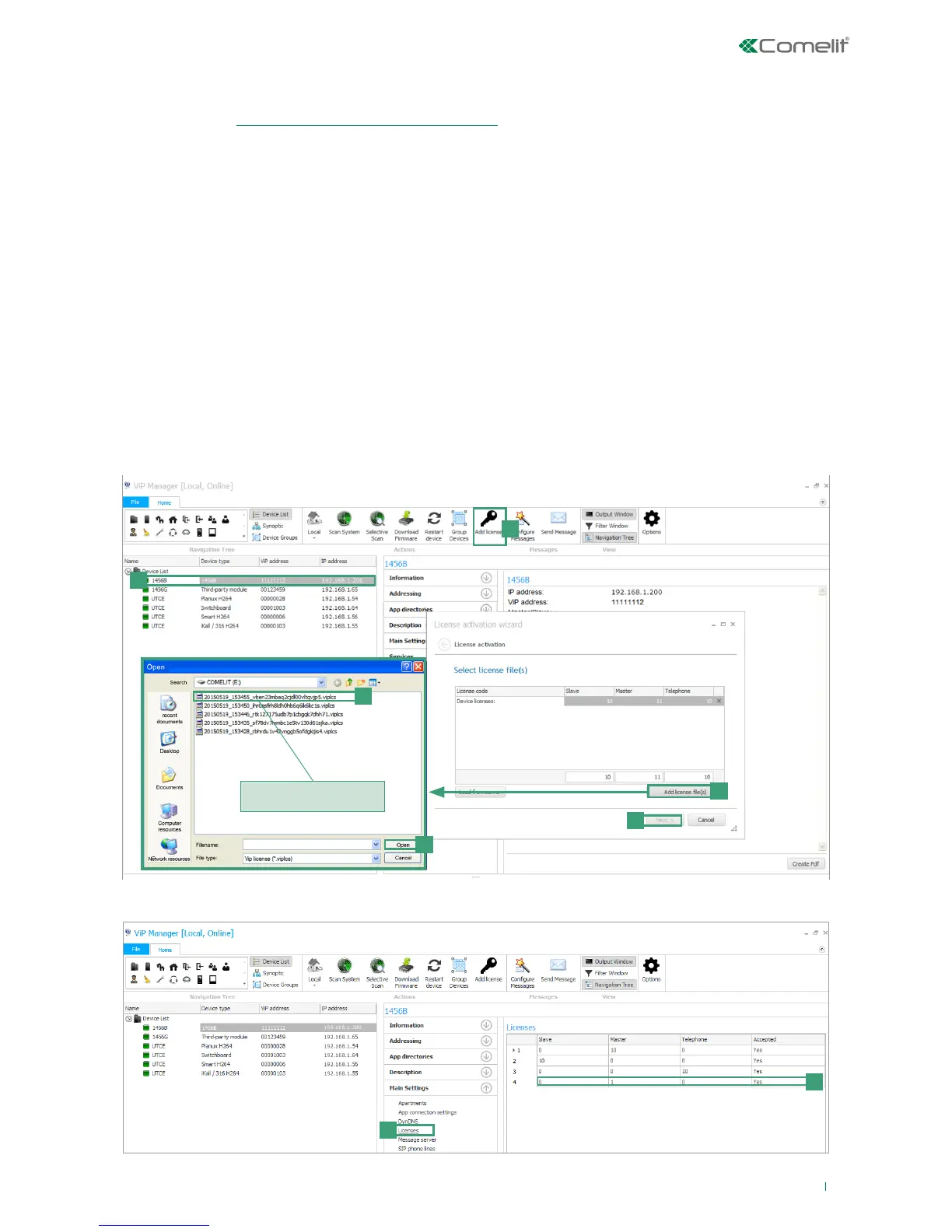
you can select more than
one file at a time
g
h
3) Licence activation
Activation of the licenses for each apartment allows the users of that residential unit to use the special functions provided by
the device 1456B (see “LICENSES AVAILABLE FOR PURCHASE” for further information about licenses):
• remotely answer an audio/video call from an external unit using a smartphone or tablet (master and slave license);
• answer an audio call from a GSM or landline telephone (all licenses);
• perform an audio telephone backup of an unreachable device (master and slave license);
• the possibility to dispense with a master internal unit (master license).
√ An active internet connection is required to complete the license activation procedure.
√ A license is needed for each apartment that wishes to make use of the functions described above.
1. Select device 1456B [a].
2. Press Add license [b].
3. Press Add license file/s [c].
4. Look for license files with the extension .viplcs [d] on the USB storage device (if supplied at time of purchase) or from the
folder where it was saved when purchased and confirm by pressing Open [e].
» a new line with the newly installed licenses will appear in the license activation wizard window.
5. Repeat steps 3 and 4 to install other licences.
6. Press Next [f],
7. Enter a valid email address, press Next and confirm.
» In Main Settings/Licenses [g] you can view all the licenses installed [h].



 To Next Page