ROUTER
... ...
Installer PC
192.168.0.1
b
c
d
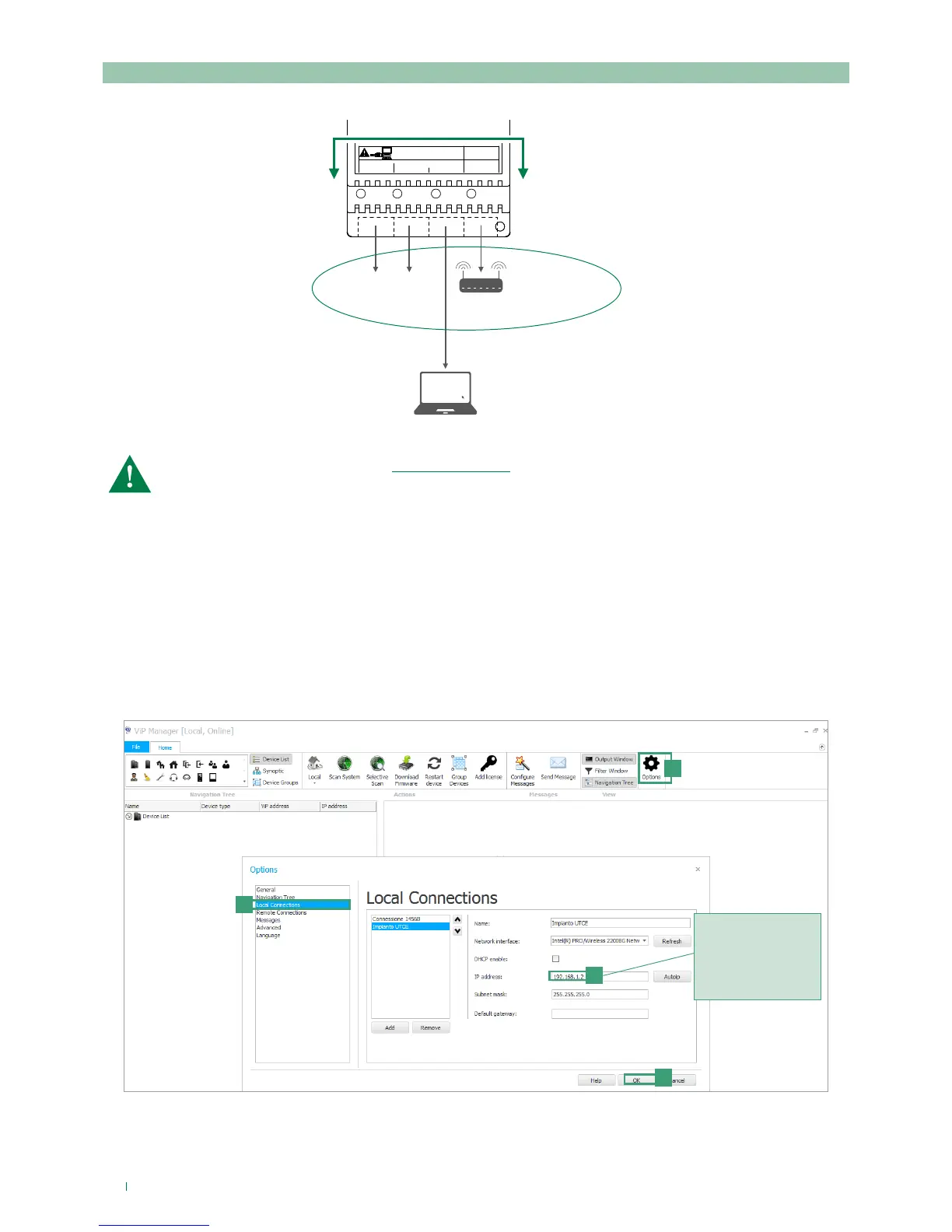
Assign to the PC an
IP address that is
compatible with the
network of the 1456B
(e.g.: 192.168.1.2) so that
the two devices are able
to communicate
a
Interface A must be assigned a new “Static IP address” in the same network as the devices connected to
interface A
CASE 2: default address of the device (192.168.1.200) NOT belonging to the same router network (e.g.: 192.168.0.1)
ASSIGN A NEW STATIC IP ADDRESS TO INTERFACE A
The following procedure describes how to assign network settings to the device1456B that are compatible with those of the
devices connected to interface A.
1. Open the software ViP Manager version 2.5.0 or later (downloadable from the website pro.comelitgroup.com).
2. From Options [a] / Local connections [b] untick the DHCP enable box and assign an IP address to your PC [c] (in the
example: 192.168.1.2)* that belongs to the same network as the IP address of interface A (default=192.168.1.200)and
confirm [d].
* the last value must be within the range of 2 to 253 excluding: 200 (assigned to the gateway Art. 1456B) and the values
already assigned to other devices connected to the network.



 To Next Page