20
a
b
c
d
9) Users configuration (devices)
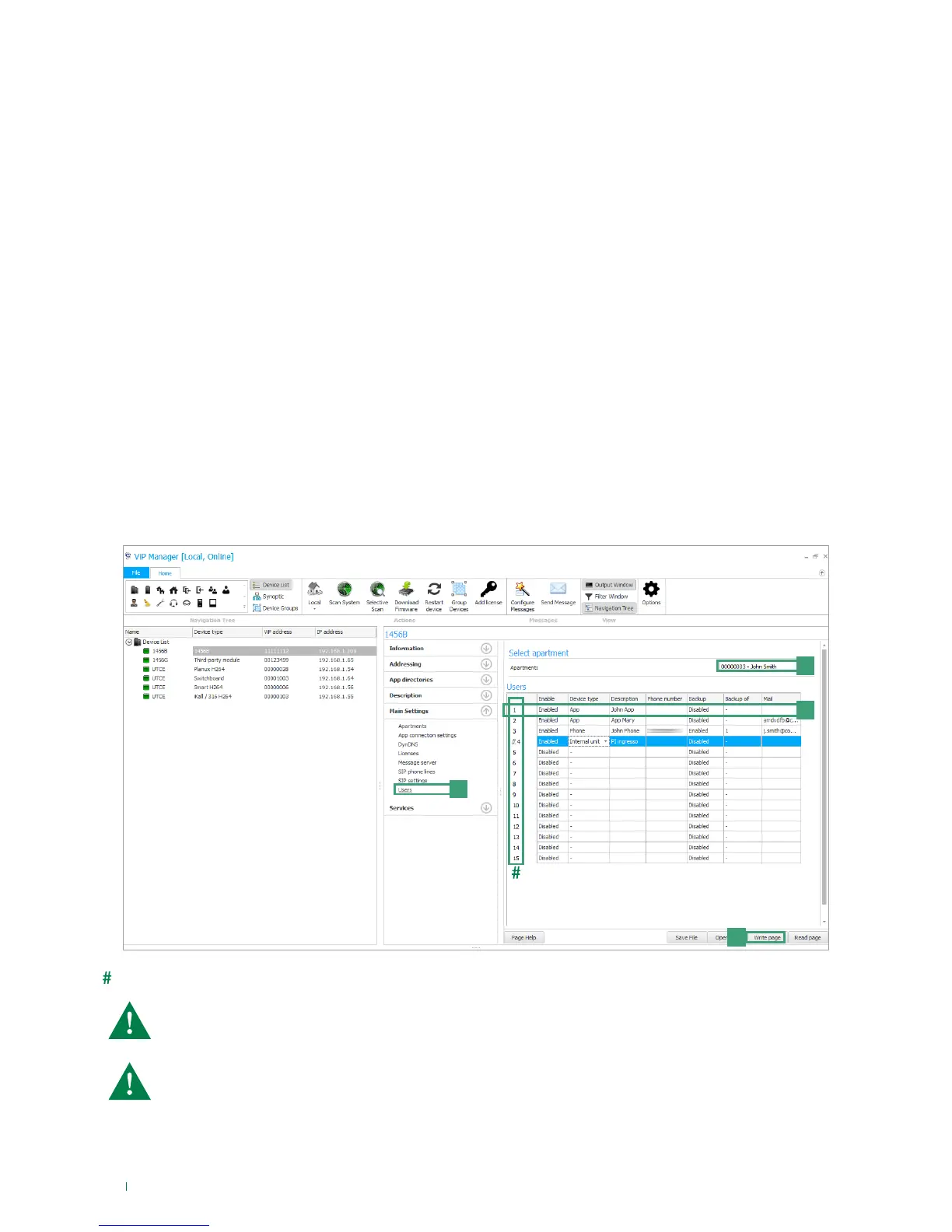
In this page you can configure the slave devices that can be activated for each apartment (max. 15) Each device is identified by
its slave number. Each device must be assigned a type (internal unit, app or telephone), a description, the phone number (in the
case of a telephone/mobile phone).
1. Select device 1456B and select Main Settings/Users [a].
2. Select the apartment for which you wish to configure the users [b]
3. Configure the individual devices (max 15 per apartment) [c]:
• Enabling: enable/disable the device for the apartment by selecting Enabled/Disabled.
• Device type: assign the type of device choosing between:
Internal unit: Comelit ViP internal unit;
App: Comelit App for Android or Apple devices (consult the relative manual for further details);
Telephone: virtual ViP device controlled by the 1456B and used to make phone calls to a landline or mobile phone.
• Description: Description: enter a description to unequivocally identify the device.
• Phone number: if you are configuring a telephone, enter the phone number of the device.
• Backup: enable/disable the backup line to configure the current device as a backup unit to which failed calls to the
device specified in the adjacent column ("Backup of") are to be forwarded.
• Backup of: specify the device to be backed up by selecting the corresponding slave device.
Example backup: the slave 3 phone number (John Phone) is enabled as the backup unit of the App slave 1 (John
App) installed on the same device --> If the App "John App" cannot be reached, after a few seconds the call will be
redirected to the phone number "John Phone".
• Mail: enter the email address of the user for whom you wish enable use of the App.
4 Press Write page [d] to save the current settings.
Slave ID of the device
Each apartment supports 15 devices, and is assigned a device ID (slave number) that identifies the device
within the apartment. The device ID assigned in this page must correspond to that assigned to the same
device in the page "Addressing/ViP address".
It is advisable to assign the slave numbers 1-2-3 to devices that can receive the video signal( internal units/
applications), so that during a call they can receive the video signal directly, without the user having to
press a video request button.



 To Next Page