25
a
b
if necessary, you can
assign a static public
address for remote
connection.
App connection settings
Special configurations
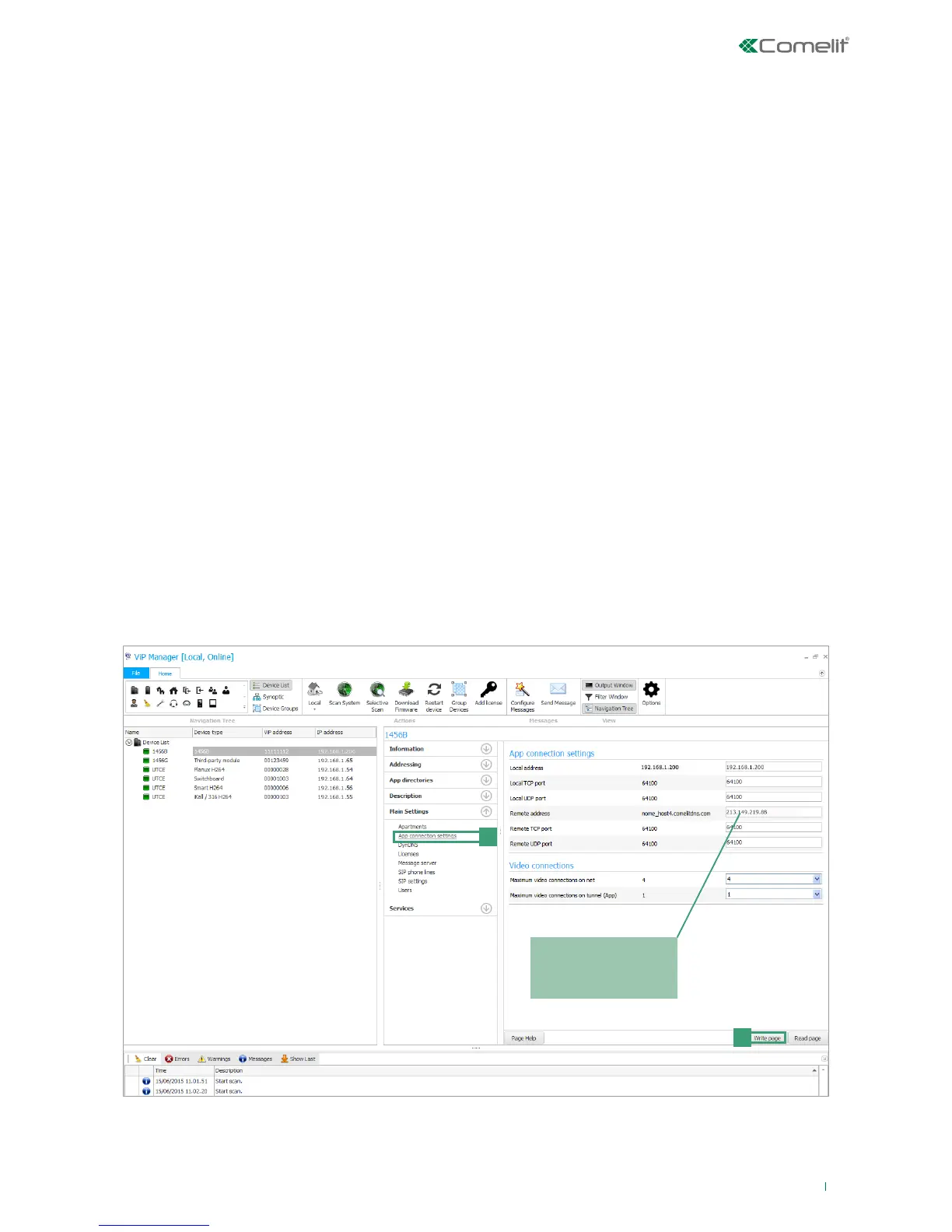
From the following configuration page you can:
• set personalised parameters for the app connection (for example, if you wish to set a different port for connection of the
app or if there is a static public address you wish to use for remote connection.
• change the maximum number of video connections on the network (max. 16) or on the App (max. 4).
1. Select the device 1456B and select Main Settings/App connection settings [a].
2. Edit the values you wish to personalise.
App connection settings
• Local address: leave the field empty if you wish to set as the local address the address of interface A, as specified in
the page Addressing/IP address.
• Local/remote TCP/UDP port (default 64100): for some internet service providers, port 64100 is not available: if the
ComelitViP Remote App fails to register, try changing the address of the port with one of the following: 25, 80, 110, 143
(open the respective ports on the router, see page 22, and edit the values on the ComelitViP Remote App).
• Remote address: leave the field empty if you wish to set as the remote address the hostname registered during
configuration of the DynDNS settings. If necessary, you can assign a static public address for remote connection.
Video connections
• Maximum video connections on net: maximum number of simultaneous video connections on the network (max. 16).
• Maximum video connections on tunnel (App): maximum number of simultaneous video connections on the App (max.
4).
3. Press Write page [b] to save the current settings.



 To Next Page