3
4
5
6
7
8
9
1 2 3
Art.1456B
A1
SOLO CON CAVO ROSSO COMELIT 2E7T000500
ONLY WITH COMELIT RED CABLE 2E7T000500
FIXED POE
SETTABLE POE
N0 POE
A2 A3 A4
Description
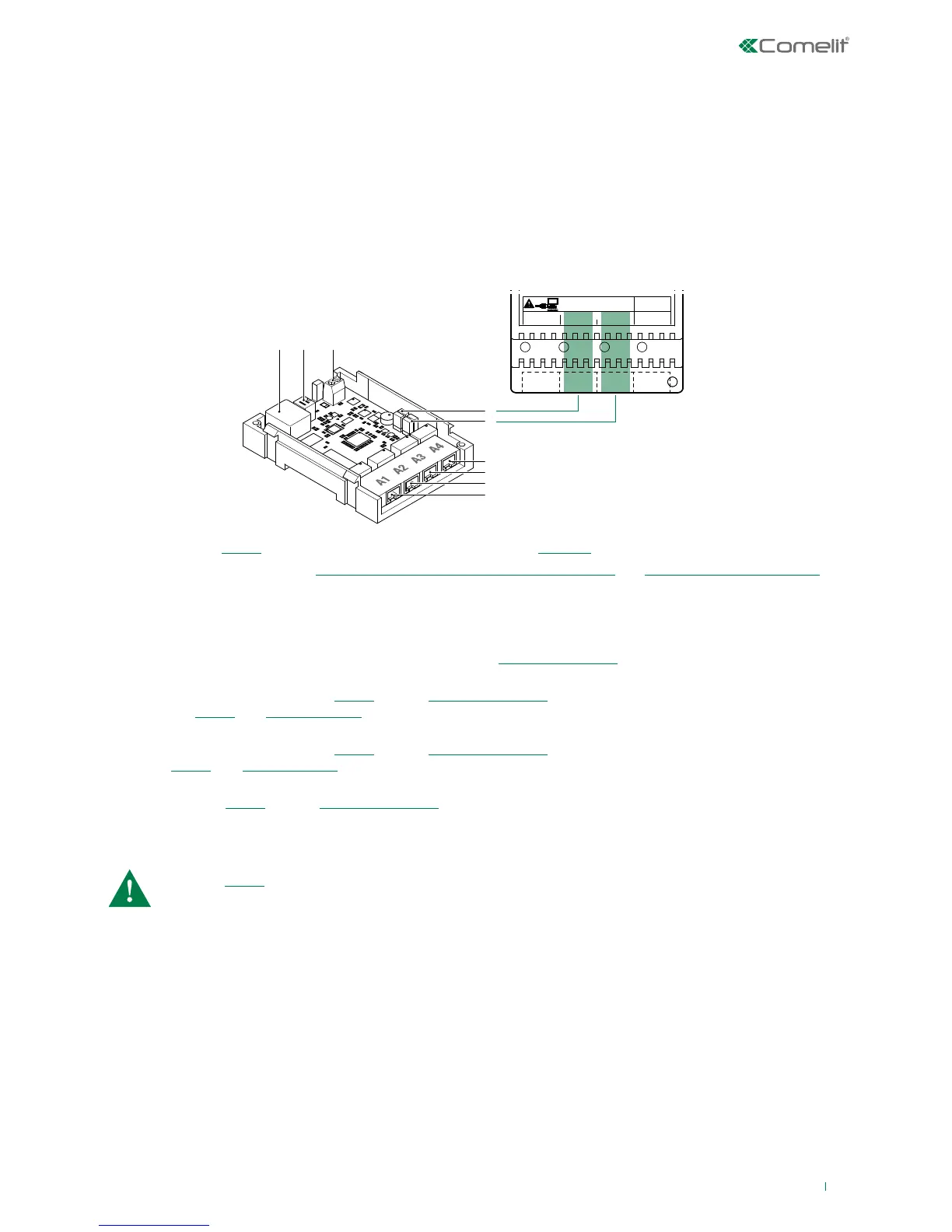
Article 1456B is a multi-apartment gateway that:
• can serve up to 200 apartments, with a maximum of 15 slave devices per apartment;
• answer calls from a external unit via a virtual door entry monitor App for smart phone/tablet or using a normal GSM or
landline telephone;
• incorporates the SIP protocol to enable telephone calls via SIP server or via virtual lines purchased from a SIP services
provider;
• allows up to 4 simultaneous audio/video calls;
• can be configured remotely from a web interface.
1. B Ethernet port (“POE”) for ViP system riser input (default addressing: “Autoip”).
2. Dip switches for the procedures ““Reboot with predetermined network settings” and “Restoring factory settings”.
3. Power supply input via Art. 1441, Art. 1441B.
4. CV1 and CV2 for setting port A2.
5. CV3and CV4 for setting port A3.
6. A4 non POE Ethernet port for PC or router connection (default: “Static IP address” 192.168.1.200, netmask
255.255.255.0).
7. A3 non POE settable Ethernet port “POE” (default: “Static IP address” 192.168.1.200, netmask 255.255.255.0). Set
the port as “POE” (see “Settable POE”) if you want to connect devices that require a power supply (door entry
monitors, for example).
8. A2 non POE settable Ethernet port “POE” (default: “Static IP address” 192.168.1.200, netmask 255.255.255.0). Set the
port as “POE” (see “Settable POE”) if you want to connect devices that require a power supply (door entry monitors,
for example).
9. A1 Ethernet port “POE” (default: “Static IP address” 192.168.1.200, netmask 255.255.255.0).
With port “POE” DO NOT use standard Ethernet to connect to the router or to the PC; use only the red
Comelit cable Art.2E7T000500 to connect to the router or to the PC.



 To Next Page