G8-S0/G3-S0-I Telephone Interface
1.1/1010 31
Outgoing Phone Call by Dialling Interface Manually
For establishing a phone call by dialling the telephone interface manually, no particular configura-
tion in CCT 800 is required ( at the Intercom station, the call number of the interface and the tele-
phone is dialled).
Outgoing Phone Call by Direct Outward Dialling
Select Subscriber – Attendant contacts:
Right click on the desired telephone interface and select function Add attendant contacts.
Select the interface in the tree structure in the folder Attendant contacts.
Select an output via right click (on the grey, blank CCT 800-background to the right) and function Add
output (this output is required as dummy contact).
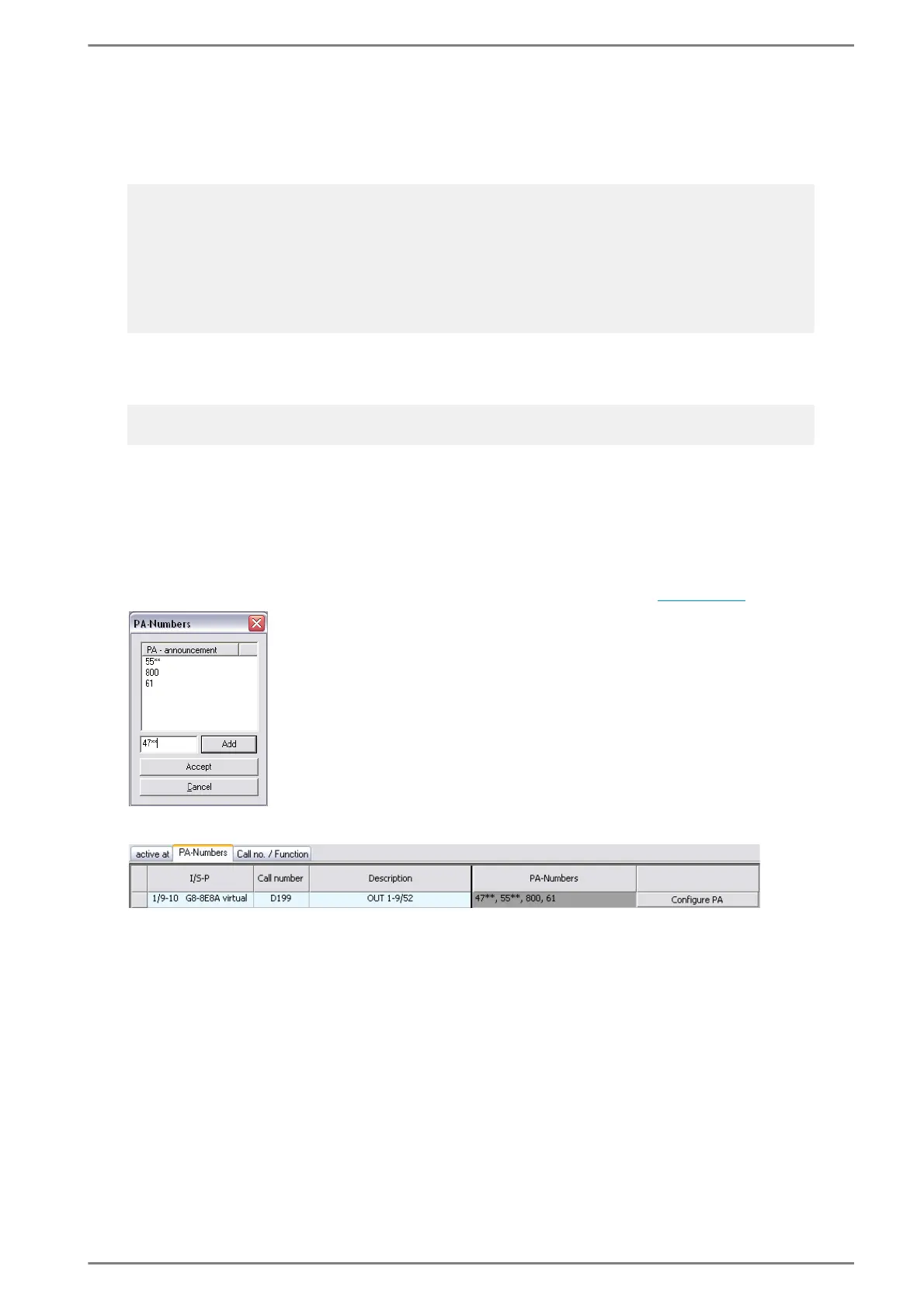
At tab PA-Numbers select the button Configure PA and enter the up to 4-digit telephone numbers
in the appearing dialogue (for the max. no. of entries per output contact see page 28
):
The entered numbers are indicated in the field PA-Numbers:
After Dialling at Telephone – Outgoing Phone Call
For outgoing phone calls initiated by dialling the interface manually, after diallings on the tele-
phone can be enabled.
Interfaces > S0 > tab Common:
For the telephone interface over which the call to the telephone shall be set up, the checkbox After-
Dial from telephone has to be activated (therewith e.g. cancelling of a conversation at the tele-
phone with “#” is enabled – for an outgoing phone call built up by dialling the interface manually).
Note:
To simplify the dialling of the telephone interface, the following options are available:
If only certain Intercom stations shall use the telephone function, at Subscriber – Direct Dialling
the number of the telephone interface is defined as short dialling for the desired button.
If all intercom stations shall use the telephone function, the best way is to change the call number of
the telephone interface to the desired digit or code (at Subscribers – Naming). If e.g. the call number
of the telephone interface is changed to 7, all Intercom stations can use the telephone function by pre-
dialling 7.
Note:
This function is only available for max. 4-digit telephone numbers (e.g. PABX subscribers)!
Accept each entered number via Add.
“Wildcards” have to be entered with “*”
(also max. 4-digit, e.g. 4***, 63** etc.).
If all numbers are entered, complete the
configuration via Accept.













 To Next Page