EasyManua.ls Logo

Commodore MPS-801 - Connecting the Printer to Your Computer

Commodore MPS-801
34 pages
Print Icon
To Next Page IconTo Next Page
To Previous Page IconTo Previous Page
Loading...
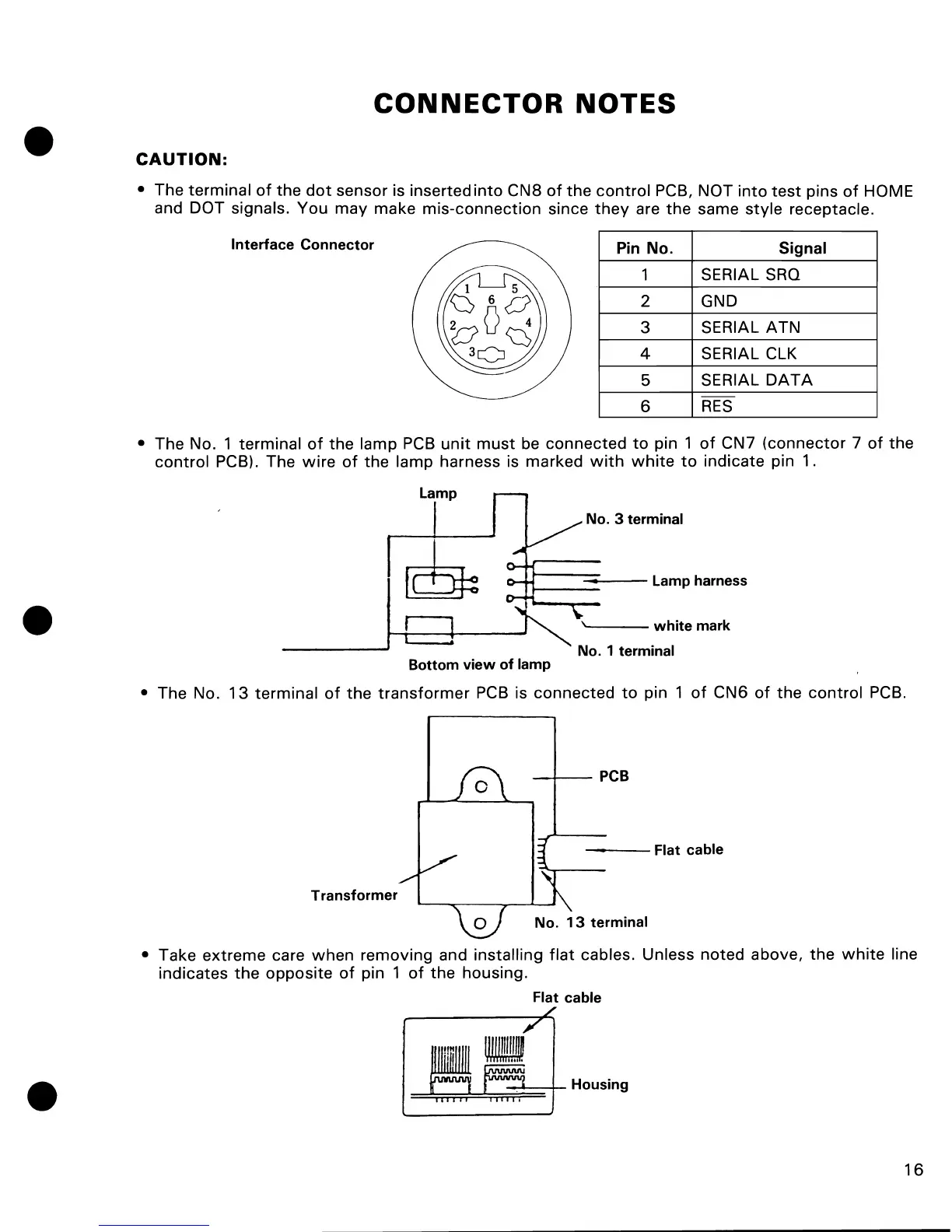
CONNECTOR
NOTES
CAUTION:
The terminal
of
the
dot
sensor is inserted
into
CN8
of
the
control
PCB, NOT
into
test
pins
of
HOME
and DOT signals. You
may
make mis-connection since
they
are
the
same
style
receptacle.
Interface
Connector
Pin No. Signal
1
SERIAL SRQ
2
GND
3
SERIAL ATN
4
SERIAL
ClK
5
SERIAL
DATA
6
RES
The
No.1
terminal
of
the lamp
PCB
unit
must
be
connected
to
pin 1
of
CN7
(connector
7
of
the
control
PCB). The
wire
of
the
lamp harness is marked
with
white
to
indicate pin 1.
C===~--
Lamp harness
t---!--..---~
\
white
mark
------'
No.1
terminal
Bottom
view
of
lamp
The No.
13
terminal
of
the
transformer
PCB
is connected
to
pin 1
of
CN6
of
the
control
PCB.
--l'---
PCB
---
Flat cable
Transformer
Take
extreme
care
when
removing and installing
flat
cables. Unless noted above,
the
white
line
indicates
the
opposite
of
pin 1
of
the
housing.
Flat cable
=~rrJ==!:r=rffi~~-
Housing
16

Other manuals for Commodore MPS-801

Related product manuals