EasyManua.ls Logo

Commodore MPS-801 - Mechanical Adjustments; Guide Pillar Installation

Commodore MPS-801
34 pages
Print Icon
To Next Page IconTo Next Page
To Previous Page IconTo Previous Page
Loading...
MECHANICAL
ADJUSTMENTS
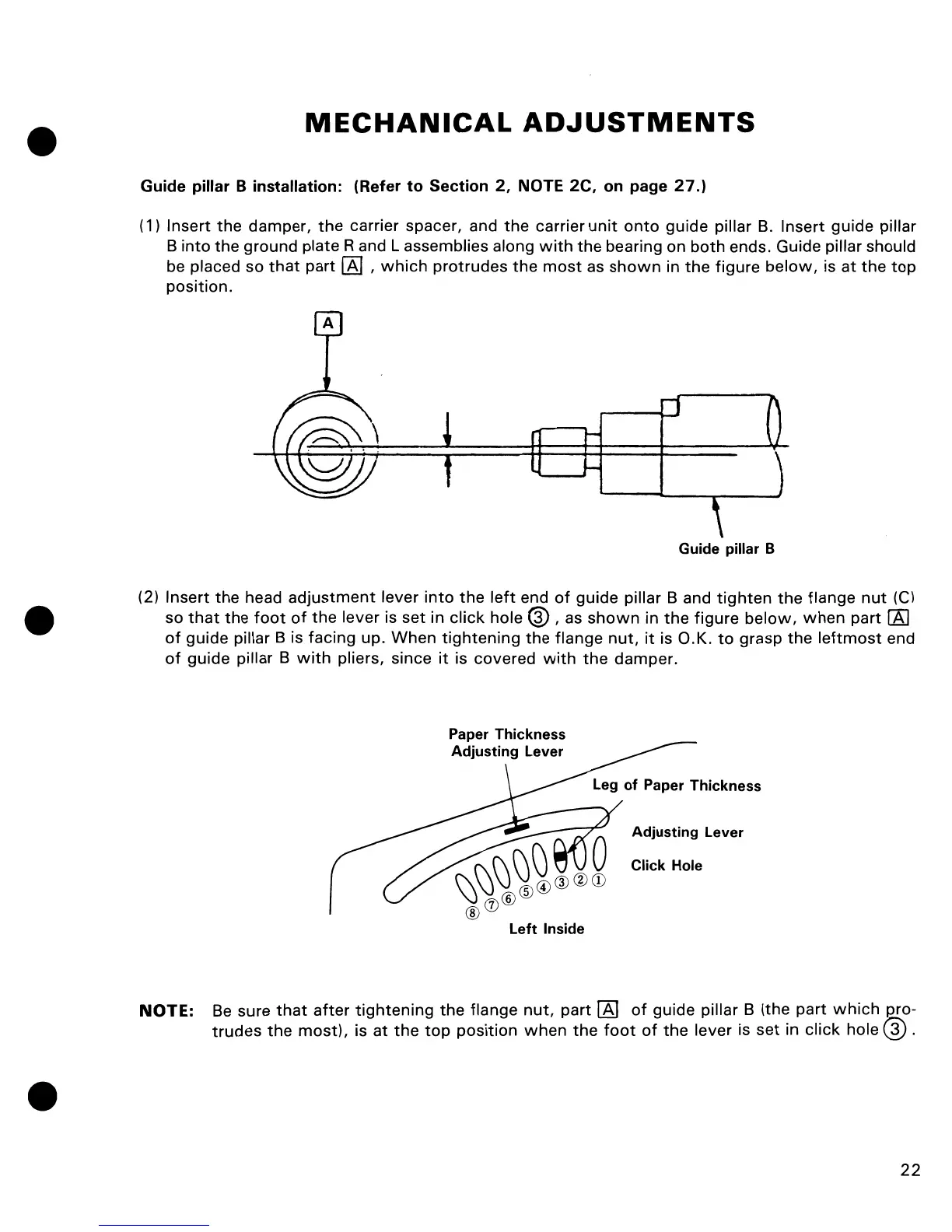
Guide pillar B installation: (Refer
to
Section
2,
NOTE 2C, on page
27.)
(1) Insert
the
damper,
the
carrier spacer, and
the
carrier
unit
onto
guide pillar
B.
Insert guide pillar
B
into
the
ground plate
Rand
L assemblies along
with
the bearing on
both
ends. Guide pillar should
be placed so
that
part
[81
,
which
protrudes
the
most
as
shown
in
the
figure
below,
is
at
the
top
position.
Guide pillar B
(2) Insert
the
head
adjustment
lever into
the
left
end
of
guide pillar B and
tighten
the
flange
nut
(e)
so
that
the
foot
of
the
lever is
set
in click hole @ , as
shown
in
the
figure
below,
when
part
rAJ
of
guide pillar B is facing up. When
tightening
the
flange
nut,
it
is O.K.
to
grasp
the
leftmost
end
of
guide pillar B
with
pliers, since
it
is covered
with
the
damper.
Adjusting
Lever
Click
Hole
left
Inside
NOTE:
Be
sure
that
after
tightening
the
flange
nut,
part [8]
of
guide pillar B (the
part
which
~ro
trudes
the
most),
is
at
the
top
position
when
the
foot
of
the
lever is
set
in
click
hole ® .
22

Other manuals for Commodore MPS-801

Related product manuals