EasyManua.ls Logo

Commodore MPS-801 - Troubleshooting Guide

Commodore MPS-801
34 pages
Print Icon
To Next Page IconTo Next Page
To Previous Page IconTo Previous Page
Loading...
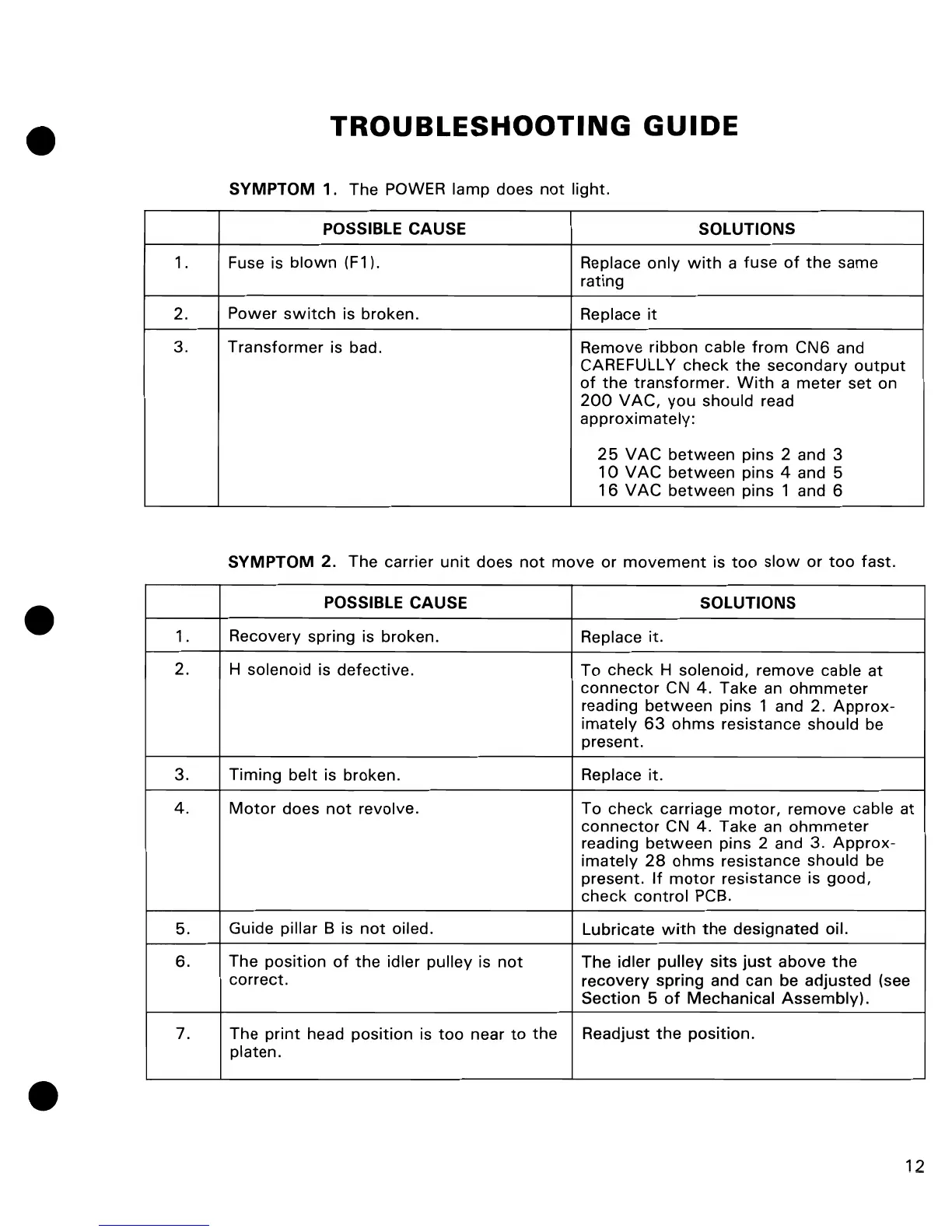
TROUBLESHOOTING
GUIDE
SYMPTOM
1. The POWER lamp does
not
light.
POSSIBLE CAUSE SOLUTIONS
1 . Fuse is
blown
(F1). Replace
only
with
a fuse
of
the
same
rating
2. Power
switch
is broken. Replace
it
3.
Transformer
is bad. Remove ribbon cable
from
CN6 and
CARE FULL
Y check
the
secondary
output
of
the
transformer.
With
a
meter
set on
200
VAC,
you
should read
approximately:
25
VAC
between
pins 2 and 3
10
V
AC
between
pins 4 and 5
16
VAC
between
pins 1 and 6
SYMPTOM
2. The carrier
unit
does
not
move or
movement
is
too
slow
or
too
fast.
POSSIBLE CAUSE
SOLUTIONS
1.
Recovery spring is broken.
Replace it.
2.
H solenoid is
defective.
To
check
H solenoid, remove cable
at
connector
CN
4.
Take
an
ohmmeter
reading
between
pins 1 and 2.
Approx-
imately
63
ohms
resistance should
be
present.
3.
Timing
belt is broken.
Replace it.
4.
Motor
does
not
revolve.
To
check
carriage
motor,
remove cable
at
connector
CN
4.
Take
an
ohmmeter
reading
between
pins 2 and 3.
Approx-
imately
28
ohms
resistance should be
present.
If
motor
resistance is good,
check
control
PCB.
5. Guide pillar B is
not
oiled.
Lubricate
with
the
designated oil.
6. The position
of
the
idler pulley is
not
The idler pulley sits
just
above
the
correct.
recovery
spring and can be adjusted (see
Section 5
of
Mechanical
Assembly).
7.
The
print
head
position
is
too
near
to
the
Readjust
the
position.
platen.
12

Other manuals for Commodore MPS-801

Related product manuals