EasyManua.ls Logo

Commodore MPS-801 - PREPARING TO USE YOUR PRINTER; Installing and Removing the Ribbon Cassette

Commodore MPS-801
34 pages
Print Icon
To Next Page IconTo Next Page
To Previous Page IconTo Previous Page
Loading...
2.
Start
of
the
Printing
Operation
When
printing
starts,
the
CPU
sets
the
MOT
signal (P5/30) and
the
HC signal (P5/29)
LOW.
When
the
MOT
signal goes
LOW,
the
driver
GP-DR-2/1 0
goes
LOW
(ON)
causing
the
motor
to
rotate.
Since
the
He"
signal is
LOW,
the
H
solenoid
is
activated,
which
disengages
the
motor
shaft
from
the
print
head
carrier
so
that
the
motor
can reach a
constant
speed
before
any
movement
of
the
print
head
occurs.
After
approximately
160
ms,
the
HC signal is
set
HIGH,
which
causes
the
motor
shaft
and
the
print
head carrier
to
engage,
and
allows
the
print
head
to
be
driven
to
the
right.
Next,
the
CPU
waits
to
see
if
the
print
head leaves
the
home
position
by
sampling
the
HOME
signal.
After
confirming
that
the
HOME
signal has
gone
LOW,
which
means
the
print
head carrier has
moved
out
of
the
home
position,
the
CPU
checks
the
DOT
signal in
order
to
decide
when
to
start
printing.
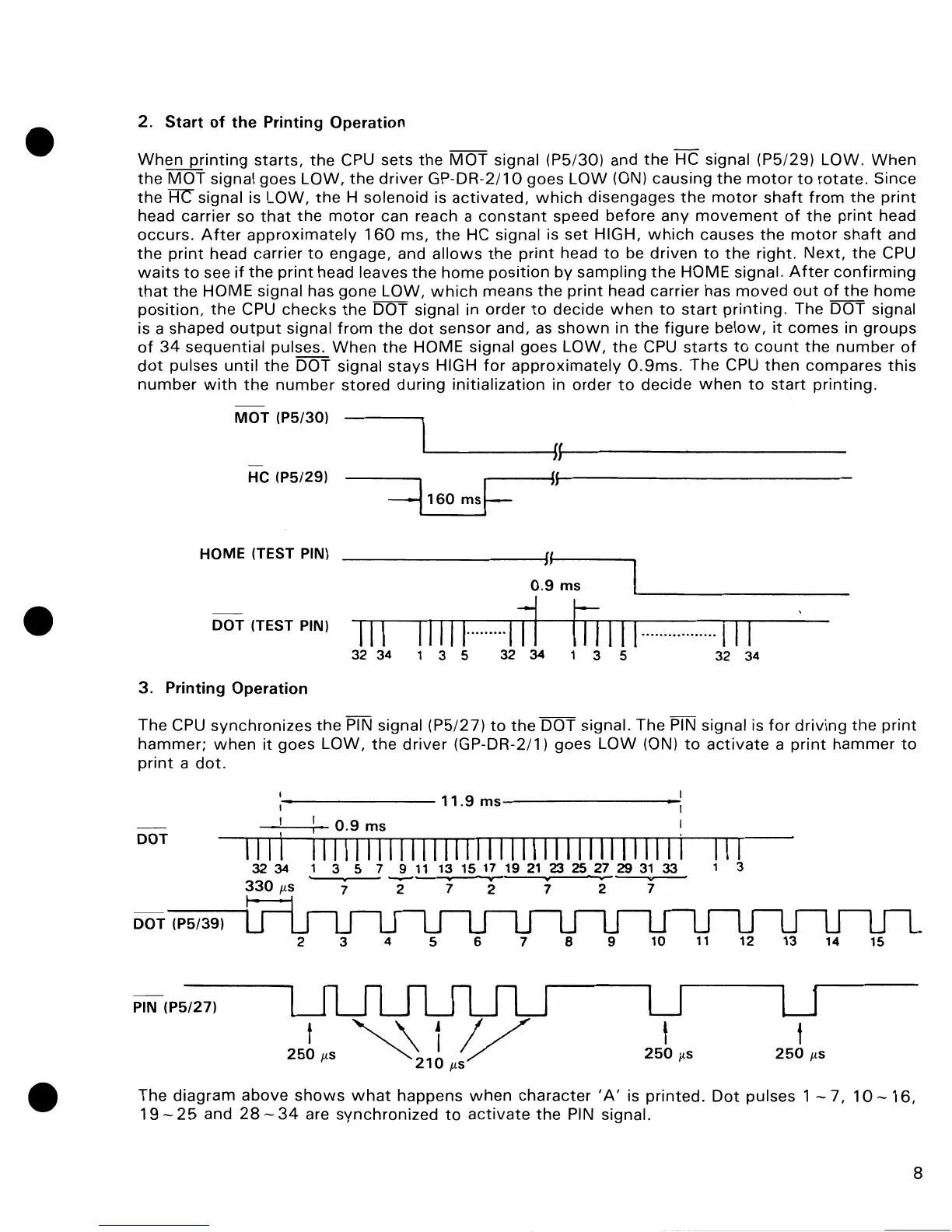
The
DOT
signal
is a shaped
output
signal
from
the
dot
sensor
and, as
shown
in
the
figure
below,
it
comes
in
groups
of
34
sequential
pulses.
When
the
HOME signal
goes
LOW,
the
CPU
starts
to
count
the
number
of
dot
pulses
until
the
DOT
signal
stays
HIGH
for
approximately
0.9ms.
The
CPU
then
compares
this
number
with
the
number
stored
during
initialization
in
order
to
decide
when
to
start
printing.
MOT
(P5/30)
He
(P5/29)
-=1
160
msf=
HOME (TEST PIN)
II
0.9
ms
DOT (TEST PIN)
III
11111·
......
ul~
mill
u
...
u.u
..
uu·111
32
34
135
32 34
3 5
32 34
3.
Printing
Operation
The
CPU
synchronizes
the
PIN signal (P5/27)
to
the
DOT
signal.
The
PIN signal is
for
driving
the
print
hammer;
when
it
goes
LOW,
the
driver
(GP-DR-2/1)
goes
LOW
(ON)
to
activate
a
print
hammer
to
print
a
dot.
.--------
11.9
ms----------
-"'---"-T-
0.9
ms
DOT
111I
1111111111111111111111111111111111
III
3234
1 3 5 7 9
11
13
15
17
19
21
23
25 27 29
31
33
1 3
330
p,s
--
v-
-~
7
272
7
27
DOT (P5/39)
2 3
4
5
6
7
8
9
10
11
12
14
15
PIN
(P5/27)
~11/
210
p,s
250
p,s
t
250
p,S
t
250
p,S
The
diagram
above
shows
what
happens
when
character
lA'
is
printed.
Dot
pulses 1
-7,10-16,
19
-
25
and
28
-
34
are
synchronized
to
activate
the
PIN signal.
8

Other manuals for Commodore MPS-801

Related product manuals