EasyManua.ls Logo

Commodore MPS-801 - Print Head Position Adjustment

Commodore MPS-801
34 pages
Print Icon
To Next Page IconTo Next Page
To Previous Page IconTo Previous Page
Loading...
MECHANICAL
ADJUSTMENTS
(Continued)
Print head
position
adjustment:
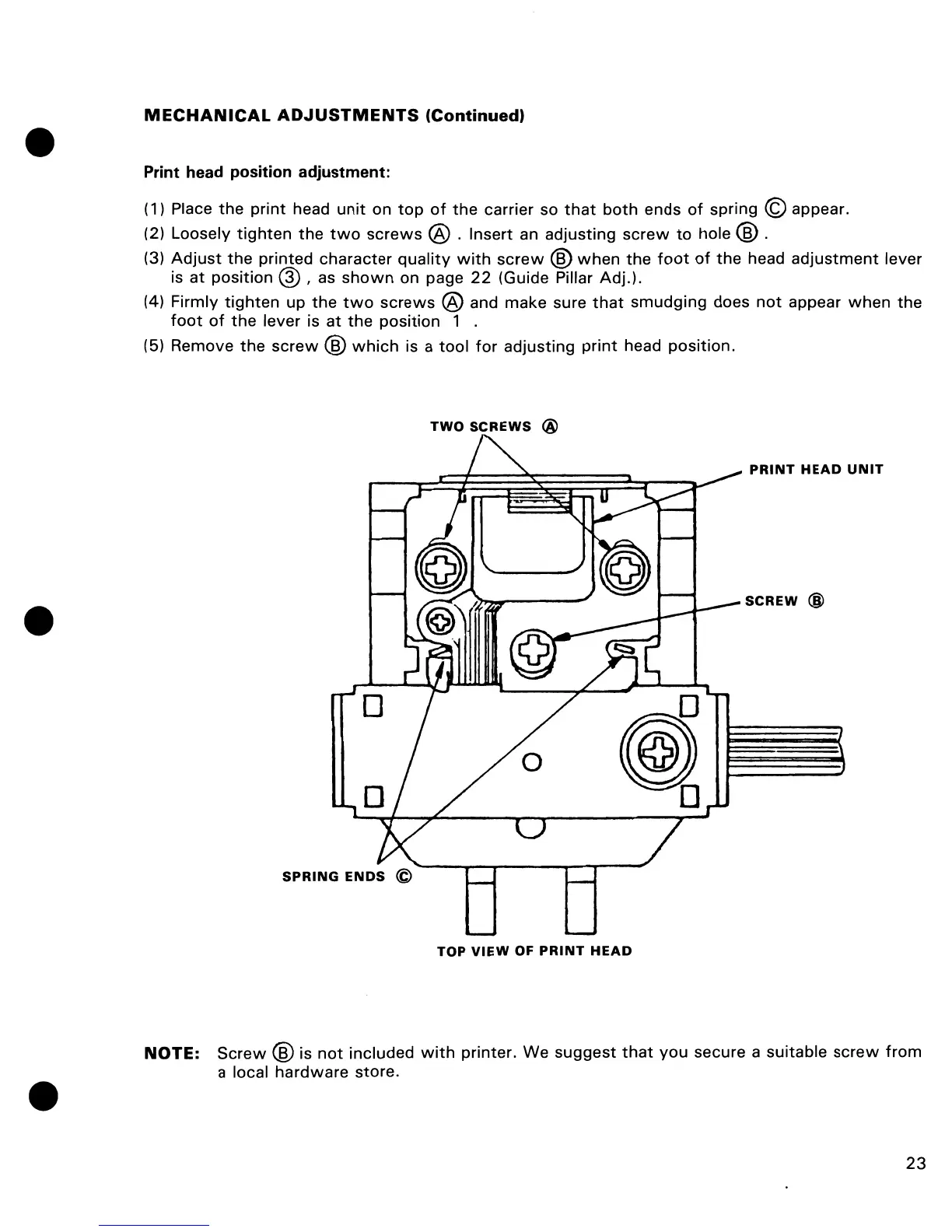
(1) Place
the
print
head
unit
on
top
of
the
carrier so
that
both
ends
of
spring © appear.
(2) Loosely
tighten
the
two
screws
@ . Insert
an
adjusting
screw
to
hole ® .
(3)
Adjust
the
printed character
quality
with
screw
®
when
the
foot
of
the
head
adjustment
lever
is
at
position @ I
as
shown
on page
22
(Guide Pillar Adj.).
(4) Firmly
tighten
up
the
two
screws
® and make sure
that
smudging does
not
appear
when
the
foot
of
the
lever is at
the
position 1 .
(5) Remove
the
screw
®
which
is a
tool
for
adjusting
print
head
position.
TWO
SCREWS
@
PRINT
HEAD
UNIT
SCREW
@
o
@
o
SPRING
ENDS
©
TOP
VIEW
OF
PRINT
HEAD
NOTE:
Screw
® is
not
included
with
printer. We
suggest
that
you
secure a suitable
screw
from
a local
hardware
store.
23

Other manuals for Commodore MPS-801

Related product manuals