CommScope Instruction Guide
860647713, Rev B, V.05
Page 12
38 Pages
► Step 2. Remove Pad Gasket from Cabinet and Prepare Pad
Caution:
■ Do not install batteries in cabinet prior to cabinet installation on pad (structure).
■ Install cabinet on a pad six inches above the grade to prevent water intrusion and install all
cable connections, including ground cable, above the pad (structure); Figure 18, Figure 19.
To remove pad gasket:
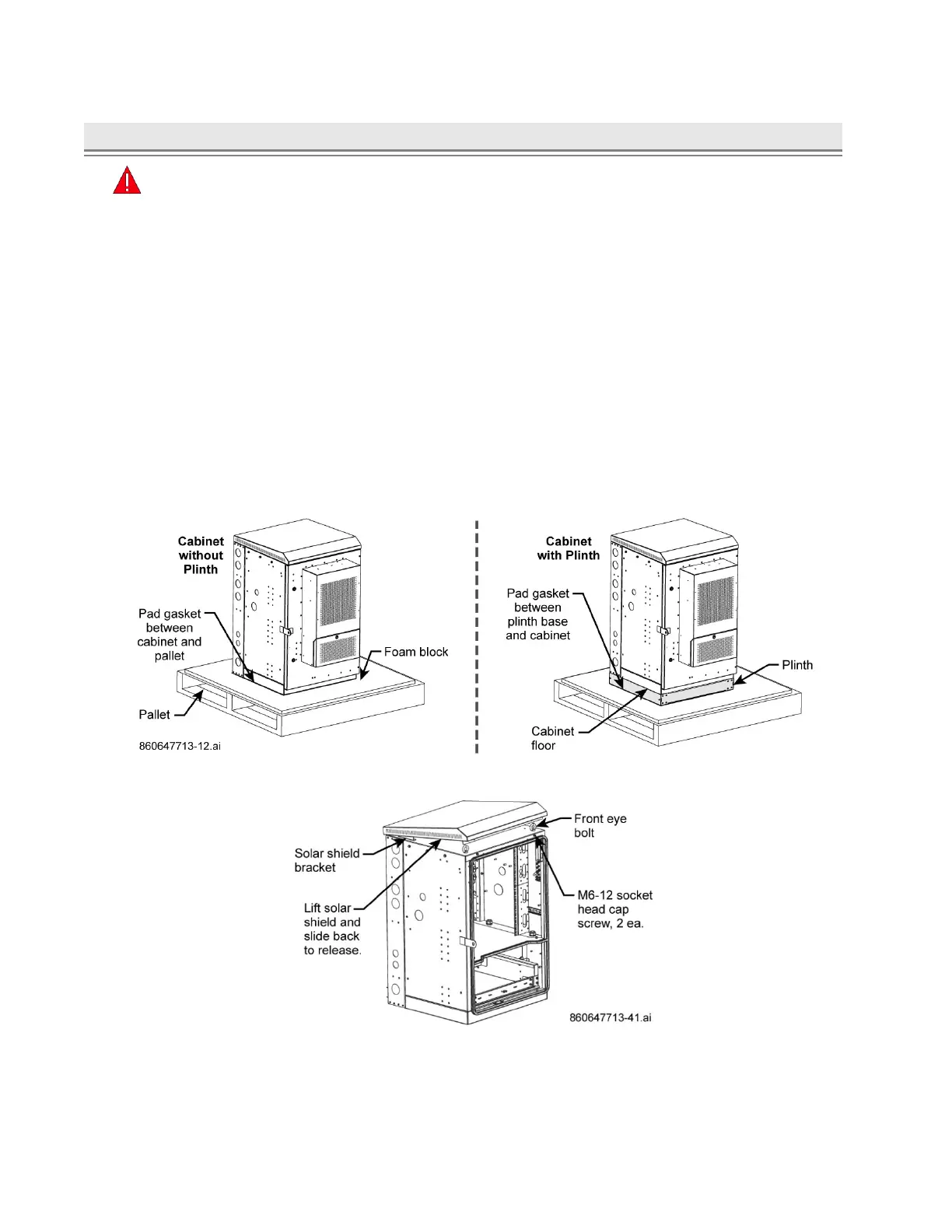
1. Open the door and rear panel to locate and remove pallet bolts (six places) from front and rear
corners on cabinet floor or base of plinth; Figure 12, Figure 14, Figure 15.
■ Pad gasket is between the cabinet floor or base of plinth on pallet. Use pad gasket as a template
to drill anchor holes into the concrete; Figure 12, Figure 14, Figure 18.
Note: Plinth is an optional order for CMC cabinets and factory installed.
2. Remove solar shield to reveal the four eye bolts on the cabinet top, Figure 13.
■ Unscrew the M6-12 cap screws, lift solar shield and slide it back to release from cabinet.
3. Close door and lift cabinet with appropriate lifting device to remove gasket, reset cabinet onto pallet.
Note: If routing cable through pad (structure), remove floor knockouts (punch outside to inside)
before installing cabinet; Figure 14, Figure 15, Figure 24.
Figure 12. Pad Gasket Removal from Pallet, Cabinet without and with Plinth
Figure 13. Solar Shield Removal



 To Next Page