Material ID 860647713
Rev B, V.05, February 2022
Page 15
38 Pages
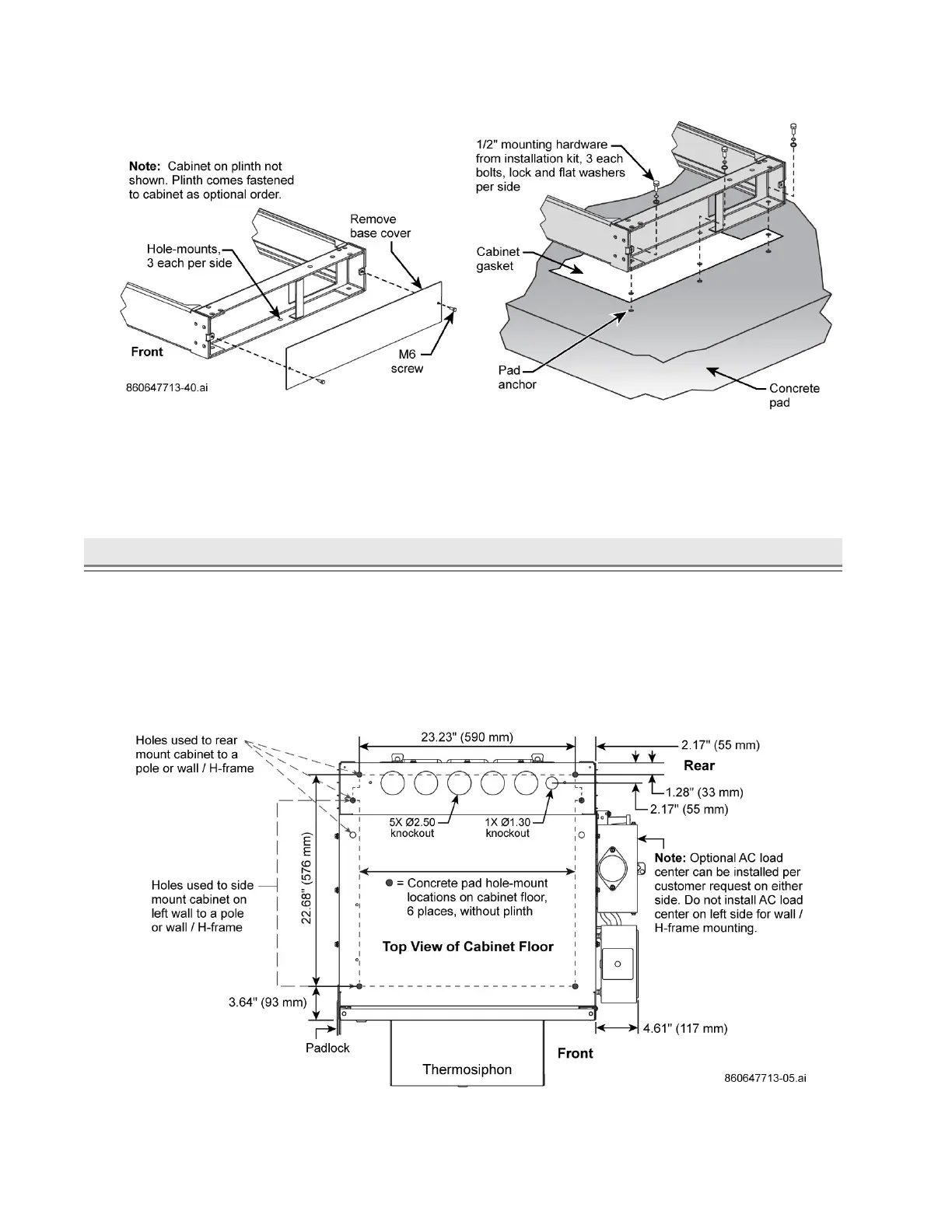
Figure 19. Example of Cabinet Installation with Optional 6-Inch Plinth on a Concrete Pad
4. Level the cabinet. If needed, insert the shims provided with the installation kit. Use caution to avoid
injury when placing the shims below the cabinet.
5. Reinstall the solar shield.
► Step 4. Fasten Cabinet to Concrete Pad or Steel Structure
1. Fasten cabinet to a concrete pad or structure from cabinet pad mount holes per Figure 14 and
Figure 20. CommScope requires use of six mounting holes. For some pad applications, install a steel
structure onto the pad and fasten cabinet to structure (recommended).
■ For pad installations, customer provides anchors or inserts to fit the 1/2"-13 x 1.5" bolts provided
with the installation kit, Table E.
■ For structures, customer provides adequate hardware to fasten cabinet to the structure.
■ For cabinet with plinth, see Figure 15, Figure 19, and Figure 21 to mount cabinet to pad.
Figure 20. Mounting Footprint for CMC-21/28/35 Cabinets without a Plinth, Top View



 To Next Page