Material ID 860647713
Rev B, V.05, February 2022
Page 27
38 Pages
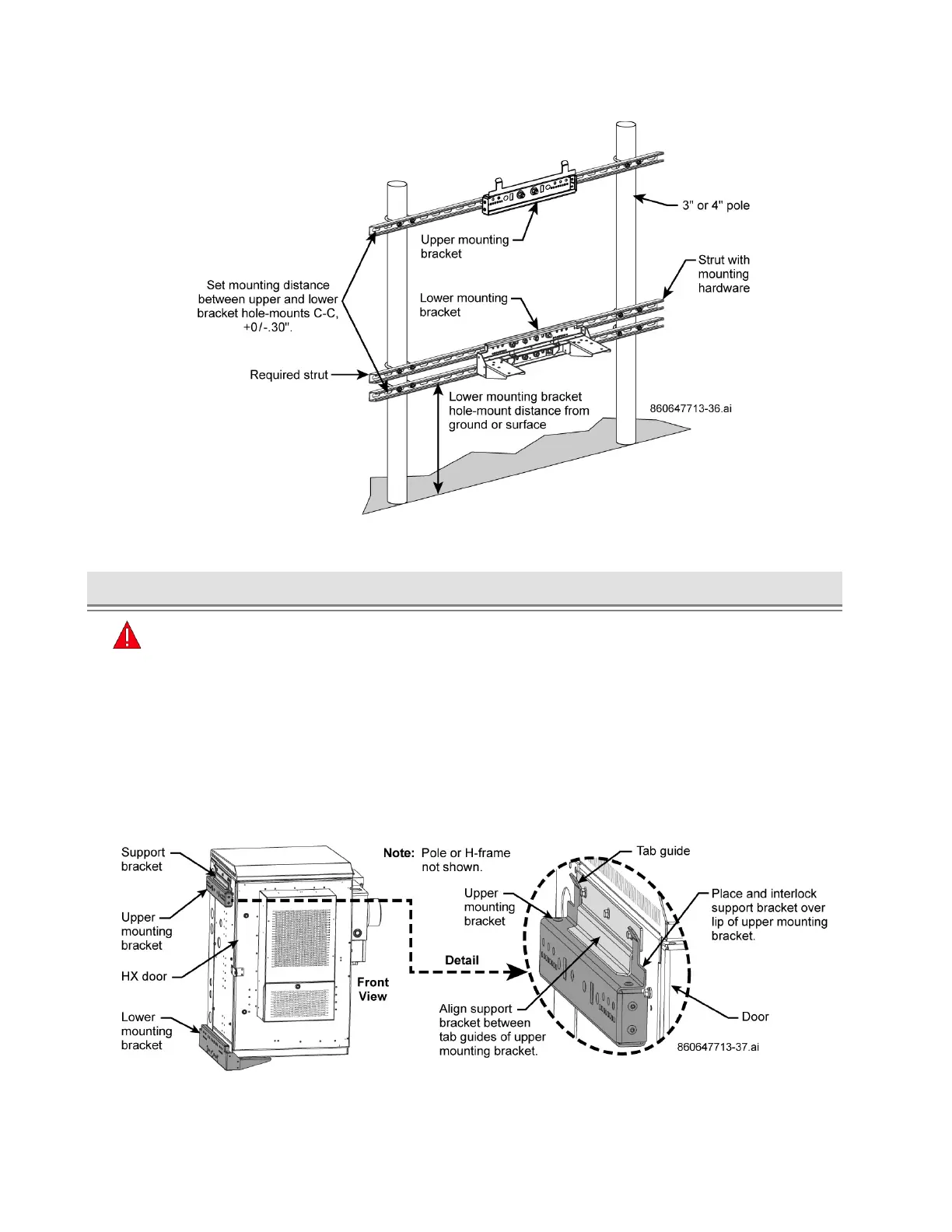
Figure 38. Fasten Upper and Lower Mounting Brackets to Pole Mounted H-Frame
► Install Cabinet onto Upper and Lower Mounting Brackets
Caution
■ If a ceiling or surface is over the cabinet, leave at least 2" to 6" of headroom to lift and place the
cabinet onto the top bracket without obstruction or interference from ceiling or surface.
■ Do not install batteries in cabinet or lift cabinet with batteries prior to installation on pad.
To install the cabinet onto the mounting brackets:
1. Lift cabinet and position side of cabinet to mount onto the brackets.
2. Guide the cabinet so that support bracket aligns between the two tabs of upper bracket, Figure 39.
■ Place edge of cabinet support bracket over top edge of upper bracket so it interlocks with the
upper bracket while lowering the cabinet, Figure 39.
Figure 39. View of Support Bracket and Upper Mounting Bracket Interlock, Side Mount
3. Position cabinet onto lower bracket so that it rests against tabs on the lower bracket, Figure 40.



 To Next Page