Material ID 860647713
Rev B, V.05, February 2022
Page 33
38 Pages
To install VRLA batteries:
1. Read the voltage for each battery, at least 12.5 VDC or higher. If reading is less than 12.5 VDC,
consult manufacturer. DO NOT install batteries that measure less than 12.5 VDC.
2. Read and follow the manufacturer's instruction on battery installation (customer provides kit).
Installation may require more than one string of batteries.
Note: Do not apply charging if battery string measures less than 50.0 VDC.
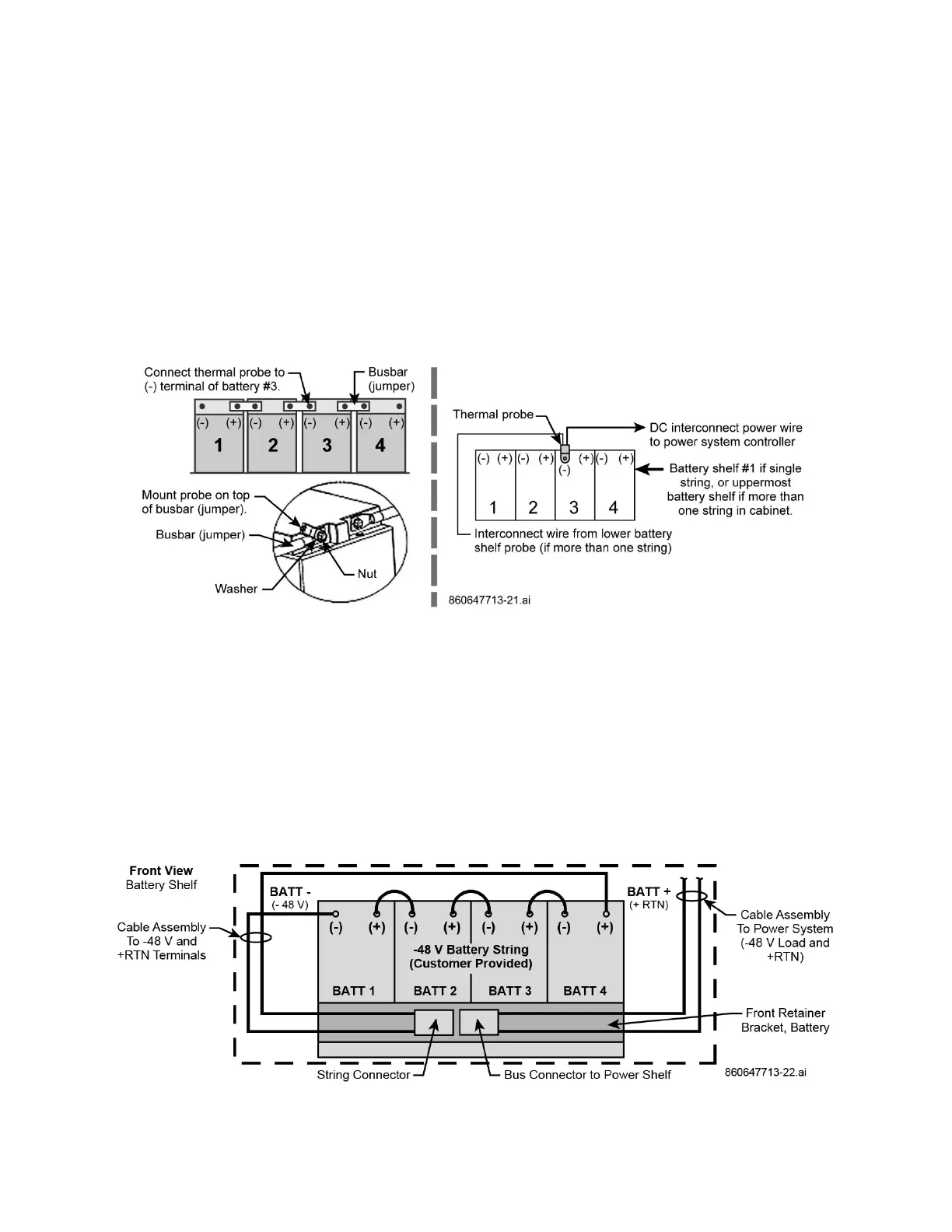
3. Install busbars (jumpers) per Figure 42 from battery kit to configure one -48 VDC string.
■ Place busbars (+ to –) between batteries #1 and #2, #2 and #3, #3 and #4 per Figure 42.
■ Install a thermal probe to the negative terminal of battery #3 for the string, Figure 42.
Note: Seat thermal probe between busbar, flat washer, and nut of per Figure 42. Refer to the SD if
installing more than one string of batteries.
Figure 42. Example of Battery Busbar and Thermal Probe Connections
4. Repeat steps 1-4 to install additional strings in the cabinet.
■ For Anderson connectors – do not fasten string connector until after installing all strings.
■ For standard lug connections – do not connect string to circuit breaker or master busbar until
after installing all strings.
5. Connect battery string cables from battery string connector. Do not remove protective cover from
each cable end until ready to connect to the -48V and +RTN string terminals.
a. Locate battery cable marked BATT+. Remove protective lug cover and connect it to positive
(+RTN) terminal of right-most battery per Figure 43 or Figure 44.
b. Locate battery cable marked BATT-. Remove protective lug cover and connect it to negative
(-48V) terminal of left-most battery per Figure 43 or Figure 44.
Figure 43. Battery String Cable Connection, Example Using Anderson Connectors



 To Next Page