M300 Pro GNSS Receiver User Guide
⑩ 10 MHz frequency input
10MHz external frequency input, Used for precision timing
⑪WIFI Antenna connector(Reserved)
4. Receiver configuration through a Web Browser
M300Pro has the advanced built-in web server, you can access the web setting page
and do configurations remotely. This section describes how to change receiver’s
settings through a web server.
4.1 Login the configuration page of M300Pro
The M300Pro receiver can connect to an Ethernet network through its Ethernet port.
It means that you can configure and monitor the receiver’s settings without serial
cable connection.
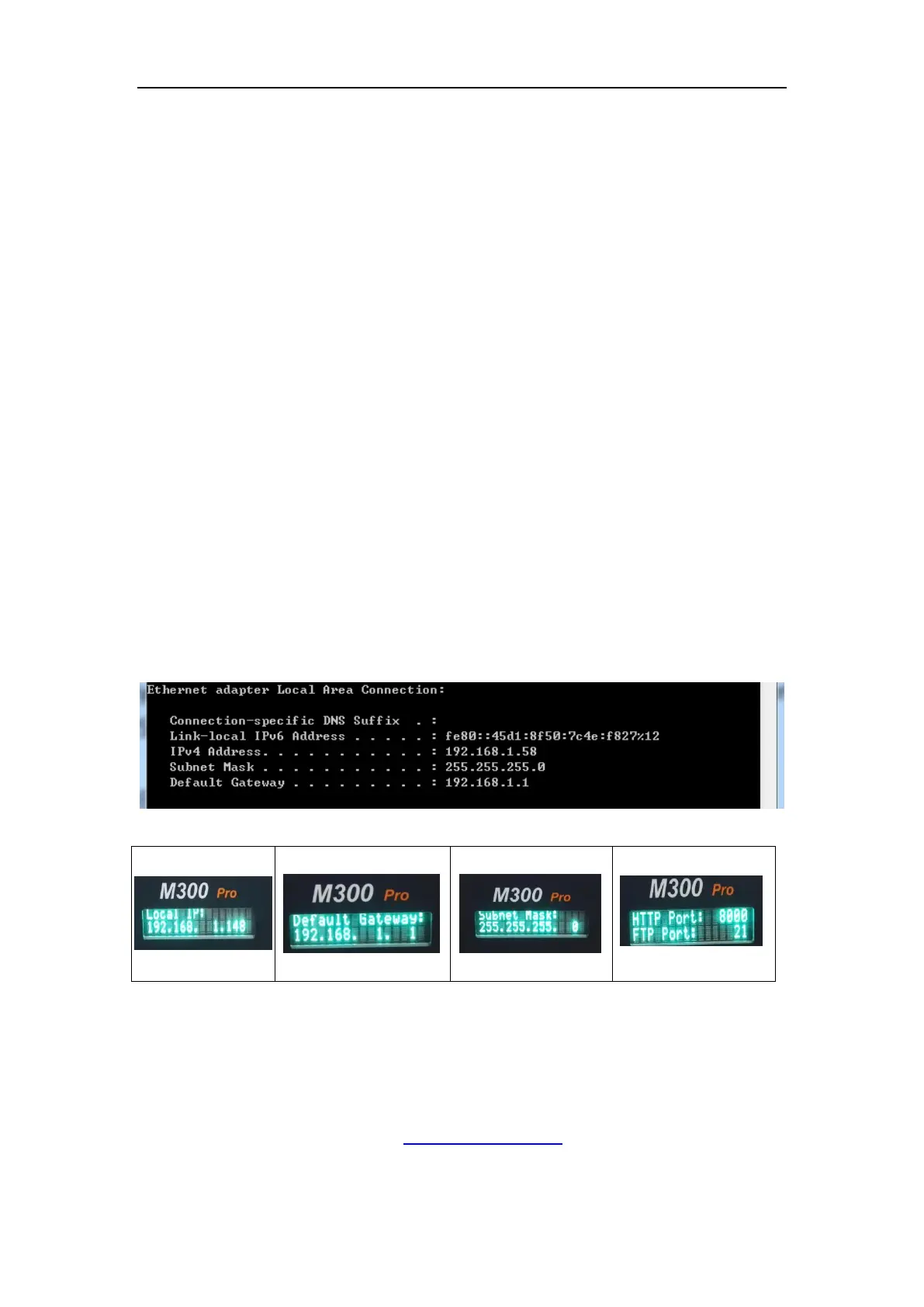
1. Firstly, make sure that the M300Pro and your computer are within the same
Local Area Network (LAN). Then change your receiver’ IP address through the
front panel based on your office computer. For example IP address in your
computer:
IP address of M300Pro:
2. Enter the IP address and HTTP port of the receiver into the address bar, you will
access the configuration page of M300Pro.The default setting for the HTTP port
is 80, which is the standard port for web servers. However, HTTP port need to be
changed in some cases.
For example, using default port 80:http://192.168.1.148
If your receiver has a port other than 80, you must enter the IP address followed by



 To Next Page