30
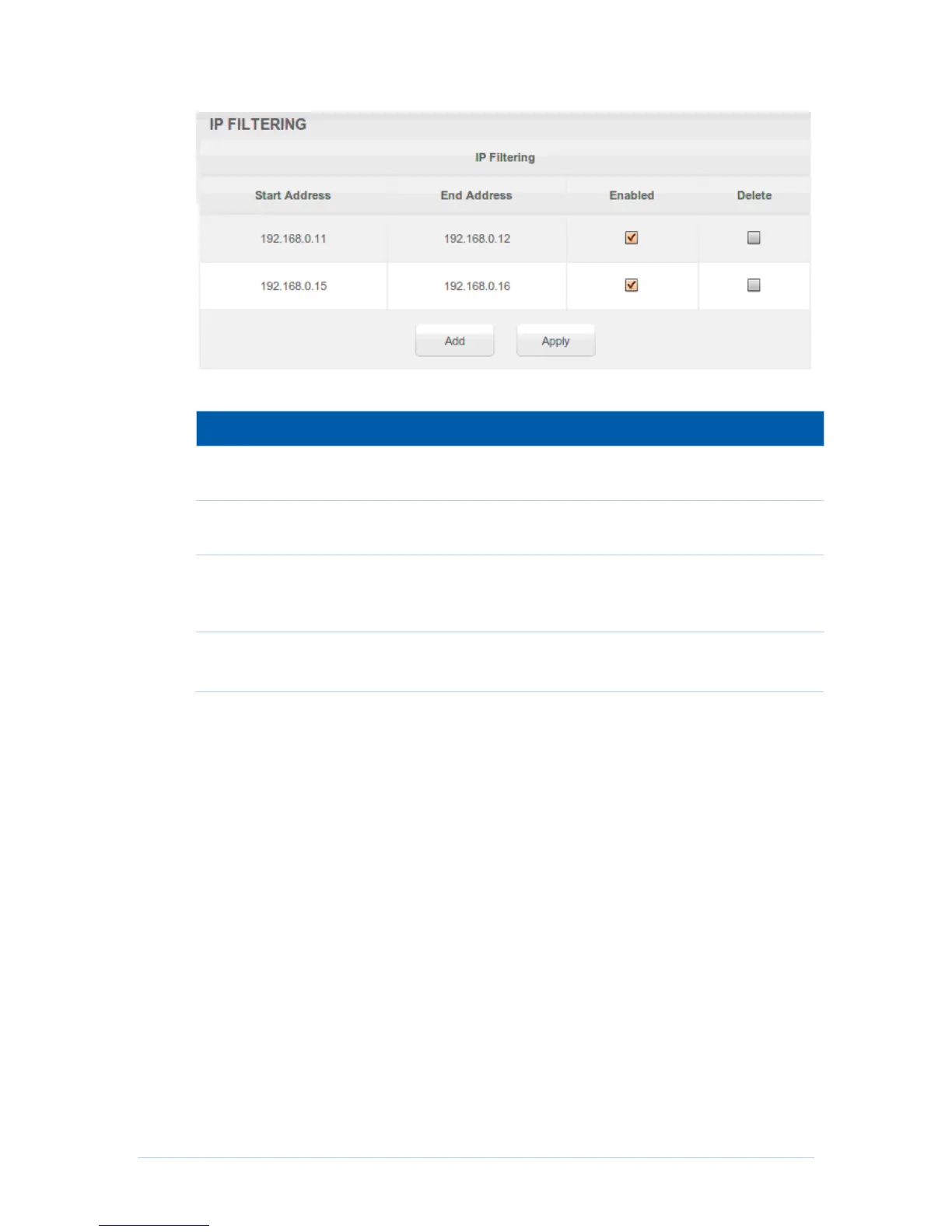
Field Descriptions for the Advanced IP Filtering Page
Enter the start IP address range of the computers for which you
want to deny access to the CH6643E WAN.
Enter the end IP address range of the computers you want to deny
access to the CH6643E WAN.
Activates the IP address filter, when selected.
Checkmark Enabled for each range of IP addresses you want to
deny access to the CH6643E WAN.
Remove the IP address filter, when selected.
Checkmark Delete for each range of IP filter you want to remove.
When done, click Apply to activate and save your settings.
Advanced MAC Filtering Page
This page allows you to define up to twenty Media Access Control (MAC) address filters
to prevent PCs from sending outgoing TCP/UDP traffic to the WAN via their MAC
addresses. This is useful because the MAC address of a specific NIC card never
changes, unlike its IP address, which can be assigned via the DHCP server or hard-
coded to various addresses over time.


 To Next Page