37
User authentications
Rejected internal and external connection requests
Session creation and termination
Outside attacks (intrusion detection)
The predefined policies provide outbound Internet access for computers on the CH6643E
LAN. The CH6643E firewall uses stateful-inspection to allow inbound responses when
there already is an outbound session running that corresponds to the data flow. For
example, if you use a web browser, outbound HTTP connections are permitted on port
80. Inbound responses from the Internet are allowed because an outbound session is
established.
When required, you can configure the CH6643E firewall to allow inbound packets without
first establishing an outbound session. You also need to configure a port forwarding entry
on the Advanced Port Forwarding Page or a DMZ client on the Advanced DMZ Host
Page.
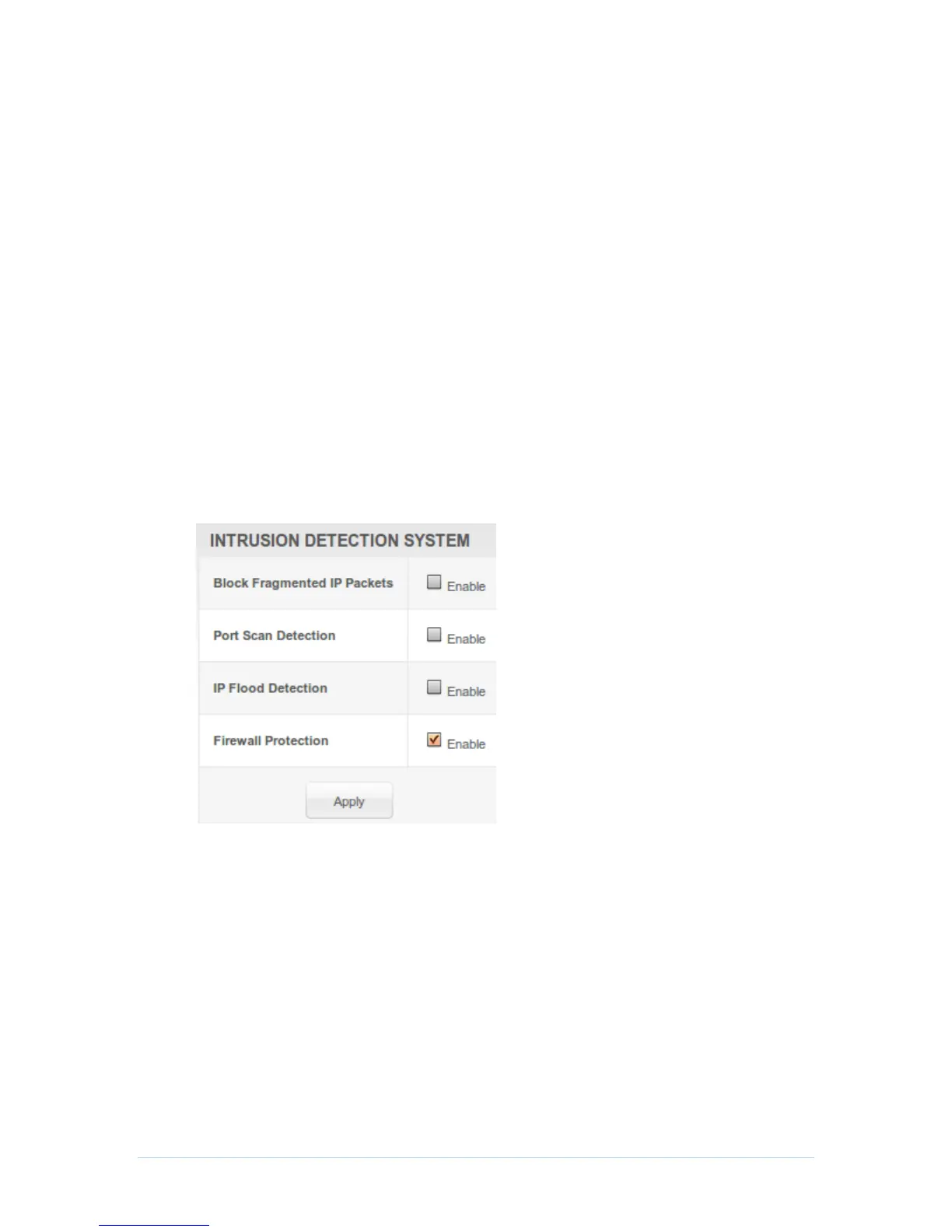
This page allows you to configure the firewall by enabling or disabling various protection
features. Block Fragmented IP packets prevent all fragmented IP packets from passing
through the firewall. Port Scan Detection detects and blocks port scan activity originating
on both the LAN and WAN. IP Flood Detection detects and blocks packet floods
originating on both the LAN and WAN.
Checkmark Enable for each Web filter you want to set for the firewall, and then click Apply.
The Web filters will activate without having to reboot the CH6643E Configuration Manager.


 To Next Page