39
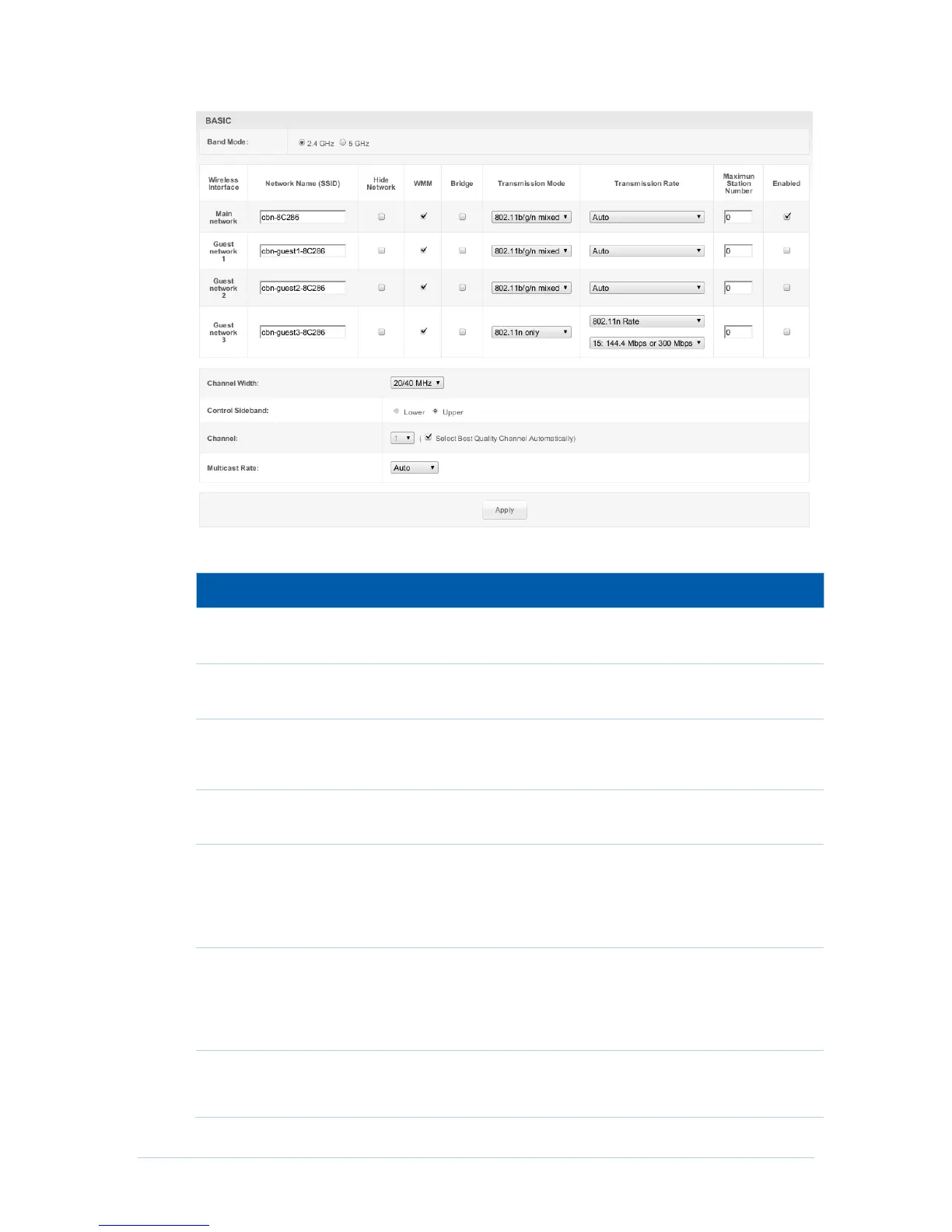
Field Descriptions for the Wireless Basic Page
Select the band mode you want to setting, and this option appear
only on Concurrent Mode.
Sets the Network Name (also known as SSID) of the Primary
wireless network. This is a 1-32 ASCII character string.
With a hide network, users type the SSID into the client
application instead of selecting the SSID from a list. This feature
makes it slightly more difficult for the user to gain access.
Enabling WMM can help control latency and jitter when
transmitting multimedia content over a wireless connection.
When the check box set, indicates network traffic from which
particular wireless interface will be bridged to HFC interface.
When the checkbox cleared, indicates network traffic from which
particular wireless interface will be handled by Gateway routing
features.
Select which 802.11 mode is used by CH6643E, including
802.11b/g/n mixed mode, 802.11g/n mixed mode, 802.11n only,
802.11b/g mixed mode, 802.11g only, for 802.11b only in 2.4G
band mode, 802.11a/n mixed mode, 802.11a only, 802.11n only
in 5G band mode.
Select 802.11 physical transmission rate, this value depends on
Transmission Mode. If “Transmission Mode” is “802.11n only”
and “802.11n Rate” is selected, the menu of MCS is provided


 To Next Page