52
Emergency recording stop settings
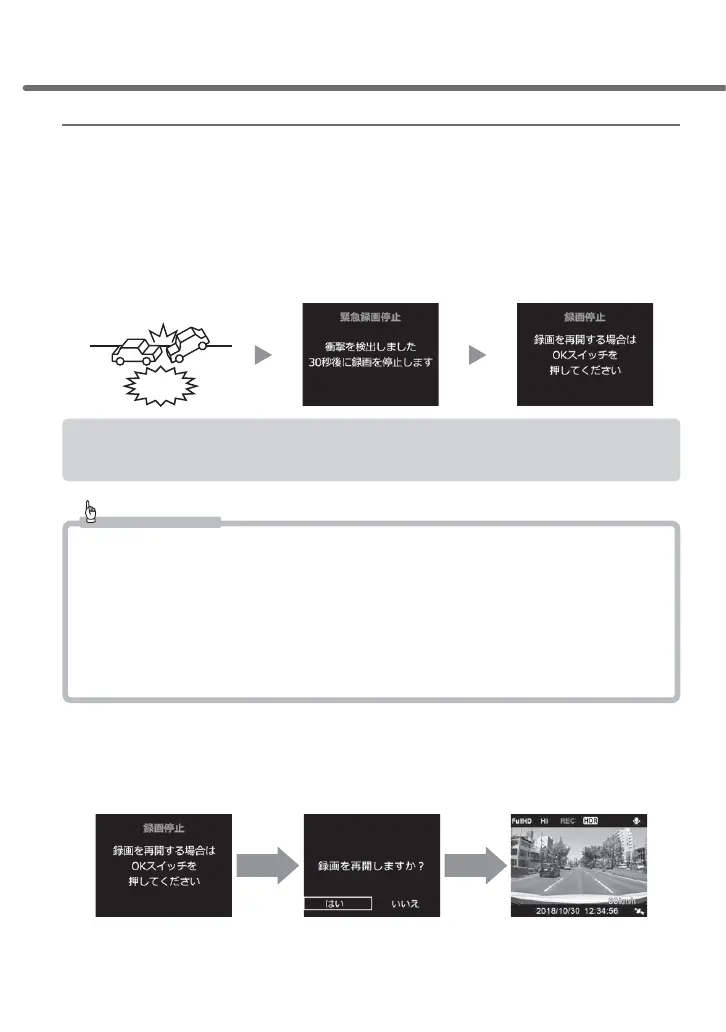
• The emergency recording stop function refers to a function that automatically stops recording about 30 seconds
after detecting a strong impact of an accident, for example, in order to prevent overwriting of critical data.
* It stops recording when an impact goes beyond any of the set values for front-back /
left-right / top-bottom.
• Sensitivity to detect an impact can be selected from [OFF / 1.1G (sensitive) to
2.0G (insensitive)].
• By default, it is set to [1.5G].
Impact
30 seconds
later
During manual recording (=> P 21), if the emergency recording stop function has been activated,
its video footage will be saved to the microSDHC card as manual recording data.
Advice
If you have an accident...
This product overwrites older data and records new data for continuous, impact and manual
recording respectively when the storage of the microSDHC card is full.
For this reason, if you move your vehicle after an accident or if the power supply of this product is
turned on during repair work at a workshop without removing the microSDHC card, it is possible
that critical data will be overwritten by accident.
,WLVUHFRPPHQGHGWKDW\RXNHHSWKLVIXQFWLRQHQDEOHGLI\RXWKLQNLWZRXOGEHGLႈFXOWWRFDOPO\
WDNHDFWLRQVWRWXUQRႇWKHSRZHUDQGHMHFWWKHPLFUR6'+&FDUGLQWKHFDVHRIDQDFFLGHQW
Ŷ:KHQUHVWDUWLQJYLGHRUHFRUGLQJ
When your recording has been stopped by the emergency recording stop
function, recording will be still paused even if you restart this product. Accord-
ingly, if you wish to restart recording, restart it by following the steps below.
(2) Select [Yes] by pressing [Up] or
[Down], and then press [OK]
3
Recordin
resumes(1) Press [OK]
Setting



 To Next Page