EasyManua.ls Logo

Contax 167MT - Page 21

Contax 167MT
68 pages
Print Icon
To Next Page IconTo Next Page
To Previous Page IconTo Previous Page
Loading...
r[[[[0
r00[[0DD[!!Dl]tl
E
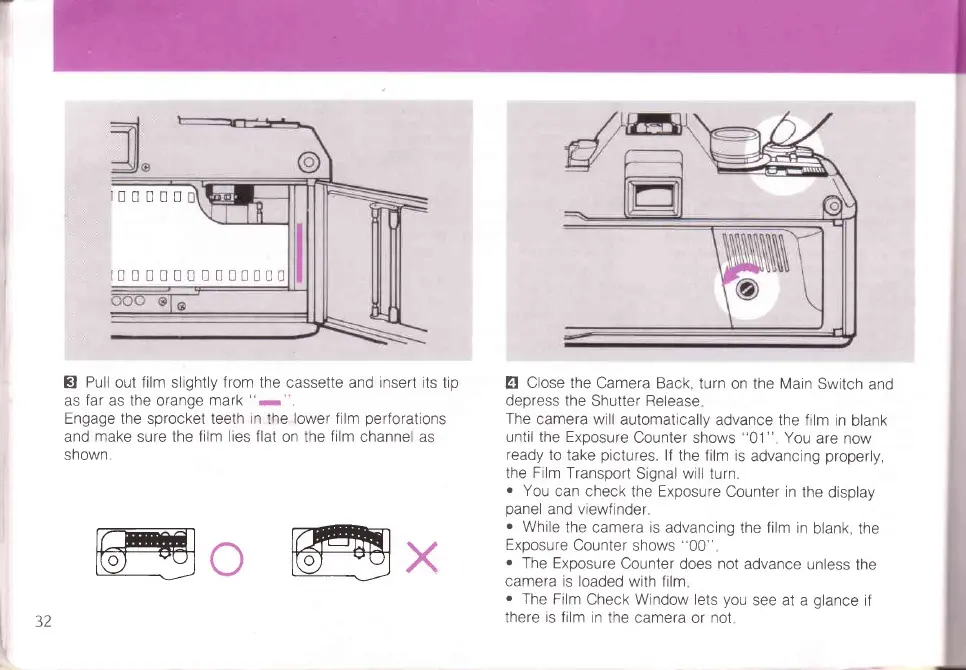
Pull
out
film
slightly
from the
cassette and
insert its
tip
as
far
as the orange
mark
"-".
Engage the sprocket teeth
in
the lower film
perforations
and
make
sure the
film lies flat
on the
film
channel as
shown
@o
@x
4
Close the
Camera Back,
turn on the Main
Switch
and
depress the
Shutter Release
The
camera will
automatically
advance the film
in
blank
until the Exposure
Counter shows
"01"
You
are now
ready
to
take
pictures.
lf
the film is
advancing
properly,
the
Film
Transport
Signal
will
turn.
o
You
can check
the Exposure
Counter in
the
display
panel
and viewfinder.
.
While
the
camera is advancing
the film in
blank, the
Exposure
Counter
shows
"00"
o
The Exposure
Counter
does
not
advance
unless
the
camera is
loaded with film
.
The Film
Check Window lets
you
see at a
glance
if
there is film
in the camera
or
not
5Z

Table of Contents

Related product manuals