EasyManua.ls Logo

Contax 167MT - Focusing the Lens; Horizontal Split-Image Spot; Microprism Collar and Matte Screten

Contax 167MT
68 pages
Print Icon
To Next Page IconTo Next Page
To Previous Page IconTo Previous Page
Loading...
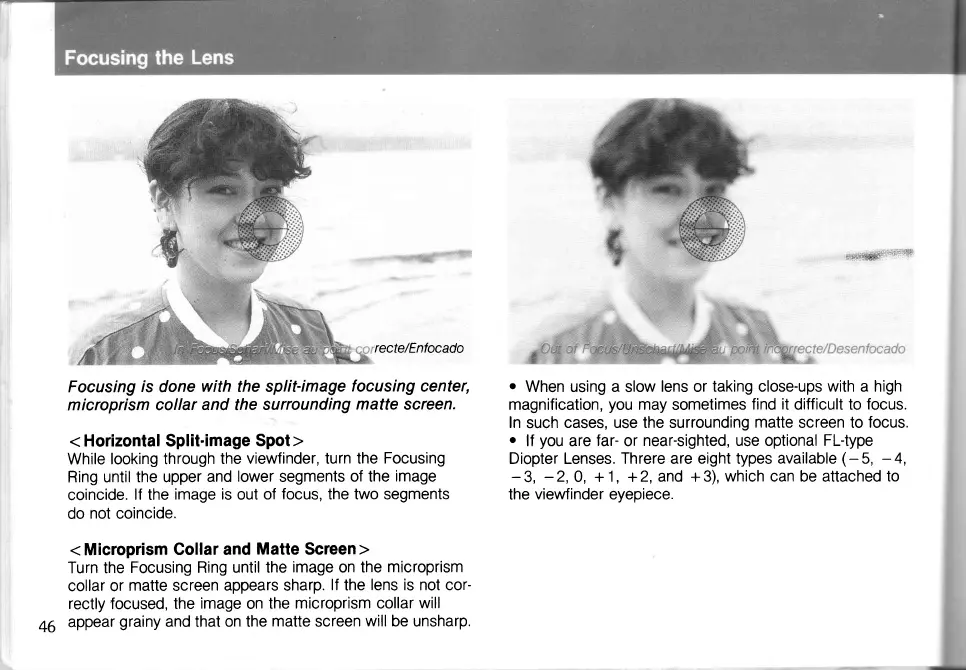
recte/Enfocado
Focusing
ts
done
with the split-image
focusing
center,
microprism
collar and the
surrounding
matte
screen.
<
Horizontal Split-image
Spot >
While
looking through
the
viewfinder, turn the
Focusing
Ring until
the upper
and
lower
segments
of the
image
coincide.
lf
the
image
is
out
of
focus,
the two segments
do
not coincide.
<
Microprism
Gollar and
Matte Screen >
Turn the
Focusing Ring until
the
image
on
the
microprism
collar or
matte screen
appears sharp.
lf
the
lens is not cor-
rectly
focused,
the
image
on
the
microprism collar will
appear
grainy
and
that
on the
matte
screen
will
be unsharp.
iit;;tiltittiiiil1vr4ii:"""":
jit"'itii+'i':
o
When
using
a
slow
lens
or
taking close-ups with a high
magnification,
you
may
sometimes
find
it
difficult to
focus.
In
such cases,
use the surrounding
matte
screen to
focus.
o
lf
you
are
far-
or
near-sighted, use optional Fl-type
Diopter Lenses.
Threre
are eight
types available
(-
5,
-
4,
-
3,
-2,
0, +
1,
+2,
and + 3),
which
can be attached to
the
vieMinder eyepiece.
46

Table of Contents

Related product manuals