EasyManua.ls Logo

Contax 167MT - Film Speed Setting; Automatic setting; Manual setting

Contax 167MT
68 pages
Print Icon
To Next Page IconTo Next Page
To Previous Page IconTo Previous Page
Loading...
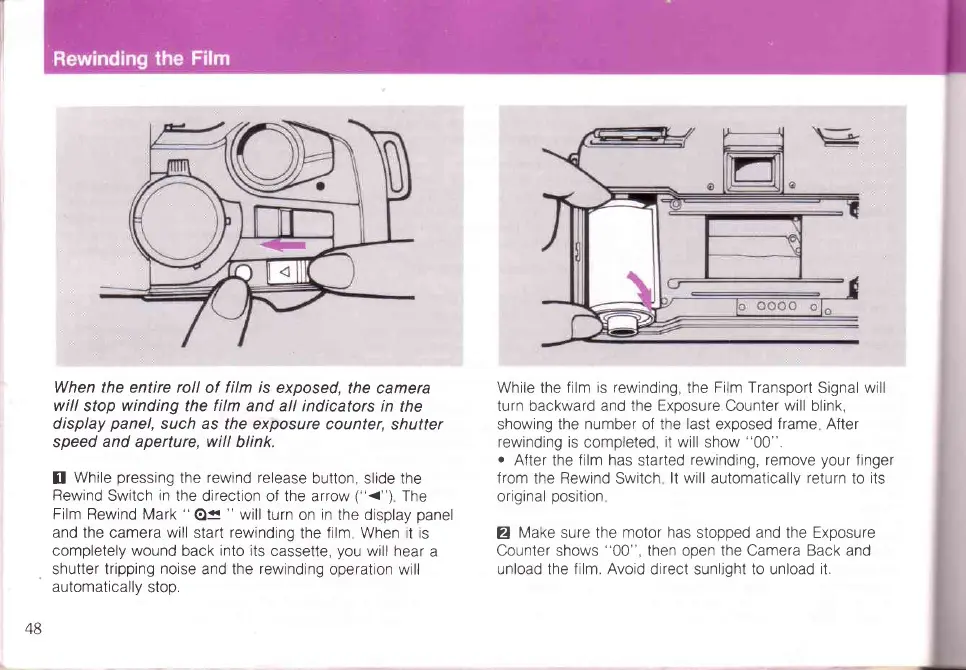
When the entire roll
of
film is
exposed,
the camera
will
stop
winding
the
film
and all indicators
in
the
display
panel,
such as
the exposure counter,
shutter
speed
and
aperture,
will
blink.
tr
While
pressing
the
rewind
release
button, slide
the
Rewind
Switch
in
the
direction of the arrow
("<")
The
Film Rewind
Mark
"
O<<
"
will
turn on
in
the display
panel
and the
camera
will
start
rewtnding
the
film
When it is
completely wound
back
into its
cassette,
you
will hear
a
shutter tripping
noise
and the
rewinding
operation will
automaticallv
stoo.
While the film
is rewinding,
the
Film Transport
Signal will
turn backward and the
Exposure
Counter
will
blink,
showing
the number of the last exposed
frame
After
rewinding is
completed,
it will
show
"00".
o
After
the
film has
started
rewinding,
remove
your
finger
from
the
Rewind
Switch
lt will automaticallv return
to
its
original
position
Z
Make
sure the
motor has
stopped and the Exposure
Counter
shows
"00",
then open the Camera Back and
unload the film. Avoid
direct sunliqht
to unload it.
48

Table of Contents

Related product manuals