EasyManua.ls Logo

Contax 167MT - Page 23

Contax 167MT
68 pages
Print Icon
To Next Page IconTo Next Page
To Previous Page IconTo Previous Page
Loading...
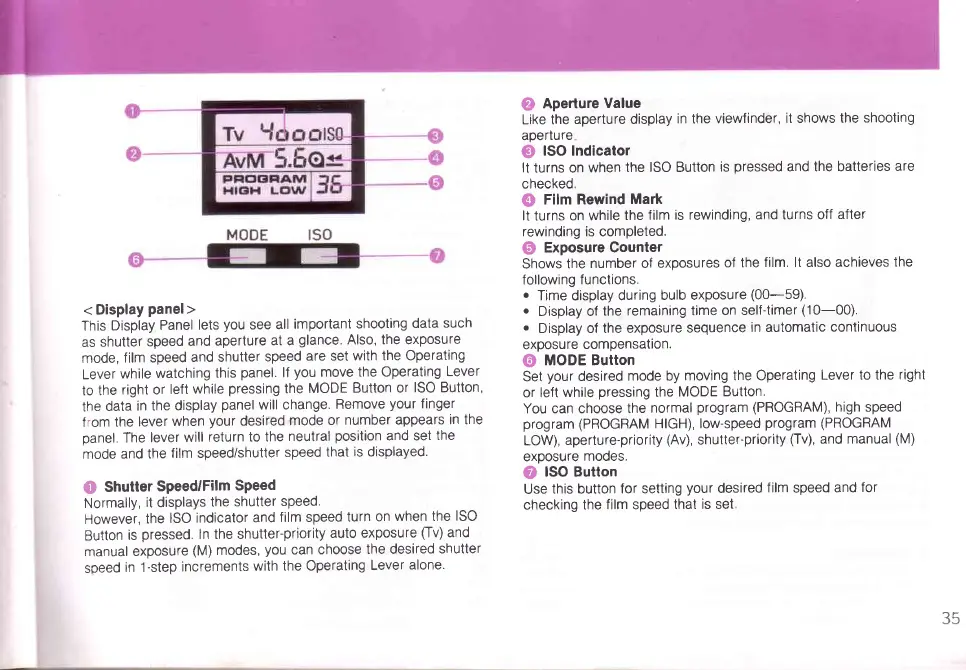
<
Display
panel>
This Display
Panel
lets
you
see
all
important
shooting
data
such
as
shutter
speed
and
aperlure
at a
glance.
Also, the exposure
mode,
film speed
and shutter
speed
are set
with the Operating
Lever
while
watching
this
panel.
lf
you
move the Operating
Lever
to the
right or
left
while
pressing
the
MODE
Button or
ISO Button,
the
data
in the
display
panel
will change.
Remove
your
finger
f
rom the
lever
when
your
desired
mode
or
number appears
in the
panel.
The
lever
will
return to the
neutral
position
and set
the
mode
and the
film speed/shutter
speed
that
is
displayed.
O
Shutter
Speed/Film
SPeed
Normally,
it
displays
the
shutter
speed.
However,
the
ISO
indicator
and
film speed
turn
on
when the
ISO
Button
is
pressed.
ln the shutter-priority
auto exposure
[v)
and
manual
exposure
(M)
modes,
you
can
choose
the desired
shutter
soeed
in 1-step
increments
with
the Operating
Lever
alone.
@
Aperture
Value
Like the
aperture display
in
the
viewfinder,
it shows the
shooting
aperture
O
lSO Indicator
It
turns on
when the
ISO Button
is
pressed
and the batteries
are
checked.
@
Film Rewind
Mark
It
turns
on while
the film
is rewinding,
and turns off
after
rewinding is completed.
@
Exposure Counter
Shows
the
number of exposures
of the
film. lt also achieves
the
following
functions.
o
Time
display
during
bulb exposure
(00-59).
o
Display of
the
remaining time
on self-timer
(10-00).
.
Display of the exposure
sequence
in automatic
continuous
exposu
re compensalron.
G)
MODE Button
Set
your
desired
mode by
moving the Operating
Lever to the
right
or left
while
pressing
the
MODE
Button.
You can choose the
normal
program
(PROGRAM),
high speed
program (PROGRAM
HIGH), low-speed
program
(PROGRAM
LOW),
aperture-priority
(Av),
shutter'priority
(Tv),
and manual
(M)
exoosure
mooes.
O
ISO Button
Use
this button
for setting
your
desired
film
speed
and
for
checking the
film speed
that is set
35

Table of Contents

Related product manuals