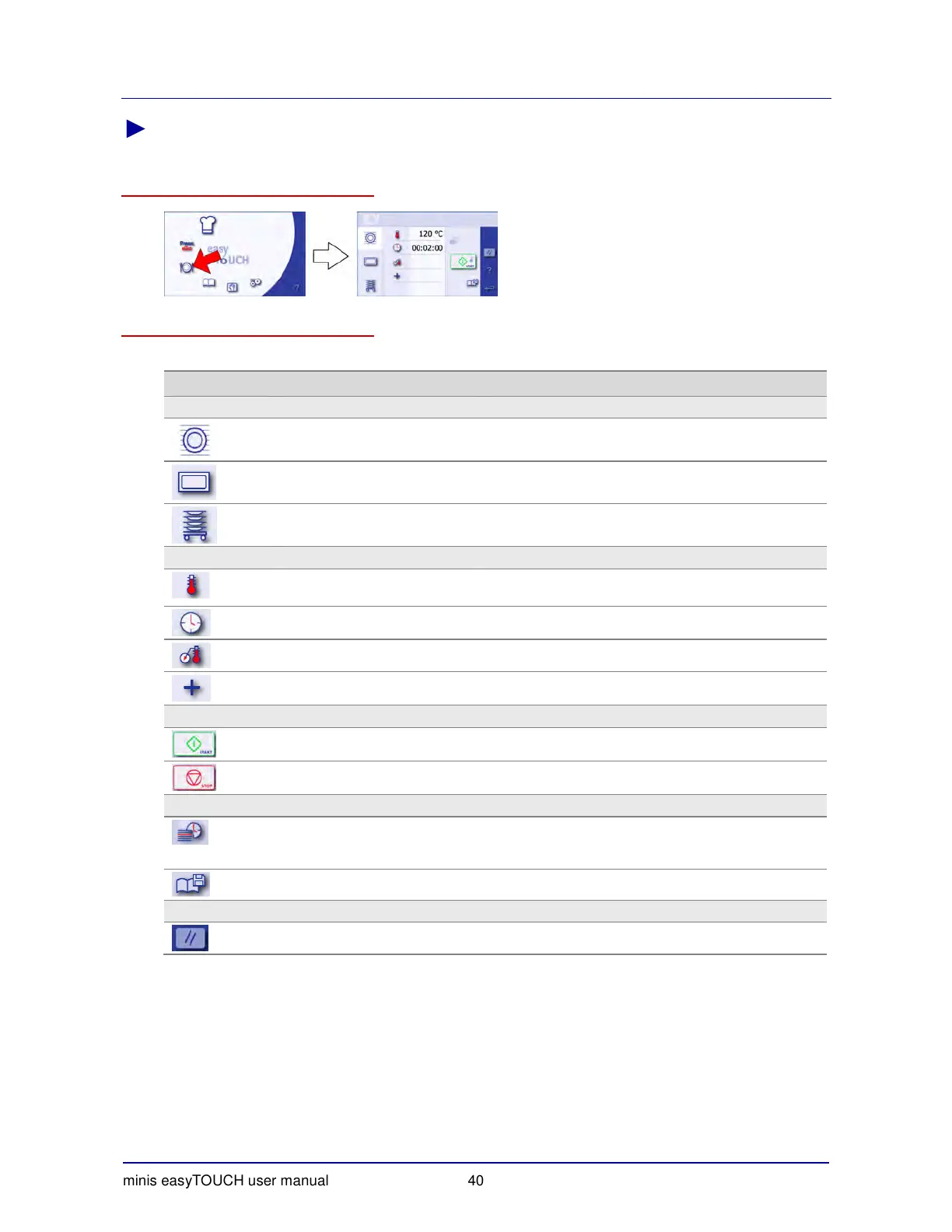
Layout of the touchscreen pages
minis easyTOUCH user manual 40
► The Regenerate page
How to access the 'Regenerate' page
The buttons and what they do
The buttons on the 'Regenerate' page have the following meanings and functions:
Button Meaning Function
Main selection
Plate Selects the Plate regenerating program.
Gastronorm Selects the Gastronorm regenerating program.
Banquet Selects the Banquet regenerating program.
Data input
Regeneration temperature Displays the keypad for entering the regeneration
temperature.
Regeneration time Displays the keypad for entering the regeneration time.
Core temperature Displays the keypad for entering the core temperature.
Extra functions Opens the 'Extra regenerating functions' page.
Program
Start Starts the regenerating program.
Stop Stops the regenerating program.
Management
Tray Timer
(while the regenerating program
is running)
Starts the use of empty trays (shelves) while the main
regenerating program is running.
Saving a regenerating recipe Saves the regenerating recipe in the cookbook.
Navigation area
Delete all data Deletes all data.


 To Next Page