Layout of the touchscreen pages
minis easyTOUCH user manual 48
► The recipe groups page
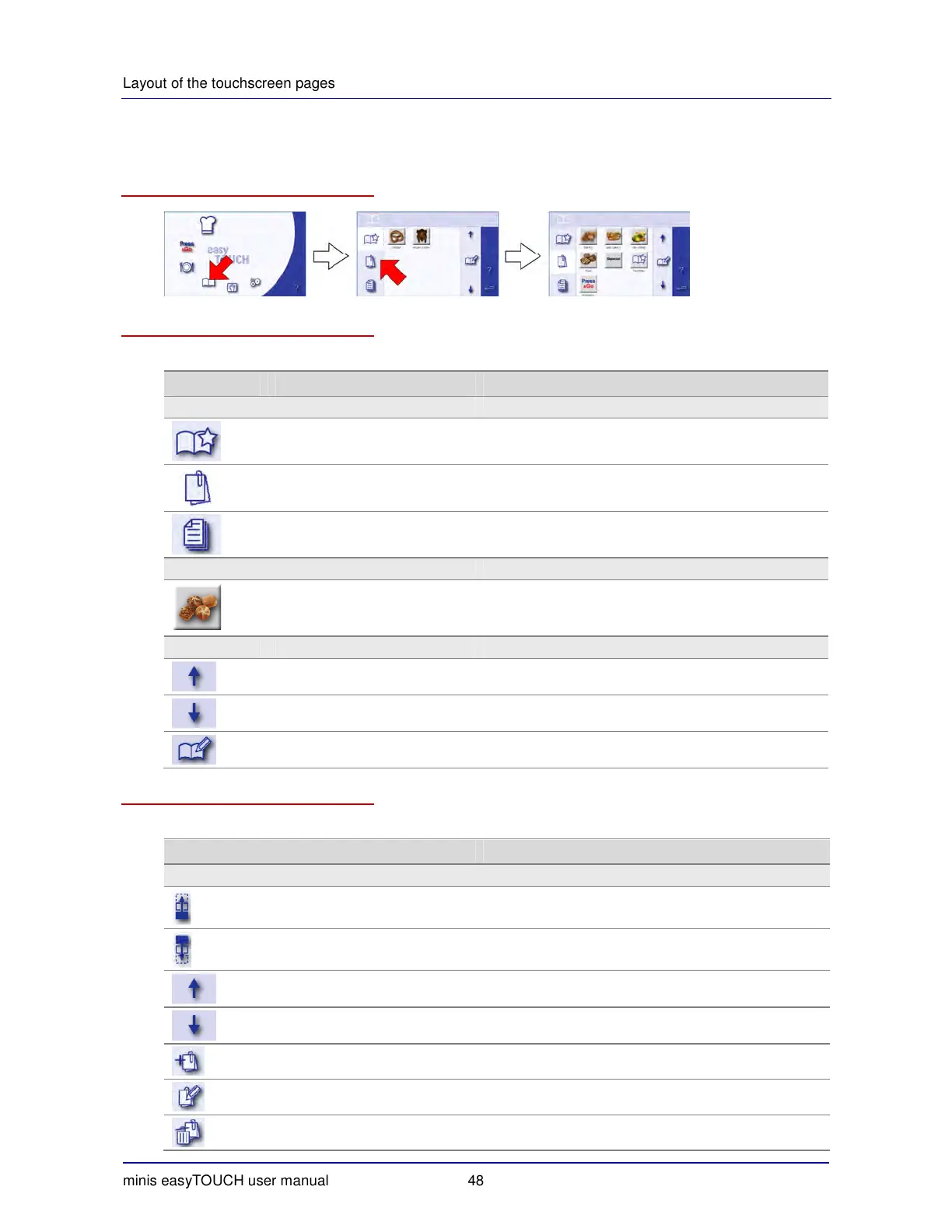
How to access the 'Recipe groups' page
The buttons and what they do
The buttons on the 'Recipe groups' page have the following meanings and functions:
Button Meaning Function
Main selection
Favorites Opens the 'Favorites' page.
Recipe groups Displays all recipe groups for selection.
All recipes Opens the 'Recipes' page.
Examples of selections
Baked goods Selection for the baked goods recipe group
Management
Up Scroll up.
Down Scroll down.
Manage recipe groups Opens the 'Manage recipe groups' page.
The 'Manage recipe groups' page
The buttons on the 'Manage recipe groups' page have the following meanings and functions:
Button Meaning Function
Main selection
Move recipe group up Moves the selected recipe group up the list.
Move recipe group down Moves the selected recipe group down the list.
Up Scroll up.
Down Scroll down.
Creating a recipe group Opens the 'Create recipe group' page.
Edit recipe group Opens the 'Edit recipe group' page.
Clear Deletes the selected recipe group.


 To Next Page