Layout of the touchscreen pages
minis easyTOUCH user manual 55
► The Import/Export page
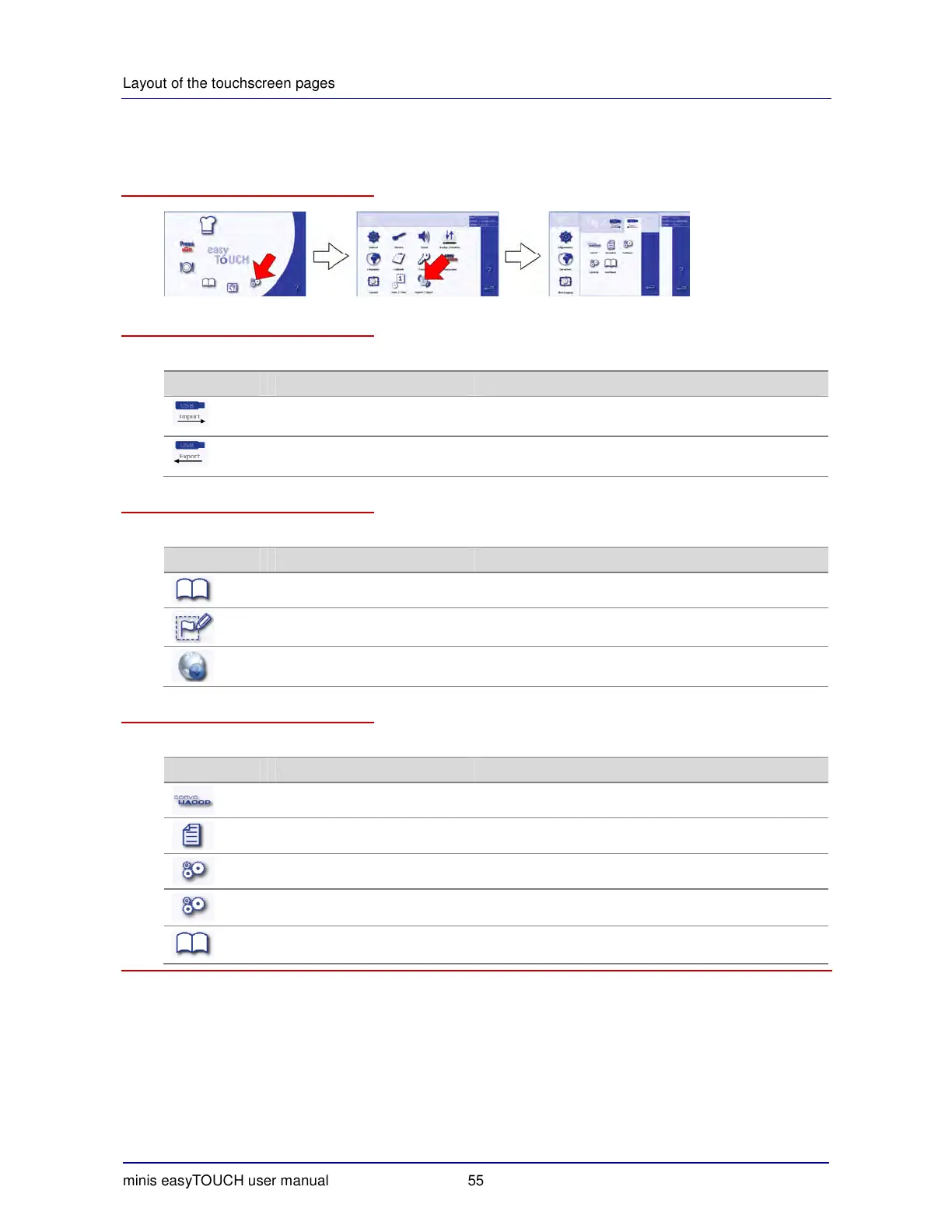
How to access the 'Import/Export' page
The buttons and what they do
The buttons on the 'Import/Export' page have the following meanings and functions:
Button Meaning Function
Import Selects the 'Import' tab:
Data transfer from USB stick to appliance
Export Selects the 'Export' tab:
Transfer from appliance to the USB stick
The Import tab
The 'Import' tab contains the following functions:
Button Meaning Function
Cookbook The cookbook is imported.
Start page logo Custom logo for the start page is imported.
Update Update is run.
The Export tab
The 'Export' tab contains the following functions:
Button Meaning Function
HACCP HACCP data are exported.
Log Log is exported.
Settings Settings can be exported for import into another appliance.
Controls Appliance settings (control parameter settings) are ex-
ported.
Cookbook The cookbook can be exported for import into another
appliance.


 To Next Page