Layout of the touchscreen pages
minis easyTOUCH user manual 53
► The Settings page
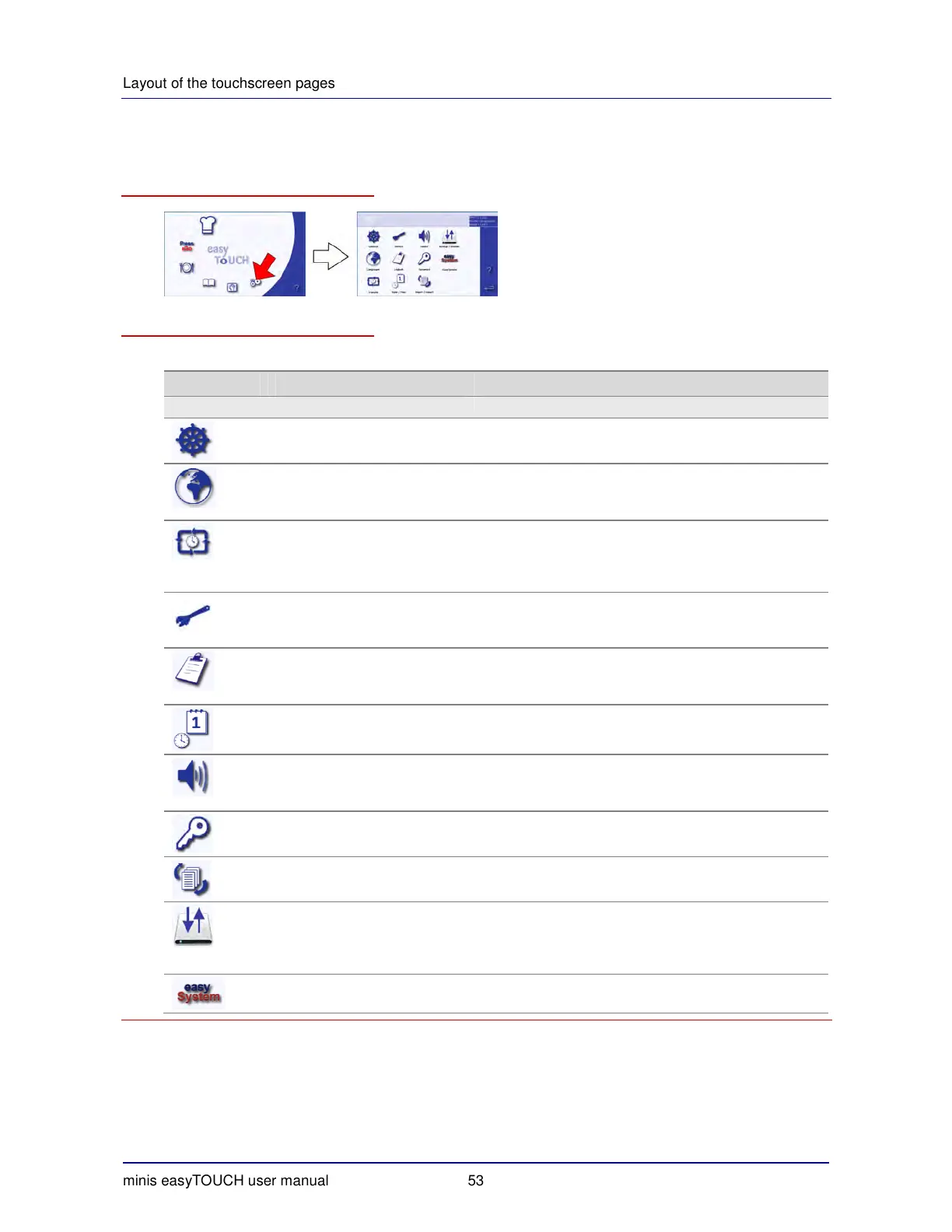
How to access the 'Settings' page
The buttons and what they do
The buttons on the 'Settings' page have the following meanings and functions:
Button Meaning Function
Main selection
General information
Opens the 'General' menu:
General system settings
Languages Opens the 'Languages' menu:
Changing the user interface language
Selecting the cookbook in the required language
Data transfer Opens the 'Transfer' menu:
Configuring data transfer from the appliance to a server
Only possible if appliance has this custom option in-
stalled
Service Opens the 'Service' menu:
Password protected; only accessible to service engi-
neers
Logbook Opens the 'Logbook' menu:
Displaying the logbook
Deleting entries from the logbook
Date/time Opens the 'Date/Time' menu:
Making changes to date and time settings
Sounds Opens the 'Sounds' menu:
Selecting signal sounds
Adjusting the volume
Password Opens the 'Password' menu:
Selecting a new password.
Import/Export Opens the 'Import/Export' page:
Import and Export of data
Backup / Restore Opens the 'Backup/Restore' page:
Saving the cookbook and easyTOUCH data on the SD
card.
Restoring the easyTOUCH data from the SD card.
easySystem Enables easySystem, password protected.


 To Next Page