CF3000 - USER MANUAL
108
3 Way Input / Output Unit - CIO351
Installation
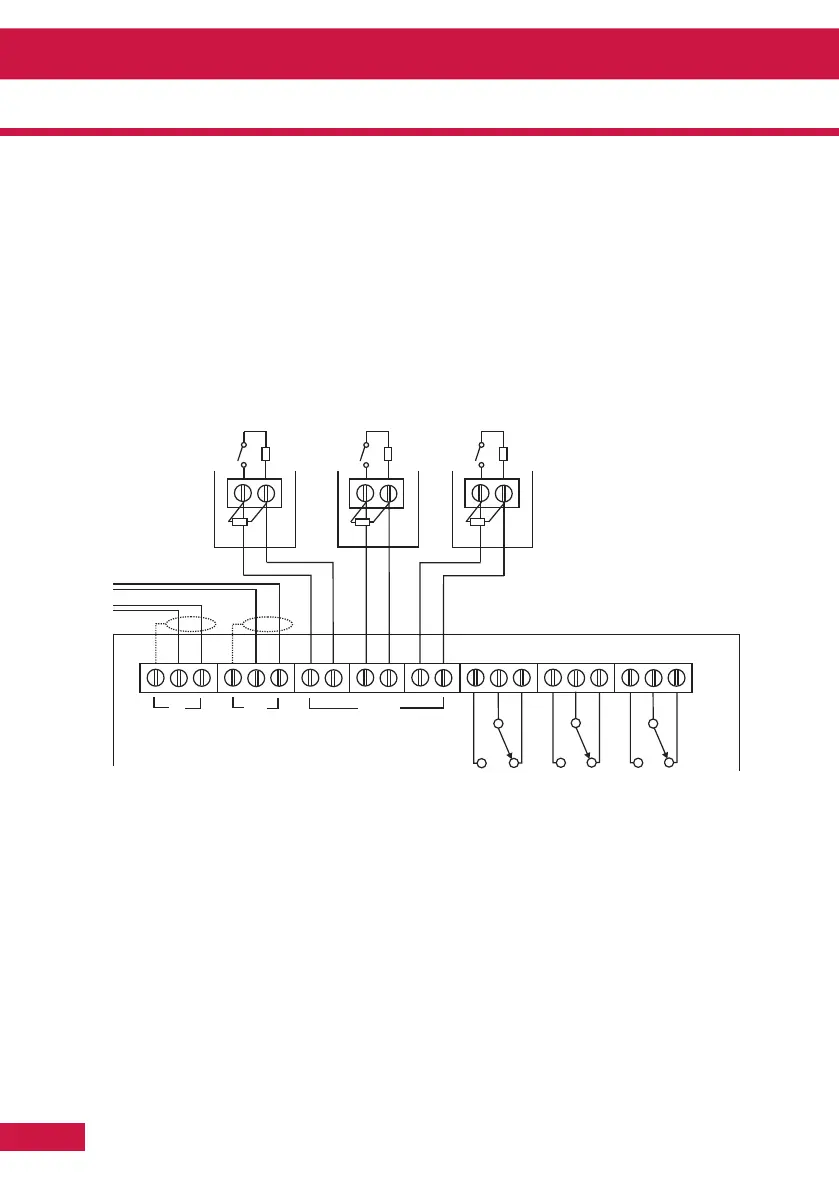
1. Separate the two halves of the unit.
2. Drill out (or knock out) the required cable entries in the surface mounting back-box.
3. Fit the back-box in position and pass the wires into it.
4. Connect the unit according to the diagram below.
Notes:
No addressing of the interface is required. See control panel operation for details.
Standard Connections
Notes:
1. Only connect cable screen to its adjacent earth terminal.
2. The end of line resistor must always be fitted, even if the inputs are unused.
3. Monitored inputs can detect open or short circuit faults.
4. Output relays are volt-free contacts and are not monitored.
Section 5 - Appendix



 To Next Page