2C9-2
1-5-16
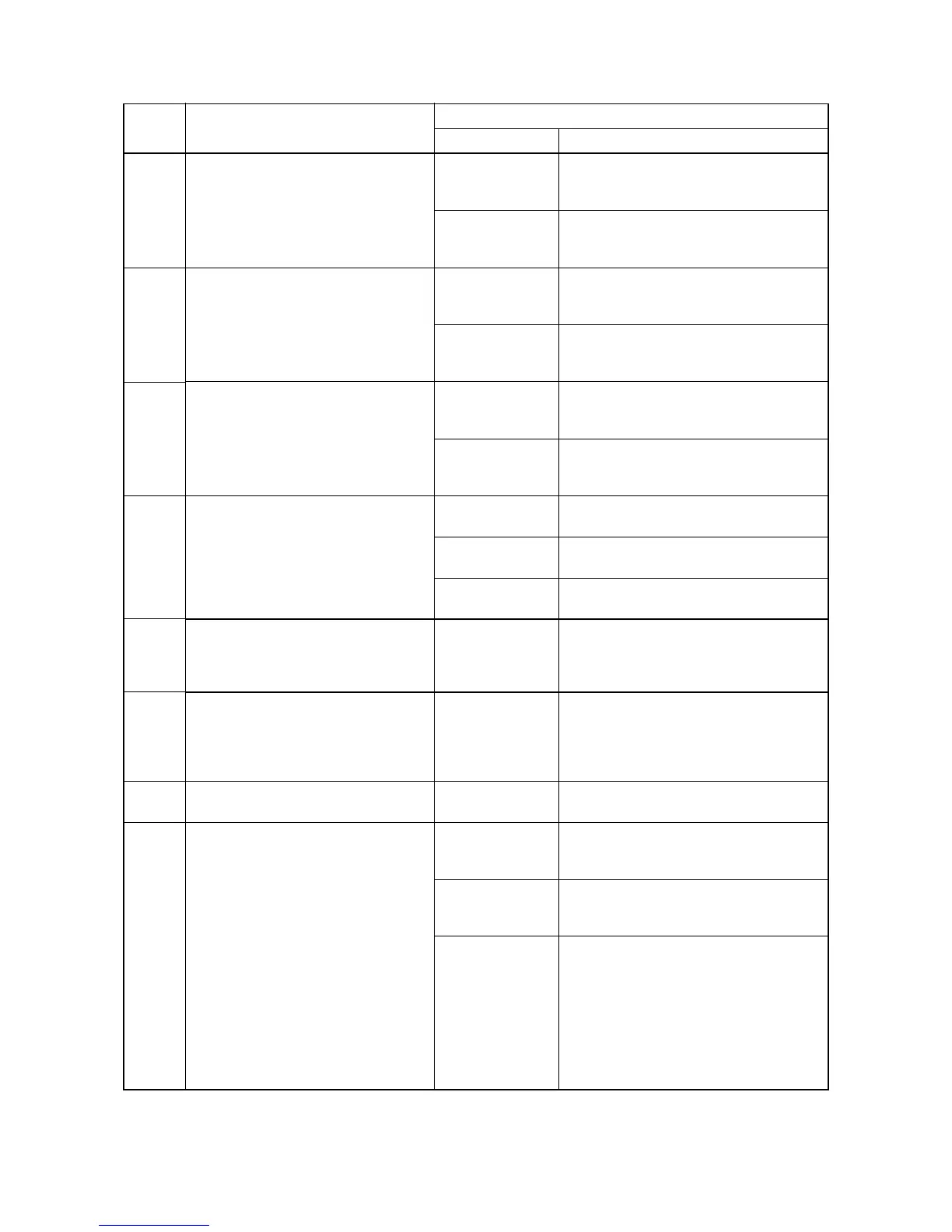
C0420
(A0420*)
Optional first paper feeder communi-
cation problem
Communication fails five times succes-
sively.
Paper feeder
installed incor-
rectly.
Check the installation state of the paper
feeder and adjust it if it is not properly
installed.
Defective main
PCB or drawer
main PCB.
Replace the main PCB or drawer main PCB
and check for correct operation.
C0500
(A0500*)
Optional second paper feeder com-
munication problem
Communication fails five times succes-
sively.
Paper feeder
installed incor-
rectly.
Check the installation state of the paper
feeder and adjust it if it is not properly
installed.
Defective main
PCB or drawer
main PCB.
Replace the main PCB or drawer main PCB
and check for correct operation.
C0510
(A0510*)
Optional third paper feeder communi-
cation problem
Communication fails five times succes-
sively.
Paper feeder
installed incor-
rectly.
Check the installation state of the paper
feeder and adjust it if it is not properly
installed.
Defective main
PCB or drawer
main PCB.
Replace the main PCB or drawer main PCB
and check for correct operation.
C0610
(A0610*)
Bitmap (DIMM) problem
There is a problem with the data or
address bus of the bitmap DRAM.
Defective main
PCB.
Replace the main PCB and check for correct
operation.
DIMM installed
incorrectly.
Check if the DIMM is inserted into the socket
on the main PCB correctly.
Defective DIMM. Replace the DIMM and check for correct
operation.
C0620
(A0620*)
Memory input interface problem
Reading-in of an image does not com-
plete within 10 s of the start of image
transmission.
Defective main
PCB.
Replace the main PCB and check for correct
operation.
C0630
(A0630*)
DMA problem
DMA transmission of compressed,
decompressed, rotated, relocated or
blanked-out image data does not com-
plete within the specified period of time.
Defective main
PCB.
Replace the main PCB and check for correct
operation.
C0800
(A0800*)
Image processing problem
JAM05 is detected twice.
Defective engine
PCB.
Replace the engine PCB and check for cor-
rect operation.
C2000 Drive motor problem
LOCK ALM signal remains high for 1 s, 1
s after the drive motor has turned on.
Poor contact in the
main motor con-
nector terminals.
Reinsert the connector. Also check for conti-
nuity within the connector cable. If none,
remedy or replace the cable.
Defective drive
motor rotation con-
trol circuit.
Replace the drive motor.
Defective drive
transmission sys-
tem.
Check if the rollers and gears rotate
smoothly. If not, grease the bushings and
gears. Check for broken gears and replace if
any.
Code Contents
Remarks
Causes Check procedures/corrective measures
“A” is displayed on the operation panel.


 To Next Page