2C9-4
1-6-15
Yes
No
Start
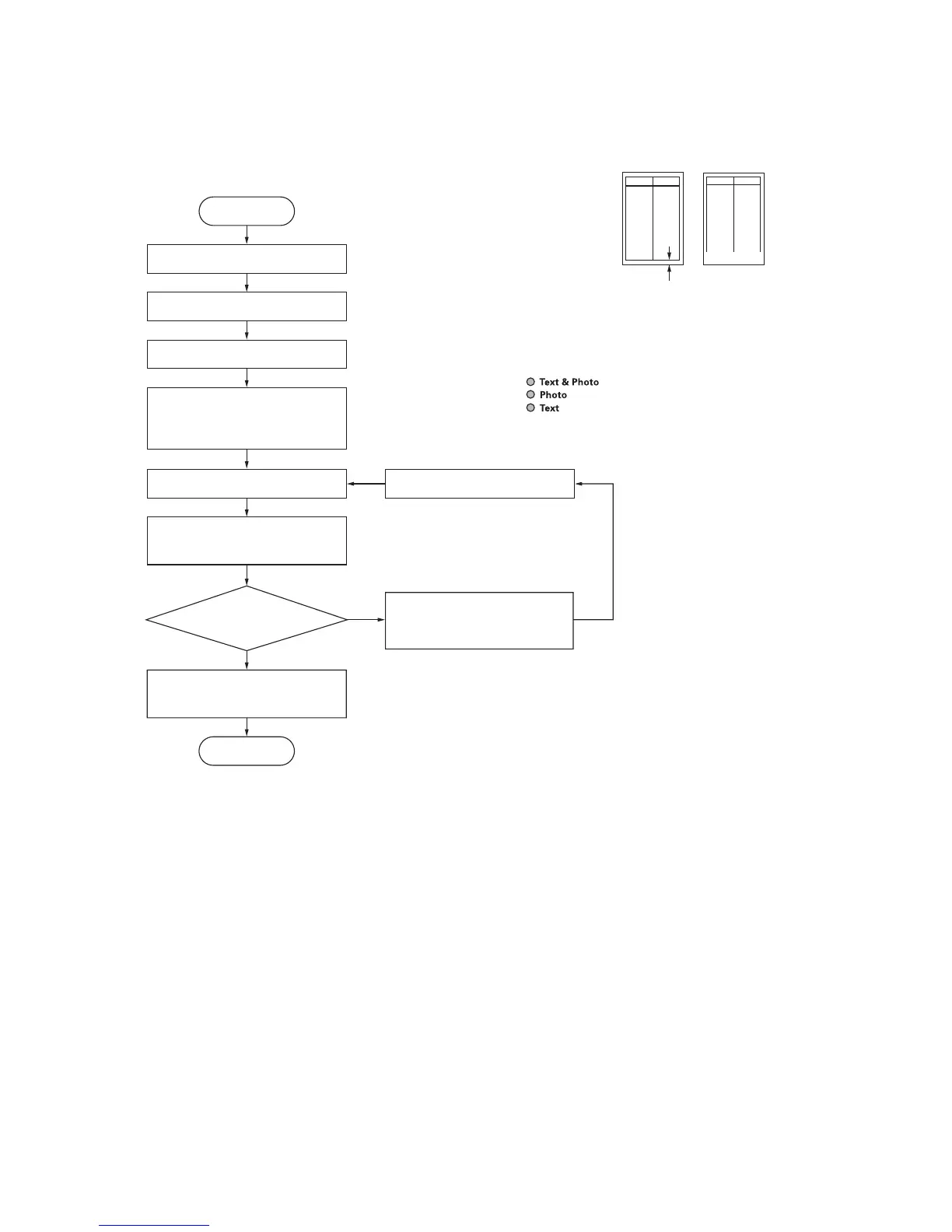
Enter maintenance mode.
Enter “034” using the numeric keys.
Press the start key.
Press the interrupt key.
Is the trailing edge
margin correct?
Press the start key
The new setting is stored
Press the stop/clear key to exit
maintenance mode.
End
For output example, increase
the value using the zoom (+)
key.
Setting range: –4.0 – +10.0
Initial setting: 0
Changing the value by 1 moves the
trailing edge by 1.0 mm.
Increasing the setting makes the margin
narrower, and decreasing it makes the
margin wider.
Press the image mode selection
key to light the text, photo and
text & photo indicators.
Press the start key
to output a test pattern.
Image mode selection key
Text, photo and text & photo indicators is on:
Trailing edge margin adjustment
(7-4) Adjusting the trailing edge margin of image printing
Make the following adjustment if there is a regular error between the trailing edges of the copy image and original.
Procedure
Figure 1-6-26-1
Correct image Output
example
Trailing edge margin
1-6-14-1



 To Next Page