2C9-2
1-7-1
1-7 Requirements on PCB Replacement
1-7-1 Upgrading the firmware on the main PCB
Firmware upgrading requires the following tools:
Flash DIMM (P/N 2C968131)
Procedure
1. Run maintenance mode U019 to check the
version of the ROM.
2. Turn the power switch off and disconnect
the power plug.
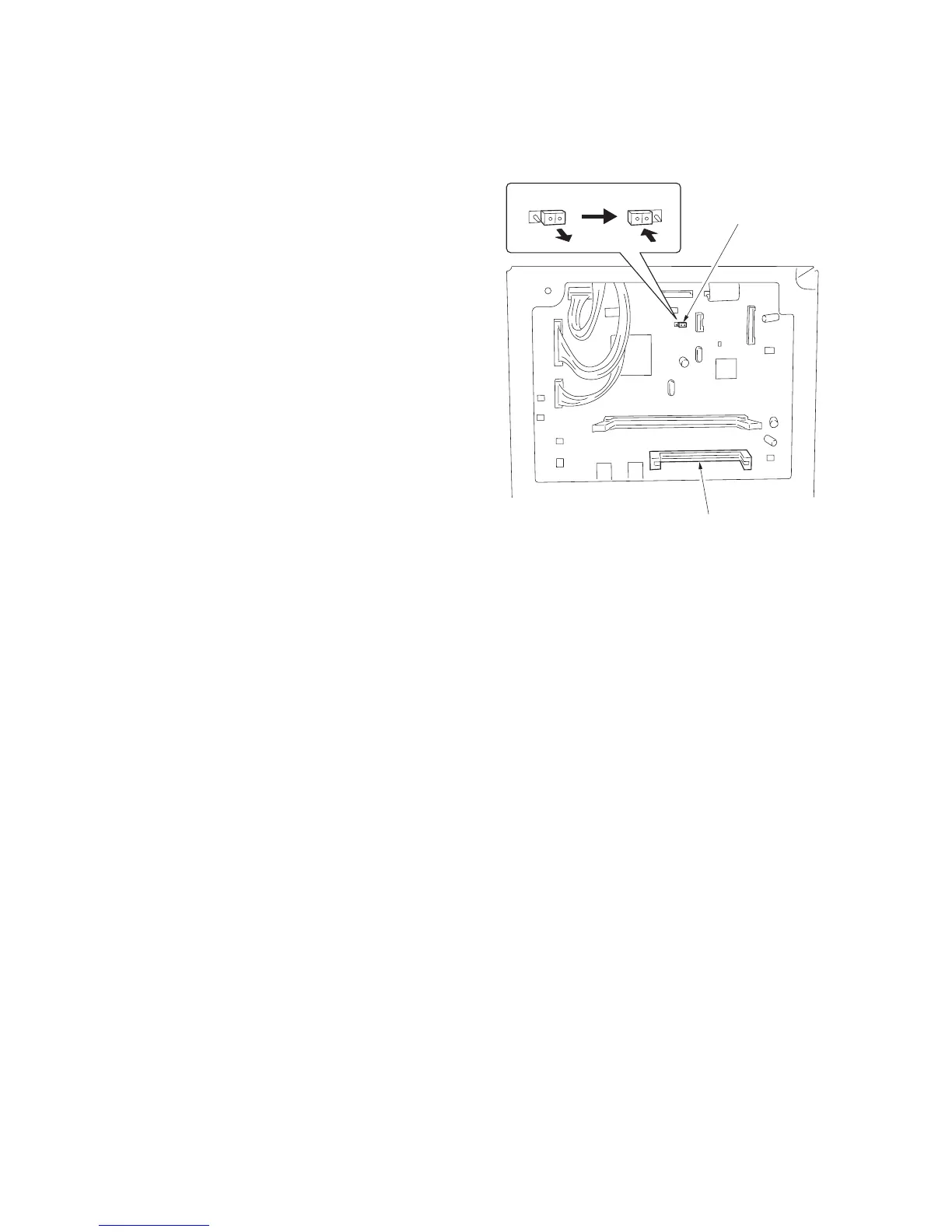
3. Remove the rear cover and change the
jumper switch position on the main PCB to
the left side.
4. Insert the DIMM into the DIMM slot on the
main PCB. Insert the power plug and turn
the power switch on.
5. The upgrade operation starts and the Copy
quantity/magnification display changes as
follows: JIG
→1% →99%.
6. When the upgrade operation is complete,
the checksum will be displayed and a beep
indicating the completion will sound.
7. Turn the power switch off and disconnect
the power plug, remove the DIMM from the
main PCB, and return the jumper switch to
its original position. Reattach the rear cover
to its original position.
8. Insert the power plug and turn the power
switch on.
9. Run maintenance mode U019 to check that
the version of the ROM has changed.
Figure 1-7-1
Jumper switch
DIMM slot



 To Next Page