2C9-6.0
1-3-9
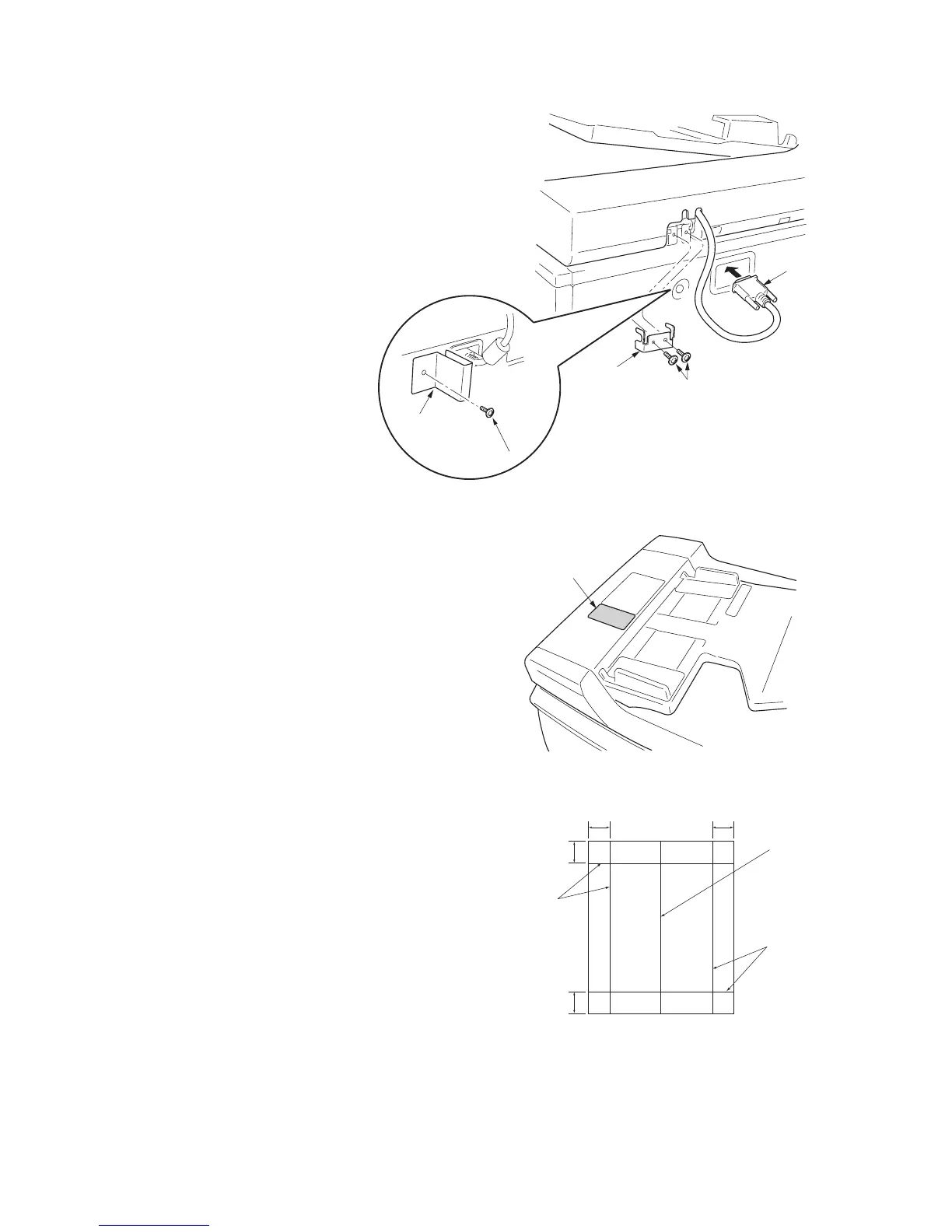
5. Close the DP, fit the fixing fitting
from the rear side of the right
hinge, and secure it with the two
bronze TP screws M3 x 06.
6. Connect the cable of the DP to the
copier.
* Be sure to tighten the fixing
screws on both side of the connec-
tor.
7. Remove the screw from the rear
cover and fit the connector protec-
tion plate to the rear cover using
the screw.
Figure 1-3-13
8. Clean the pasting position for the caution
label with alcohol.
Paste the caution label that corresponds to
the language according to the destination to
the DP.
Figure 1-3-14
[Operation check]
1. Prepare an original on which 4 lines are
drawn 15 mm from the edges and the center
line is drawn.
2. Set the original on the DP and make a test
copy to check the copy image.
At this time, set the paper guide for the origi-
nal table and drawer to the paper size to be
used.
3. If the copy image does not match the origi-
nal image, carry out the following adjust-
ments in maintenance mode.
Maintenance mode 070 (sub-scan line
adjustment)
Maintenance mode 071 (leading edge tim-
ing adjustment)
Maintenance mode 072 (center line adjust-
ment)
Figure 1-3-15
Fixing fitting
Cable
Bronze TP screws M3 x 06
Screw
Connector
protection plate
Caution label
15 mm15 mm
15 mm
15 mm
Lines
Lines
Center line
Original



 To Next Page