2C9-4
1-4-39
U905
Checking/clearing counts by the DP
Description
Displays or clears the counts of the DP.
Purpose
To check the use of the DP. Also to clear the counts after replacing consumable parts.
Method
1. Press the start key.
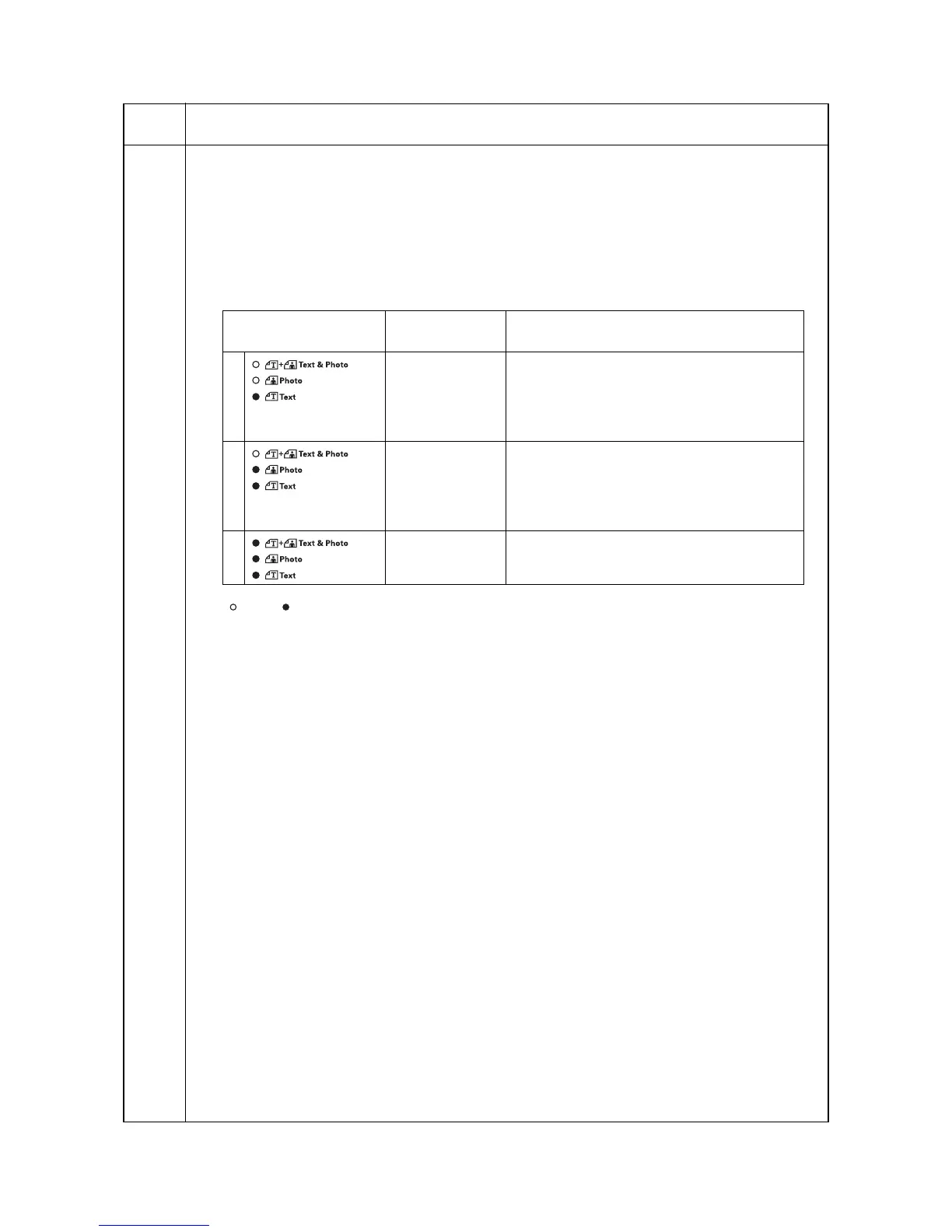
2. Select the count (group No.) to be checked or cleared by lighting image mode LEDs using the image
mode selection key.
3. Select the item by lighting a copy exposure indicator using the copy exposure adjustment keys.
: Off, : On
Clearing
1. Select the count to be cleared.
2. Light exp. 3 using the copy exposure adjustment keys.
3. Press the start key. The count is cleared.
Clearing copy counts for all counts
1. Select group 3.
2. Press the start key. The counts are cleared.
Completion
Press the stop/clear key. The indication for selecting a maintenance item No. appears.
Maintenance
item No.
Description
Image mode LED
(group No.)
Copy exposure
indicator
Copy quantity display (count value)
1 Exp. 1
Exp. 2
Exp. 3
First 3 digits of the number of original
replacement
Last 3 digits of the number of original
replacement
Clearing the count (CLE)
2 Exp. 1
Exp. 2
Exp. 3
First 3 digits of the double-sided original feed
count
Last 3 digits of the double-sided original feed
count
Clearing the count (CLE)
3 Exp. 1 Clearing all counts (CLE)



 To Next Page