Operator’s Manual (PRELIMINARY)
Publication Number: 621260373OPR - 6 - © 2008, IMI Cornelius Inc.
Control Panel Display
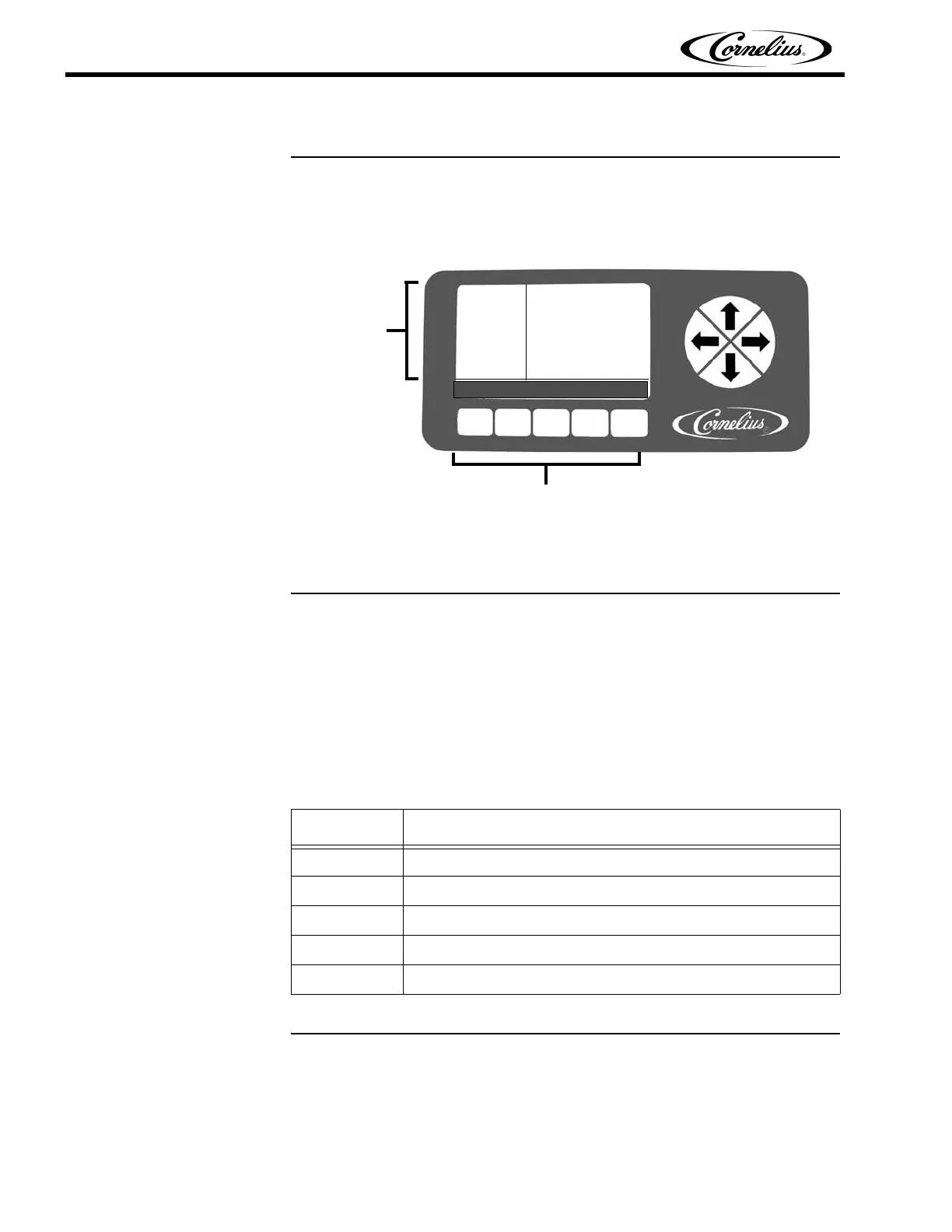
The control panel display has two areas. The Menu Display Area presents infor-
mation about the status and settings of the machine. It also displays menus of
actions that are taken to change the functioning of the machine.
Figure 5
Control Panel Buttons
The Menu Buttons Area, which is located across the bottom of the control panel
and the arrow buttons to the right is used to operate the unit. There are up to five
buttons that are activated on a screen to provide various functions using the
control system. Each button that is active has a label directly above it. The label
describes what the button controls when pressed or the current menu, if high-
lighted. Refer to Table 3 for a description of the buttons on the Barrel Status
menu.
BARREL
STATUS
12:51P
MAR 04
#1 OFF 54
#2 OFF 17
MENU OFF ON DFRST SPIN
Menu Buttons
Menu
Area
Display
Table 3
Button Description
MENU Opens the Main menu.
OFF Turns the highlighted barrel Off.
ON Turns the highlighted barrel On.
DFRST Defrosts the highlighted barrel.
SPIN Turns off refrigeration and turns on the barrel motor.



 To Next Page