Cosman G4 Radiofrequency Generator Service Manual (SPI 11291 Rev A)
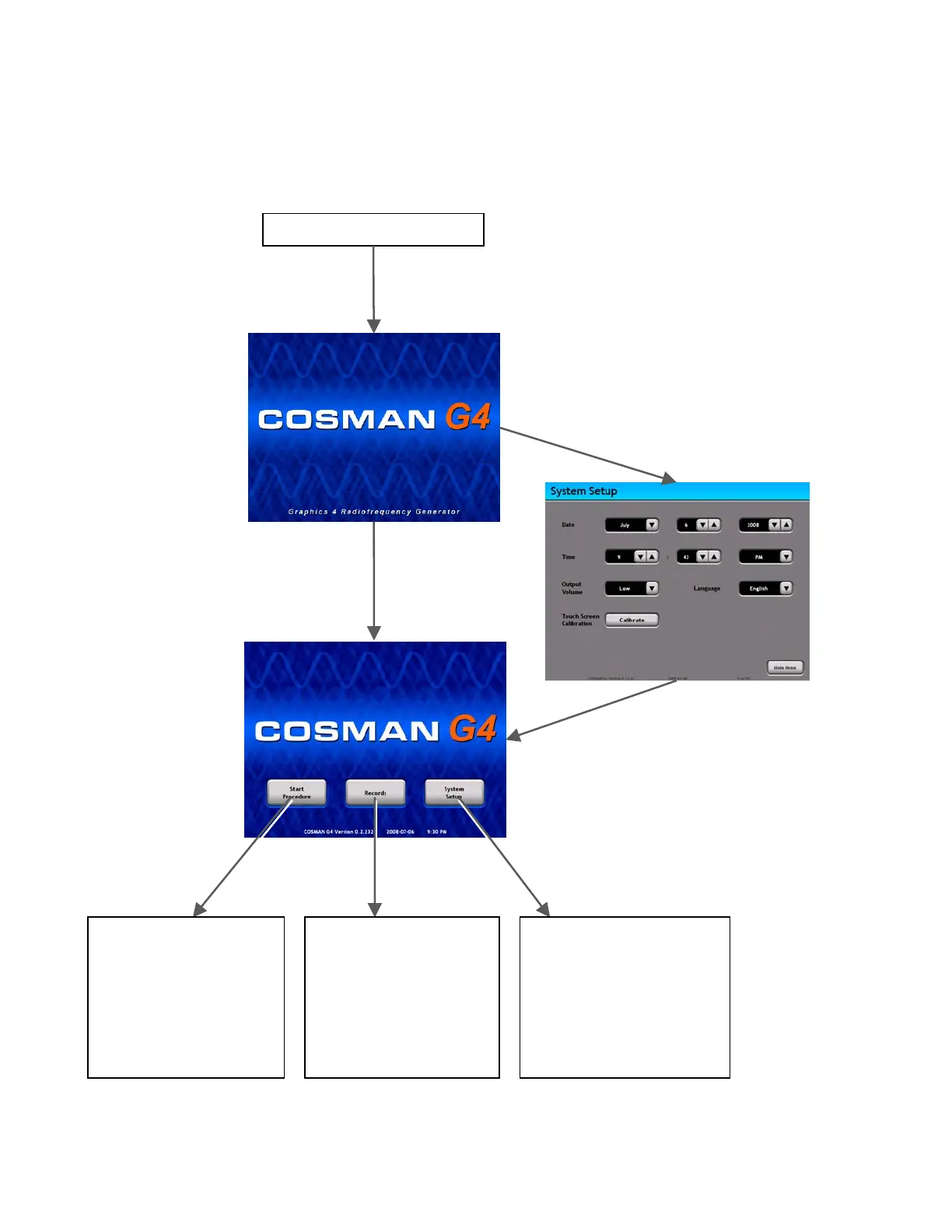
4. If the Time and Date is set, the Main Menu screen is displayed. If the Time and Date is not set, the
System Setup screen is displayed and the Time and Date must be set (Section 5.1).
Section 4
Generator Mains Power is Off
Press Mains Power On Switch on
back panel of generator (Section
2.2). Wait for 2 sec delay.
Startup
Screen
If Time & Date not set
(15 sec delay)
Set Time and Date
If Time
D t
(15 sec delay)
ate previously se
System
Setup
Section 5
Main
Menu
System Setup
Section 5
• Set Time and Date
• Adjust Audio Volume
• Change Language
• Calibrate Touch Screen
Records
• Review, Edit, Print,
Export, or Delete
Procedure Records
saved on the generator
Start Procedure
Section 6
• Load or Modify Personal
Settings Presets
• Produce Stimulation,
Thermal RF, or Pulsed
RF output.
System
Setup
Records
Start
Procedure


 To Next Page