Cosman G4 Radiofrequency Generator Service Manual (SPI 11291 Rev A)
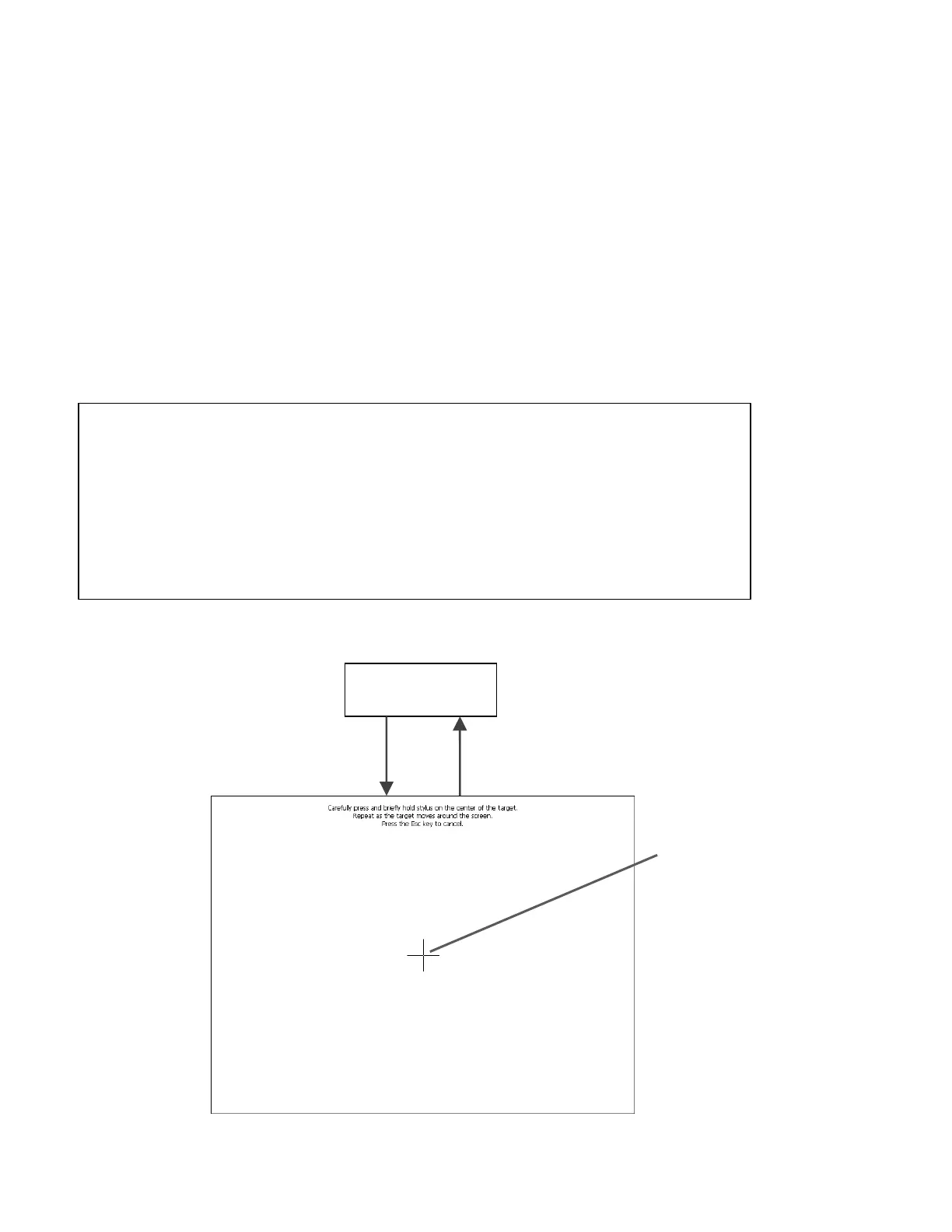
5.2 Touch Screen Calibration
1. Carefully press and briefly hold the center of each cross-shaped target. Lift your finger or stylus
from the screen and repeat when the target moves. Lift your finger from the screen when the target
disappears.
2. When the cross symbol disappears, press anywhere on the screen to return to the System Setup
screen (Section 5.1).
3. Before enabling any generator output, verify the calibration by pressing on-screen buttons that
appear in a variety of locations across the screen. For instance, press each button or drop-down
menu, except the “Calibrate” button, on the System Setup and Main Menu screens. For each tested
button, confirm that a button press is recognized if and only if the screen is pressed within the visible
border of that button. If this test fails for any tested button, repeat the touch screen calibration.
WARNING: Poor calibration of the touch screen may cause user input to be
recognized incorrectly.
NOTICE: Light use of a blunt, plastic stylus (such as that from a touch-screen PDA)
to precisely target the cross symbols may improve touch screen calibration. Damage
to the touch screen could occur if too much pressure is applied or if a sharp object is
used to touch the screen.
NOTICE: Ignore the text “Press the Esc key to cancel”. Touch screen calibration
cannot be canceled.
Calibration
Complete
Press
"Calibrate"
System Setup
Section 5.1
Target
Center
Calibration
Screen
Section 5


 To Next Page