Cosman G4 Radiofrequency Generator Service Manual (SPI 11291 Rev A)
5.4 Error and Warning Dialogs
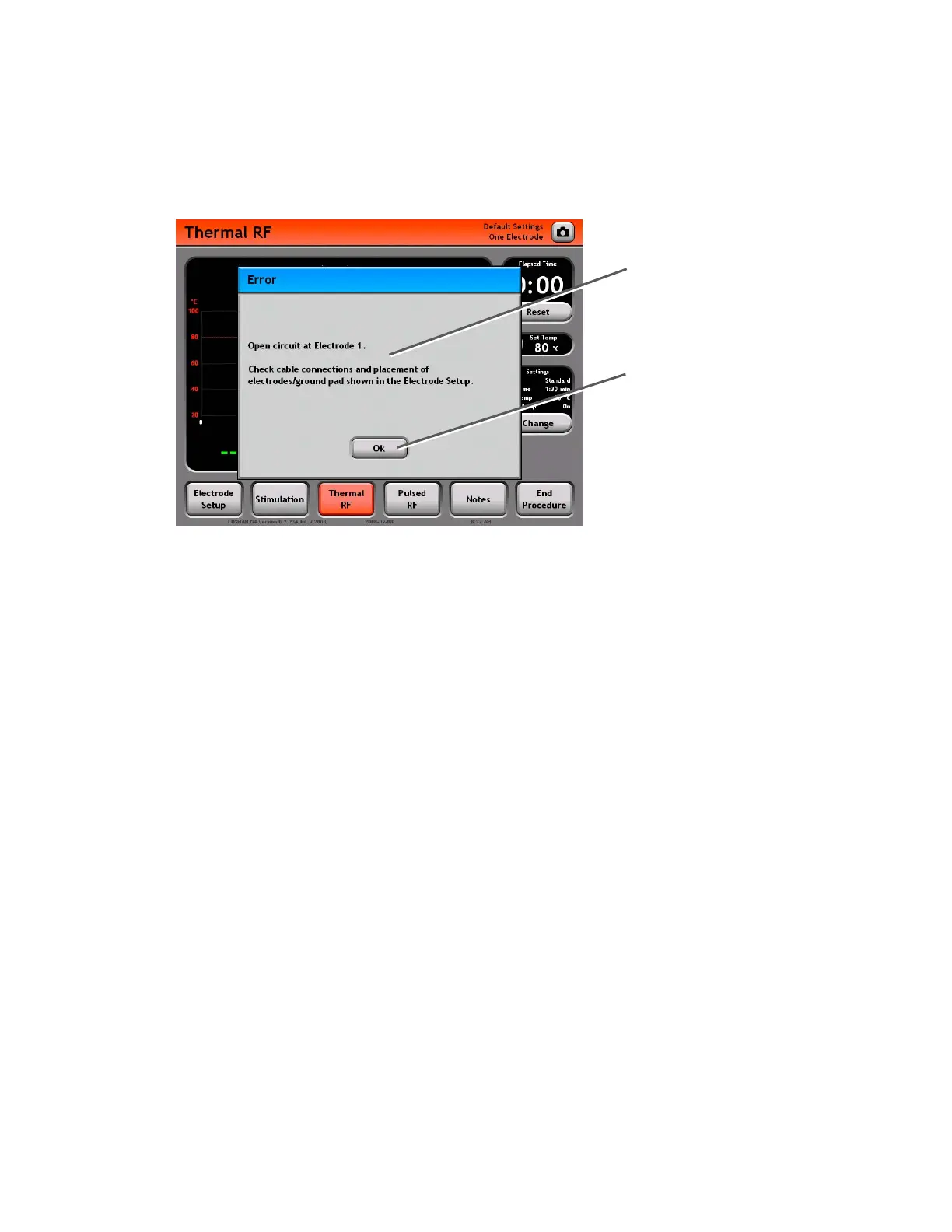
The generator will alert the user with a dialog box when error conditions occur or for other notification
purposes. Display of an error dialog box is accompanied by an audible error tone, and the user is prompted
to acknowledge the error condition by pressing a button in the error dialog box. An example of a dialog box
is shown below.
Error or Warning Message:
Describes an error condition
that has occurred, or describes
the function of the available
Dialog Box Buttons.
Dialog Box Button: The action o
these buttons should always be
considered in the context of the
Error or Warning Message. For
example:
• Ok: Perform the described
action, or acknowledge the
error/warning message.
• Cancel: Do not perform the
listed action.
f
Common error conditions include the following. See the Troubleshooting guide (Section 11) for more
information.
• Open Circuit: Impedance from Electrode to Reference > 3000
• Short Circuit: Impedance from Electrode to Reference < 30
• No Temperature: No temperature reading from an Electrode
• Low Temperature: Electrode Temp < 10 °C
• High Temperature: Electrode Temp > 100 °C
• Over Temperature: Electrode Temp > TRF Set Temp or PRF Max Temp
• Disconnect Electrode: Electrodes attached to generator do not match current Electrode Setup
settings (Section 7.1).
• High Current/Power: Current or Power output exceeds limits.
Section 5


 To Next Page