Cosman G4 Radiofrequency Generator Service Manual (SPI 11291 Rev A)
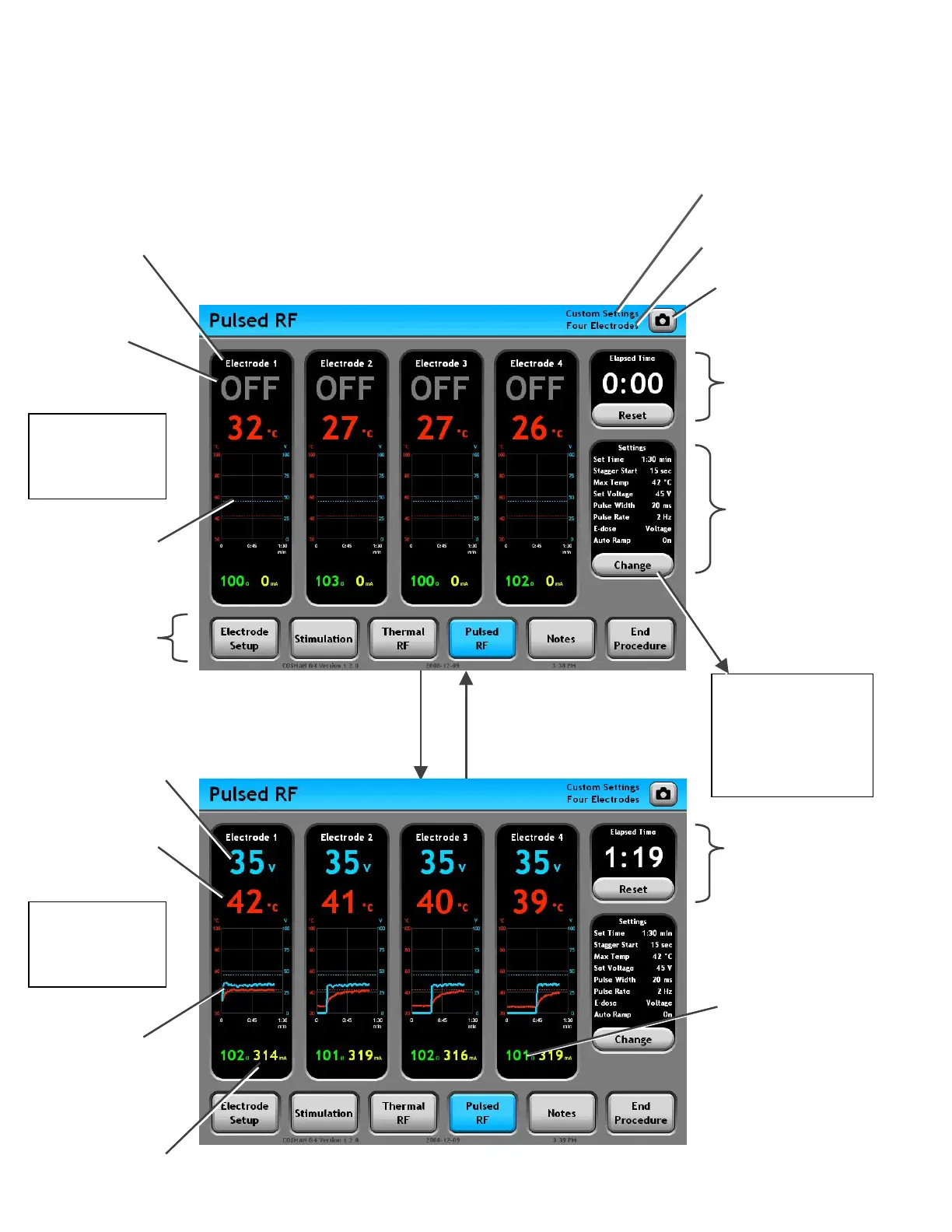
8.3 Pulsed RF Screen
Time
: Holds value from
last instance of Thermal
RF output.
Press Change
Button
Settings Panel: Lists
the current Pulsed RF
settings.
Screen Shot Button:
Save an image of the
screen to the Procedure
Record.
Mode Ba
: A
other procedur
screens
ccess
e
Pulsed RF
Settings
Section 8.3.2
• Change settings
for Thermal RF
output
E-dose =
Vary Voltage
Output Off
Electrode Panel (Black area):
Displays all readings for the
indicated electrode output. When
enabled, RF output is delivered to
this output.
Temperature &
Voltage graphs held
from last instance of
Thermal RF output
(None held here)
Output Off
Indicator
Timer: Counts up t
Set Temp in Minutes
and Seconds (min:sec)
Graphs of
Temperature &
Voltage readings
over time
RF Current Reading:
In units of Peak
Milliamps.
Press Front-panel Stop
Button, release footswitch,
timed output completes, or
error occurs: Electrode
output is turned off.
Press Front-panel Start
Button or depress
Footswitch: Pulsed RF
output is delivered to
all active electrodes.
E-dose =
Vary Voltage
Output On
Temperature reading:
Reads “-- °C” when
Temperature is less
than 10°C or absent.
Impedance reading:
• Held a latest value
(gray color) when
during Stagger S
Reads “
tart.
• --- ” when
Impedance greater
than 3000 (open
circuit
.
Electrode Setup Indicator
(Section 7.1)
Personal Settings Preset
Indicato
RF Voltage Reading:
In units of Peak Volts.
Section 8


 To Next Page