Cosman G4 Radiofrequency Generator Service Manual (SPI 11291 Rev A)
8.3.1 Additional Example Screens
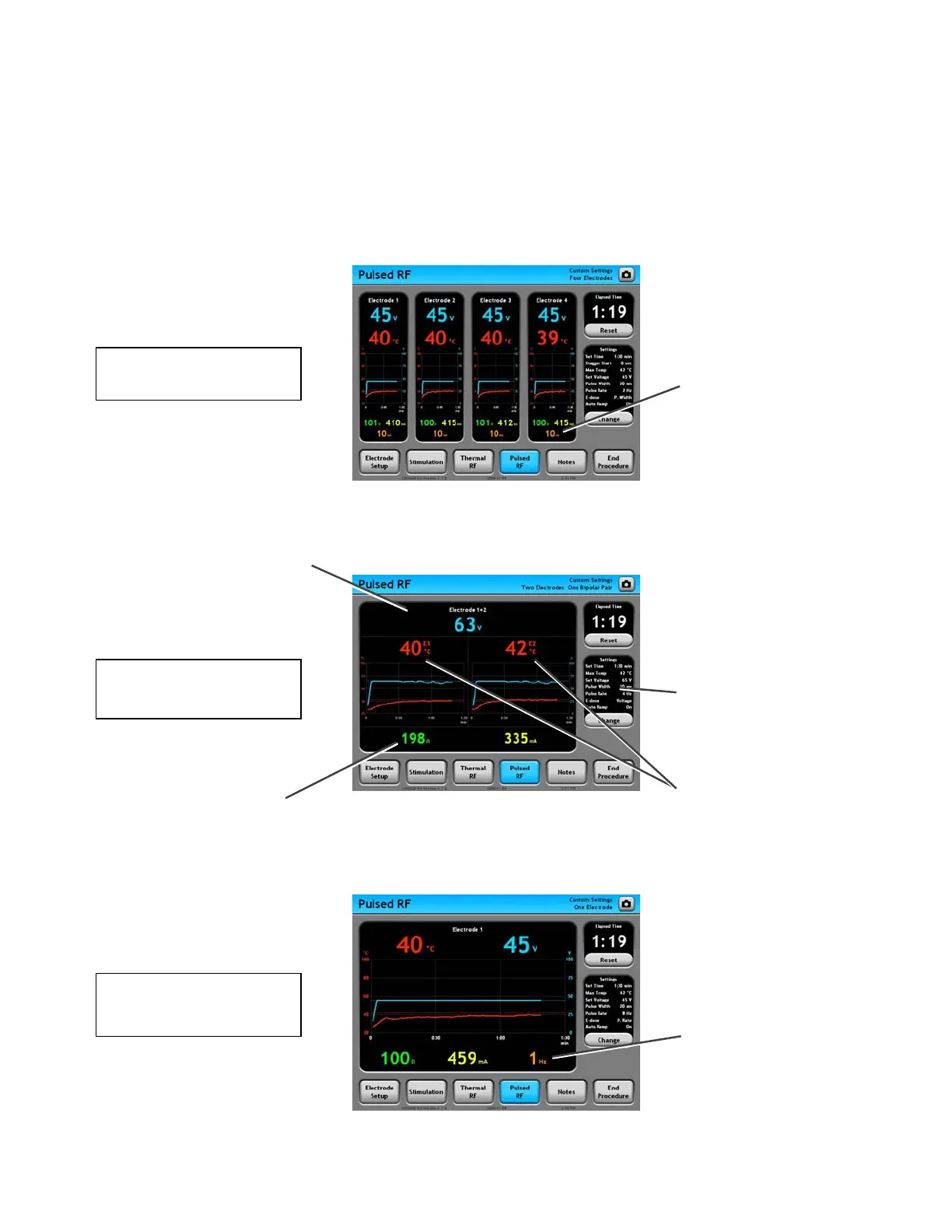
The Graphing Pulsed RF screen will appear differently depending on the current settings:
• Electrode Setup settings (see Section 7.1)
• E-dose setting: Vary Voltage, Vary Width, or Vary Rate (see Section 8.3.2)
Pulse Width Reading:
Displayed in units of
milliseconds only if E-dose =
Vary Width. The Pulse Ra
is fixed at the value shown
in the Settings Panel.
te
Electrode Panel (Black area):
Displays all readings for the
indicated bipolar electrode pair,
e.g. “Electrode 1+2”.
E-dose = Vary Rate
One Electrode
E-dose = Vary Voltage
One Bipolar Pair
Temperature Readings:
One Temperature reading
from each electrode in
bipolar pair. For instance,
“E1” indicates a reading
from Electrode 1.
Bipolar readings: Voltage,
Current, and Impedance
between the two electrodes in
the bi
olar
ai
Settings Panel: If E-dose =
Vary Width, the Pulse Width
and Pulse Rate are fixed at
the values shown here.
E-dose = Vary Width
F
r El
r
Pulse Rate Reading:
Displayed in units of
Hertz only if E-dose =
ary Rate. The Pulse
Width is fixed at the
val
Section 8


 To Next Page