ENG
10
User manual J5060403 v1.2
RESET
Switch off power supply of the controller. Hold button and switch on
power supply. Controller resets and runs initial setup.
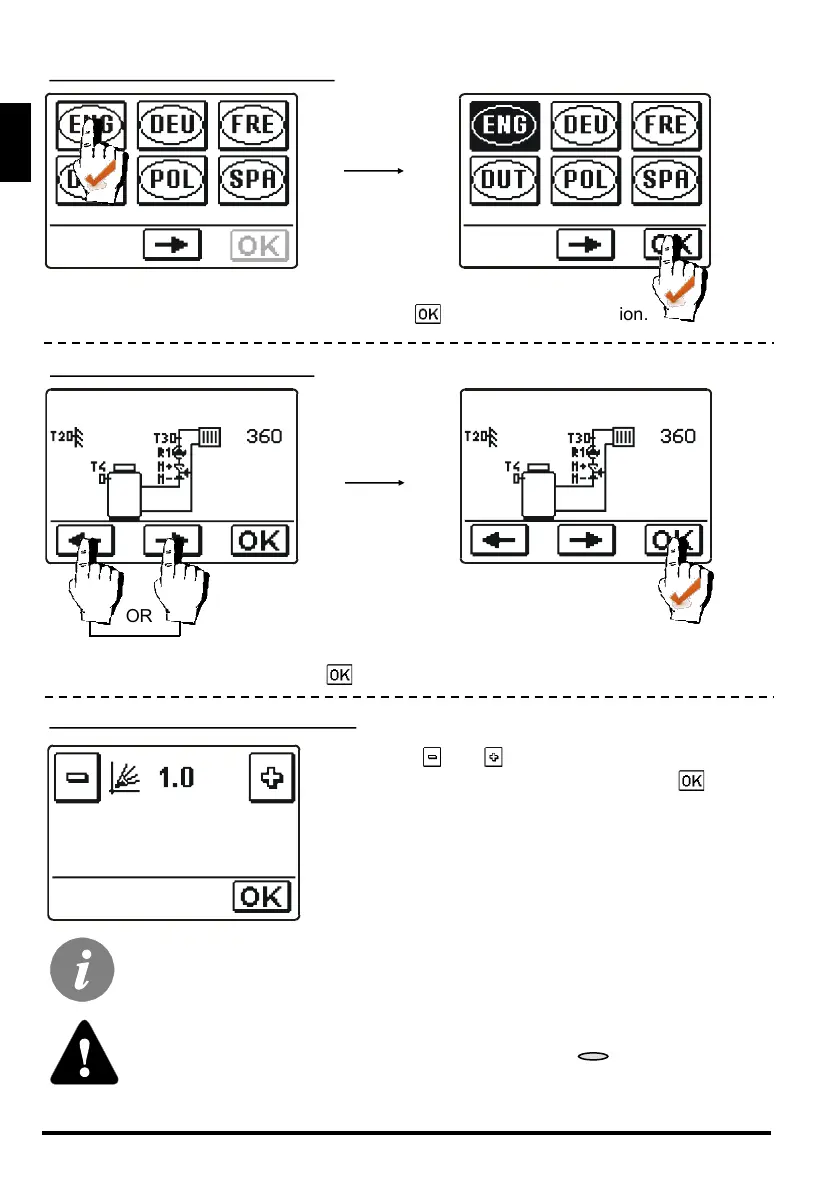
Press icon which indicates your language.
After selecting proper language, press button to confirm your selection.
STEP 4 - LANGUAGE SELECTION
Select scheme for controller operation.
Confirm your selection with button .
STEP 5 - HYDRAULIC SCHEME
Selected hydraulic scheme, screen orientation direction, rotation direction
and language can be at any time changed in service settings or with reset of
controller!
Press buttons and to set requested heat curve
steepness. Confirm your selection with button .
Heat curve steepness is detailed described on pages 30
and 31.
STEP 6 - HEAT CURVE STEEPNESS
OR



 To Next Page