23
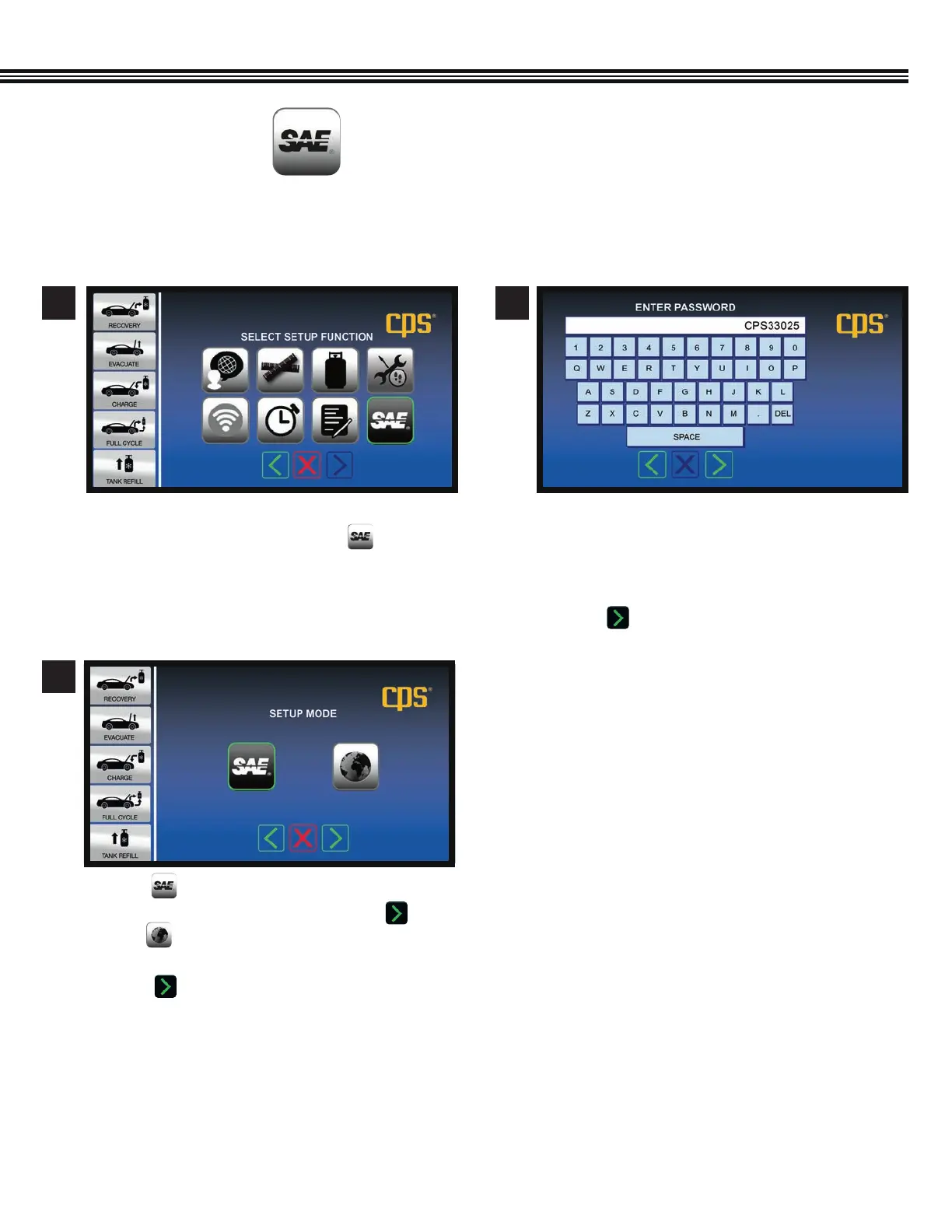
SELECT SAE OR GLOBAL STANDARDS
(Not All Screens Are Shown)
a. To change the factory default SAE Mode setting TO
International Mode, Touch the SAE key.
1
a. Enter password (example password shown.
Contact CPS Technical Support for password to
change to International Mode) that has been set
up for this machine.
b. Touch to enter password.
2
a. Touch so the MX3030 machine operation
follows SAE J2788 standard, then touch OR,
b. Touch for the MX3030 to follow
INTERNATIONAL STANDARDS.
C. Touch to enter selection and move to next
screen.
3
Setup Function Screen
Setup Function Screen
SETUP (Cont’d)
MX Series machines are shipped with a default SAE Mode setting (for the U.S. and most Canadian markets). Yet, some
Canadian and many global markets use the International setting.


 To Next Page