44
Use this mode for checking system pressures and vent temperature before and after servicing the AC system.
1. System parameters can be printed while in this mode to provide a before and after comparison.
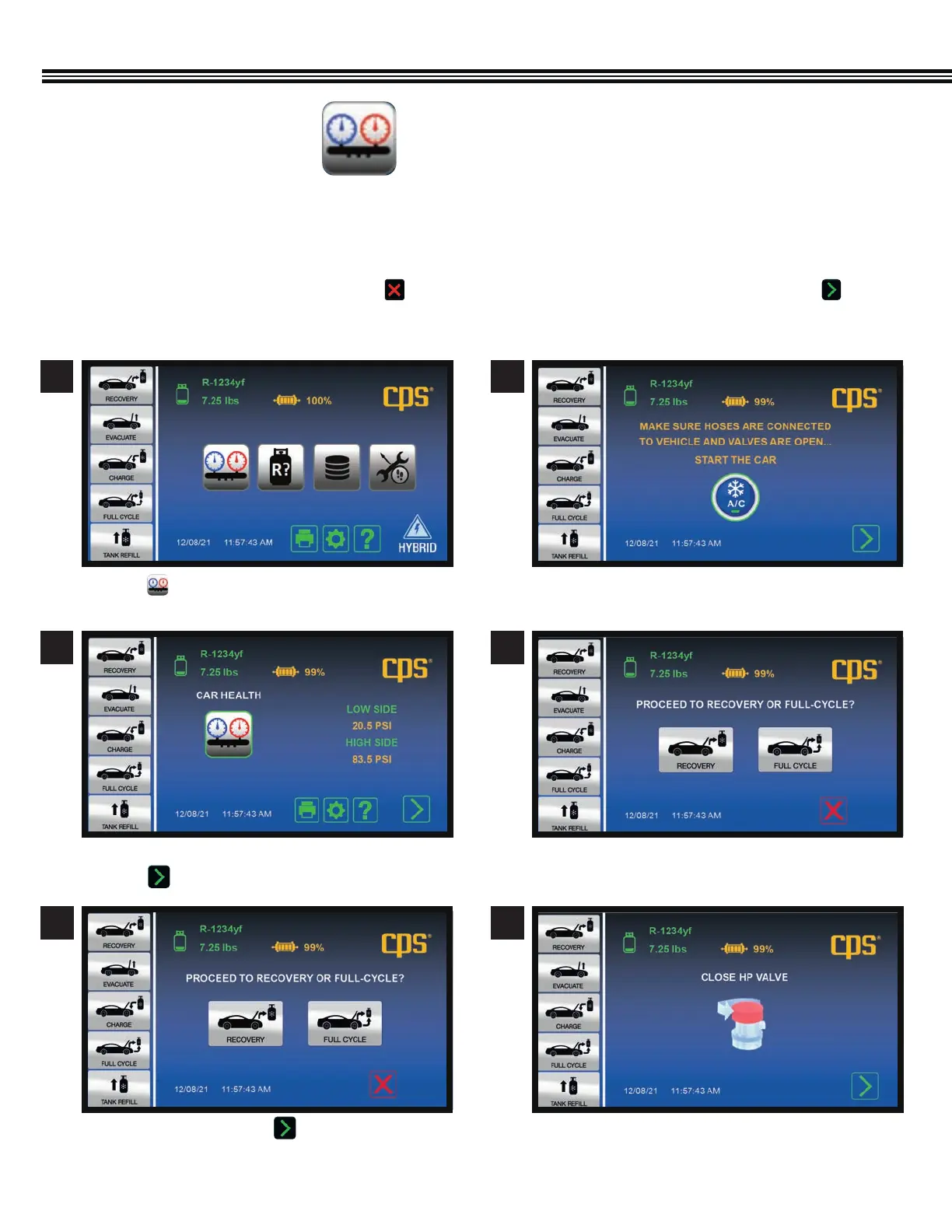
2. When entering the Car Health mode, the machine will provide a prompt to start the vehicle’s AC system.
3. Readings can then be collected and printed.
4. If Refrigerant Recovery is planned next, touch . This will take users to the Home Screen. If all is well, touch and
the machine will guide users through clearing the hoses of refrigerant back into the AC system.
CAR SYSTEM HEALTH MODE
a. Touch to view vehicle’s AC system Low & High
Side Pressures, and Probe Temperature (if used).
a. Ambient, High & Low Side pressures shown
b. Touch to proceed o next screen.
a. CONFIRMATION - Touch to proceed to
RECOVERY or FULL CYCLE.
a. Ensure HOSES are CONNECTED TO VEHICLE and \
VALVES are OPEN.
a. Select RECOVERY or FULL CYCLE.
a. CLOSE HIGH PRESSURE VALVE.
CAR SYSTEM HEALTH MODE
(Not All Screens Are Shown)
1
3
2
4
5 6
Home Screen


 To Next Page