47
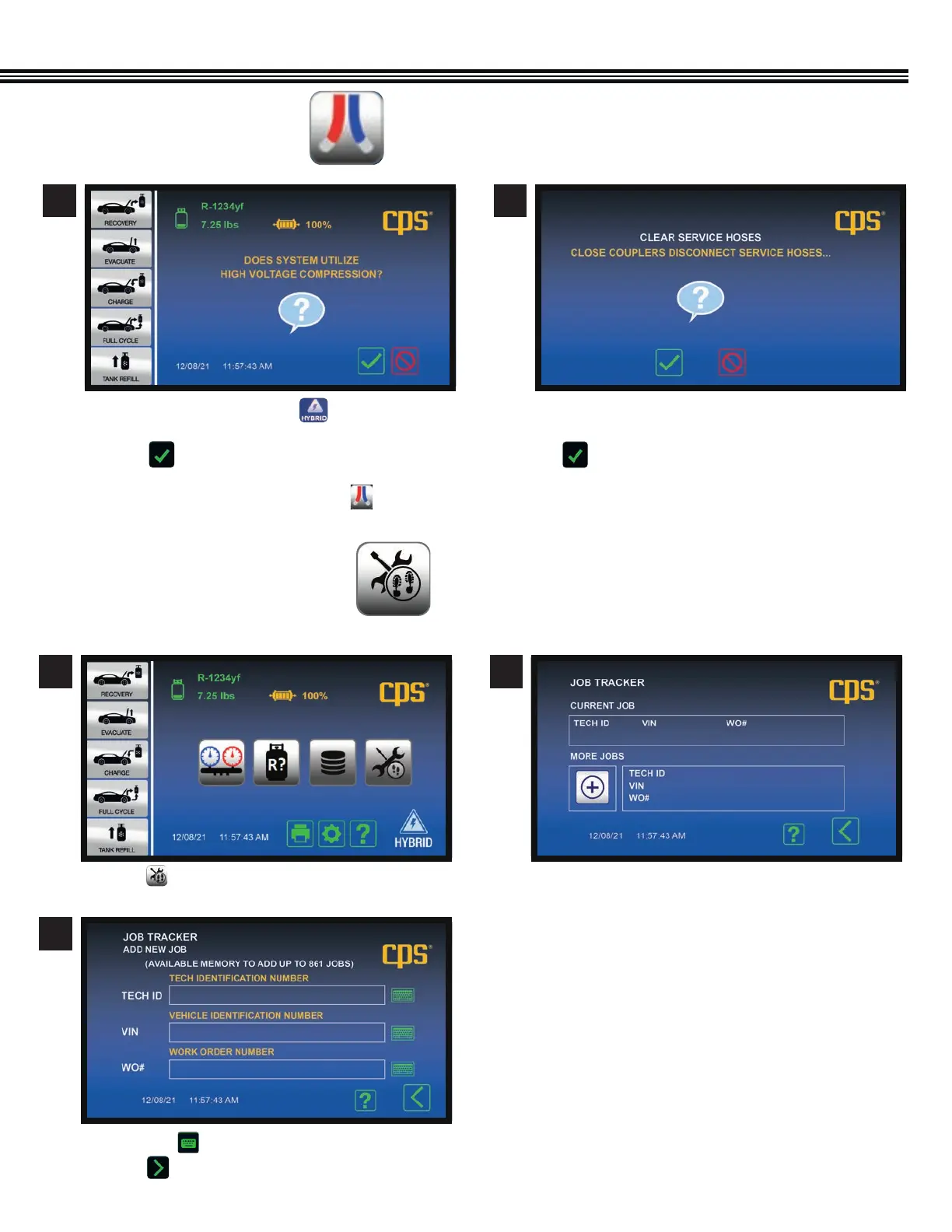
a. On the HOME screen, touch if the vehicle is
Hybrid/Electric to flush service hoses.
b. Touch to continue.
If machine is in Non-SAE mode, touch to flush
service hoses.
FLUSH REFRIGERANT HOSES
(Not All Screens Are Shown)
1 2
a. If you want to Clear Service Hoses (of refrigerant), CLOSE
COUPLERS and DISCONNECT SERVICE HOSES, then
b. Touch to continue.
c. The Home Screen will appear after the clearing process
has been completed
1 2
JOB TRACKER
(Not All Screens Are Shown)
a. Touch on the Home Screen. a. If CURRENT JOB data was previously entered, it
will appear in TOP portion of screen.
b. Touching the “+” icon brings up the next screen.
c. Enter your Shop Password.
Home Screen Current vs More Jobs Screen
3
a. Touch any to enter data for each field.
b. Touch to proceed to next screen.
FLUSH REFRIGERANT HOSES


 To Next Page