35
MAINTENANCE (Cont’d)
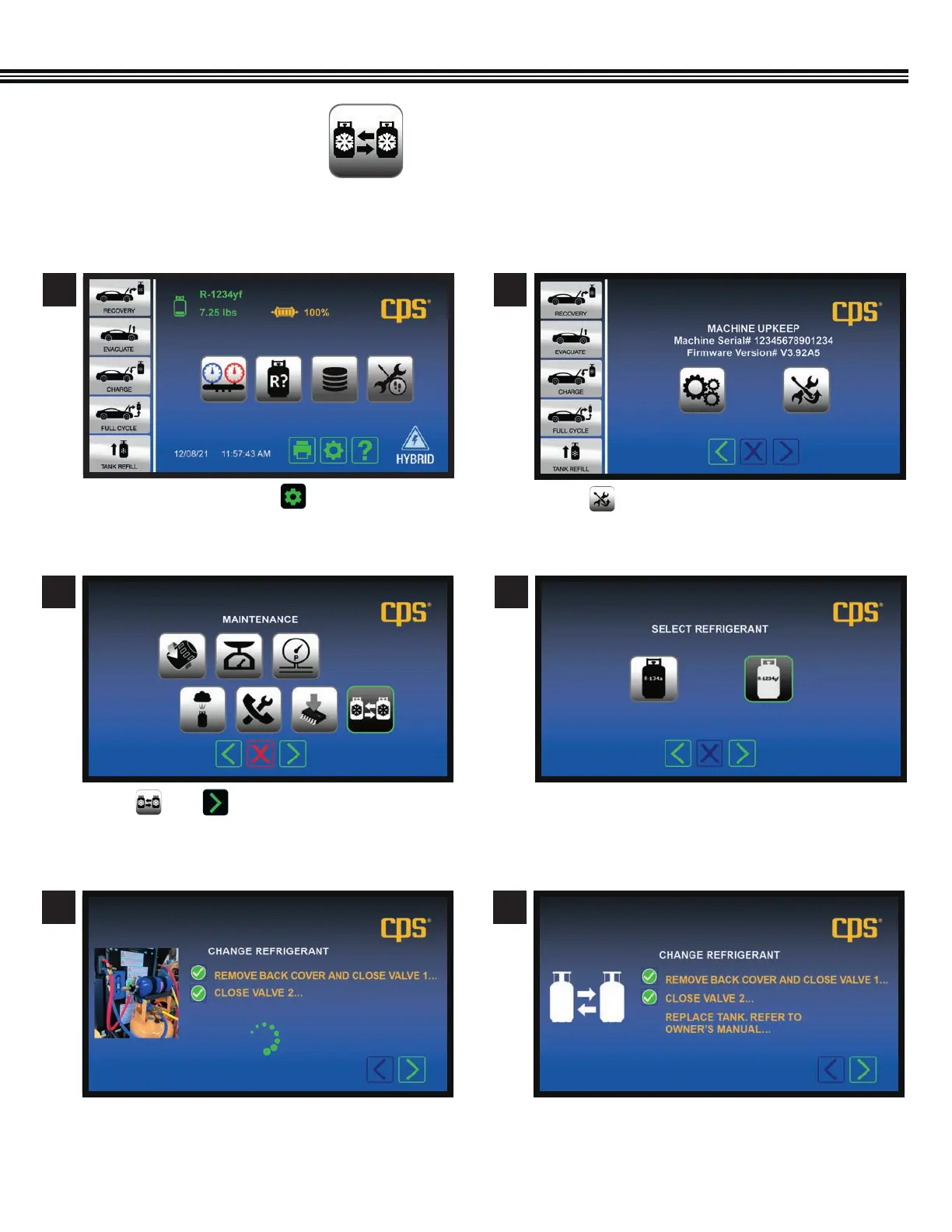
Touch then .
Follow onscreen instructions to close both valves 1
and 2. The MX unit indicates when complete.
After a 3 – 5 minute purge/deep vacuum to remove
any remaining trace of the refrigerant, you will be
prompted to replace tank.
Touch icon to select refrigerant type:
• R-134a
• R-1234yf
REFRIGERANT CHANGE
(Not All Screens Are Shown)
3
5 6
4
On the Home Screen touch to access the
MACHINE UPKEEP Screen.
Touch to enter the MAINTENANCE MENU.
1 2
Home Screen
Maintenance Menu Screen
Change Refrigerant Screen Change Refrigerant Screen
Select Refrigerant Screen
Machine Upkeep Screen
The MX3030 Refrigerant Change function feature allows you to switch between the R-134a and R-1234yf refrigerant type;
specific to that used in the vehicle.


 To Next Page