37
MAINTENANCE (Cont’d)
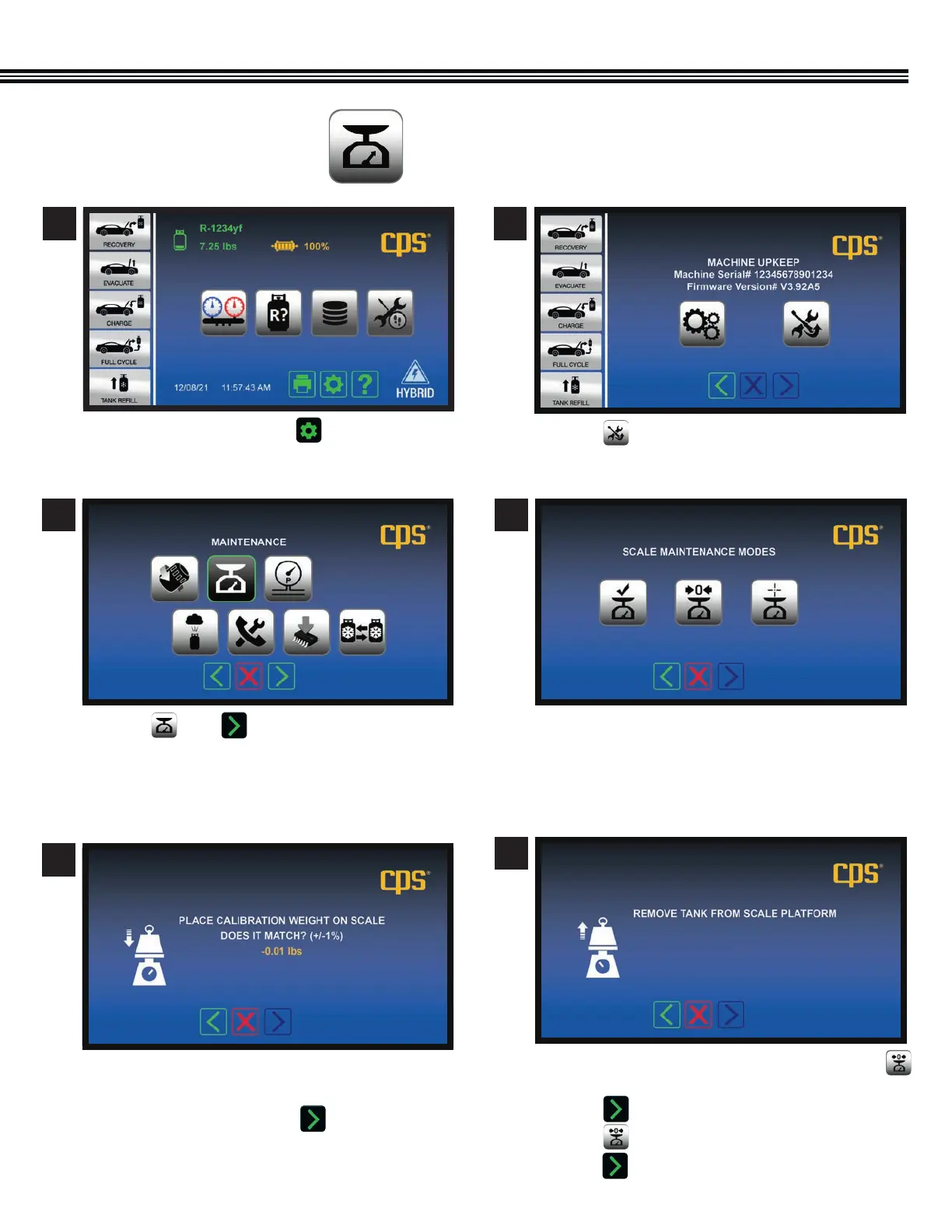
a. Touch then .
a. On the “Scale Maintenance Modes” screen, touch
b. Remove the refrigerant tank from the scale.
c. Touch .
b. Touch to reset the emplty tank weight to zero.
e. Touch to move to next screen.
a. Touch Maintenance Mode Icon to: (left to right)
• Check Calibration
• Tare (Zero) the Scale
• Scale Calibration (by CPS Products only).
a. Set the included 1 lb weight on the scale.
b. If the scale weight in within =/- 1% of 1lb
(0.99 – 1.01 lbs), touch the icon.
MAINTENANCE MODES
(Not All Screens Are Shown)
3
6
4
5
a. On the Home Screen touch to access the
MACHINE UPKEEP Screen.
a. Touch to enter the MAINTENANCE MENU.
1 2
Home Screen
Maintenance Menu Screen
Tare (Zero) The Scale
Scale Maintenance Modes
Check Calibration Screen
Machine Upkeep Screen
Fig 3: Service hoses attached to
right-side, back of unit.


 To Next Page