29
3.3 Electrical Installation
3.3.1 Removing/Replacing the Wire-box Cover
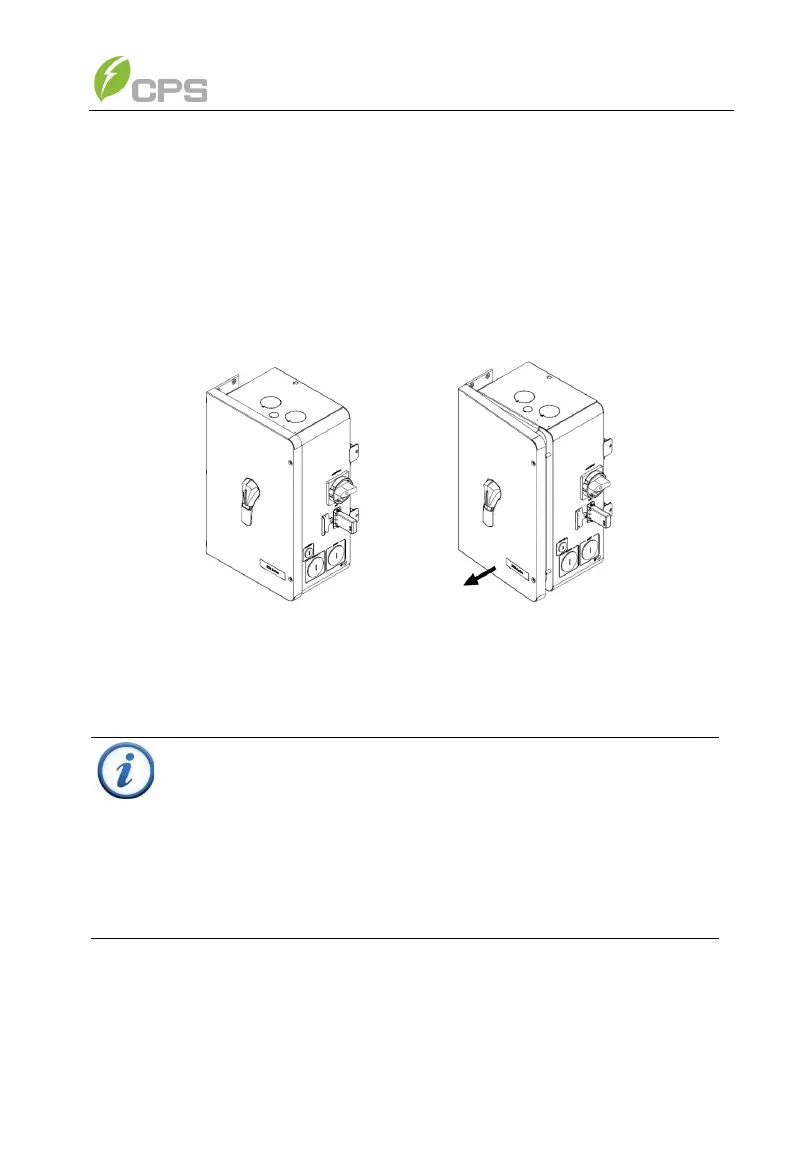
Tool required: No.3 Phillips head screwdriver. Tabs hold the left side of the
cover in place and it is secured by two screws on the right side. Use a No.3
Philips head screwdriver to remove the 2 screws on the wire-box. Pull the
right side of the cover away from the wire-box approximately 1 inch before
sliding the cover right to release the tabs. This will free the cover from the
enclosure and allow the cover to be removed. (See Figure 3-20)
Figure 3-20 Removing the Wire-box Cover
To replace the cover, reverse the order of the above steps use a No.3
Philips head screwdriver to replace the 2 screws on the cover. Torque to
4Nm (35.4 in-lbs).
INSTRUCTION:
It is important to use hand tools (e.g. Screwdriver or T-handle, #3
Phillips) and not power drivers or other types of screw drivers.
During installation, it is recommended to hold the cover in alignment
with balanced force. Partially engage the screws into the threaded
inserts before tightening. Maintain alignment to avoid thread
damage, and after screws are fully engaged torque to 4Nm (35.4 in-
lbs).



 To Next Page