©2016 Cradlepoint. All Rights Reserved. | +1.855.813.3385 | cradlepoint.com
55
User Manual / AER2100
4/19/16
• Source Netmask/Prex
• Destination IP/Network Address
• Destination Netmask/Prex
• Incoming Device: Select the incoming device upon which this
• Table:
is matched.
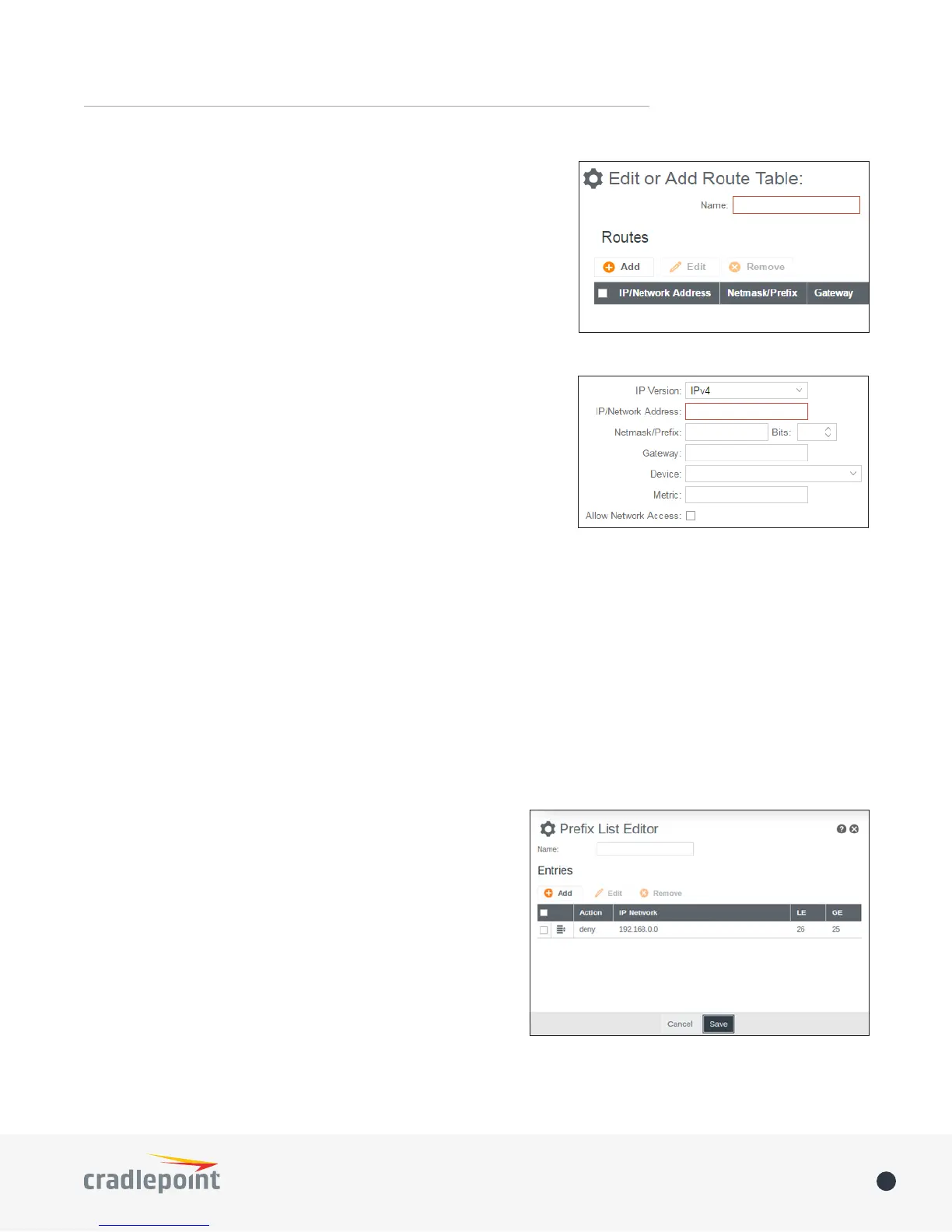
Route Tables:
route, click Add.
• IP Version: Select the IP protocol version.
• IP/Network Address
• Netmask/Prex
• Gateway
• Device: Select the interface or enter null0 to install a black hole
route.
• Metric: Set the route metric.
• Allow Network Access: Some static routes will need an IP Filter
ROUTE FILTERS
Common route lters
the route is denied.
Access List:
Prefix List: Works the same as an access list with the
or equal to the ‘le’ value, or greater than or equal to the ‘ge’
list acts as an access list.
Route Map: Provides a richer set of match conditions for
to be applied to a route via set actions.
• Description:
• Permit:
if the Match Conditions are met, and permit the
Conditions are met.
• Match Conditions:
• Set Actions:














 To Next Page