©2016 Cradlepoint. All Rights Reserved. | +1.855.813.3385 | cradlepoint.com
97
User Manual / AER2100
4/19/16
SNMP CONFIGURATION
SNMP, or Simple Network Management Protocol, is an Internet standard protocol for remote management. You
both Cradlepoint and non-Cradlepoint products.
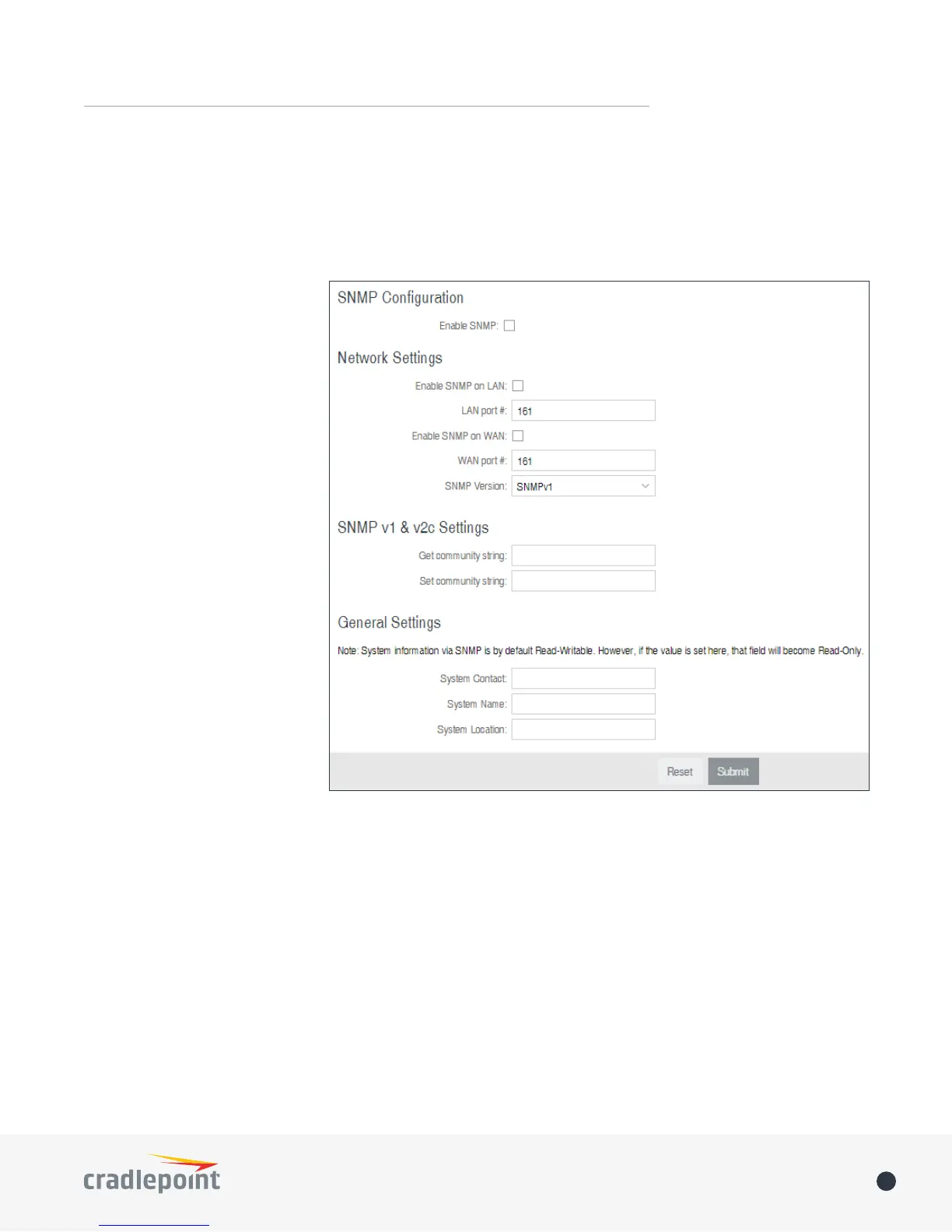
SNMP Conguration
• Enable SNMP: Selecting
“Enable SNMP” will reveal the
options.
Network Settings
• Enable SNMP on LAN:
Enabling SNMP on LAN will
make SNMP services available
on the LAN networks provided
not be available on guest or
virtual networks that do not
have administrative access.
• LAN port #: Use the LAN
to access SNMP services on.
(Default: 161)
• Enable SNMP on WAN:
Enabling SNMP on WAN will
make SNMP services available
to the WAN interfaces of the
router.
• WAN port #: Use the WAN
SNMP services available on.
(Default: 161)
• SNMP Version
• SNMPv1
transmit with settings compatible with SNMP version 1 protocols.
• SNMPv2c: SNMP version 2c has the same features as v1 with some additional commands. SNMPv2c will
• SNMPv3
SNMP v1 & v2c Settings
• Get community string
string is like a password that is transmitted in regular text with no protection.
• Set community string















 To Next Page