©2016 Cradlepoint. All Rights Reserved. | +1.855.813.3385 | cradlepoint.com
81
User Manual / AER2100
4/19/16
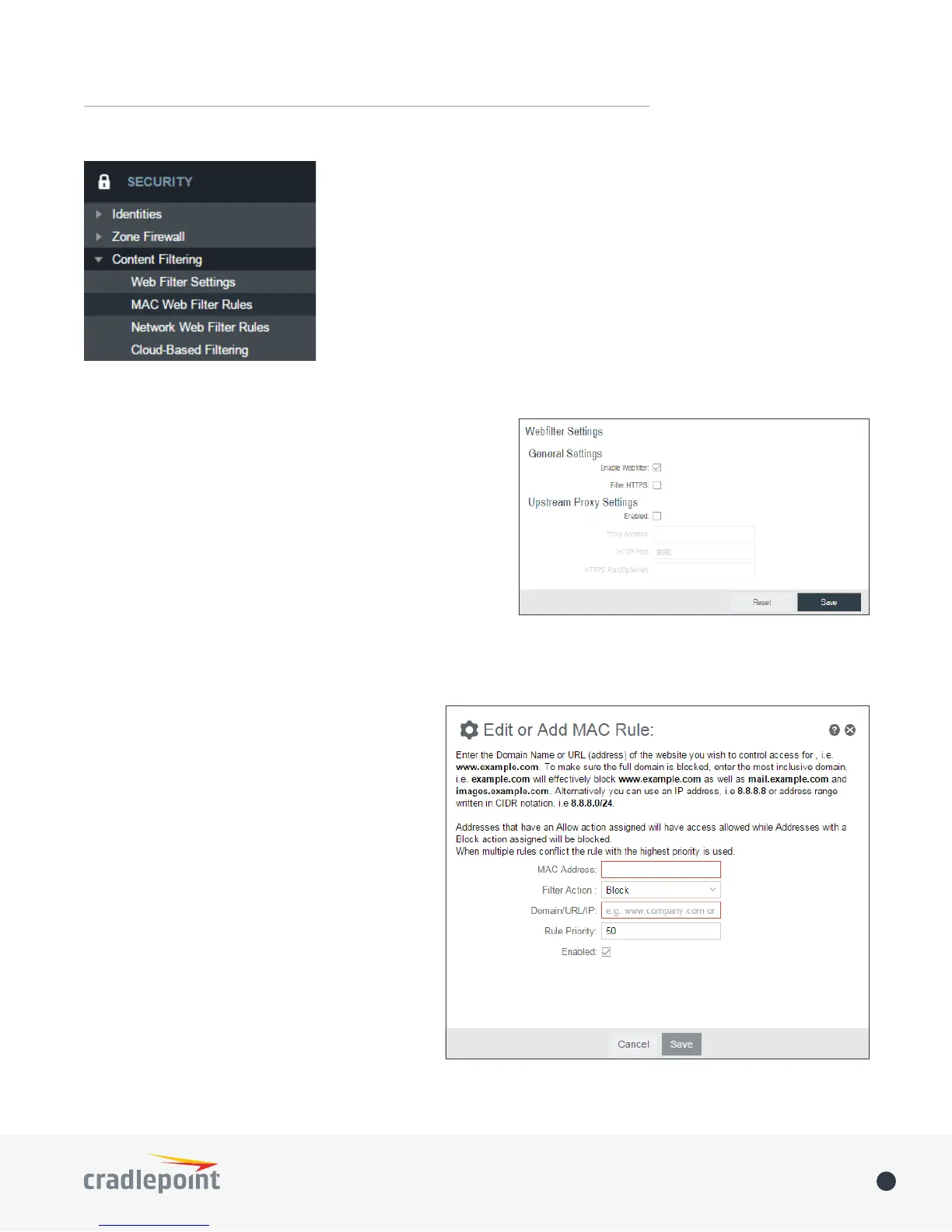
MAC Address WebFilter Rules
domains or websites. To add a rule, click Add.
• MAC Address: Enter MAC Address.
• Filter Action: Select Block or Allow.
• Domain/URL/IP: Enter the Domain Name or
control access for, e.g. www.google.com. To
make sure the full domain is blocked, enter
the most inclusive domain (e.g. google.com
well as maps.google.com and images.google.
e.g. 8.8.8.8, or address range written in CIDR
notation, e.g. 8.8.8.0/24.
• Rule Priority: Higher number rules overrule
lower number rules.
• Enabled
selecting or deselecting the checkbox.
Use MAC Address WebFilter Defaults together
with MAC Address WebFilter Rules
MAC WEB FILTER RULES
CONTENT FILTERING
WEBFILTER SETTINGS
General Settings
Enbable Webfilter
forwarding.
Filter HTTPS: Selecting “Filter HTTPS” enables redirection of all port 443
the SNI (Server Name Indication). If SNI is unavailable then the original
session is done.
Upstream Proxy Settings
Enabled
server is enabled.
Proxy Address
will be shown.
HTTP Port
HTTPS Port (Optional)














 To Next Page